-e filename 如果 filename存在,则为真
-d filename 如果 filename为目录,则为真
-f filename 如果 filename为常规文件,则为真
-L filename 如果 filename为符号链接,则为真
-r filename 如果 filename可读,则为真
-w filename 如果 filename可写,则为真
-x filename 如果 filename可执行,则为真
-s filename 如果文件长度不为0,则为真
-h filename 如果文件是软链接,则为真
filename1 -nt filename2 如果 filename1比 filename2新,则为真。
filename1 -ot filename2 如果 filename1比 filename2旧,则为真。
-eq 等于
-ne 不等于
-gt 大于
-ge 大于等于
-lt 小于
-le 小于等于
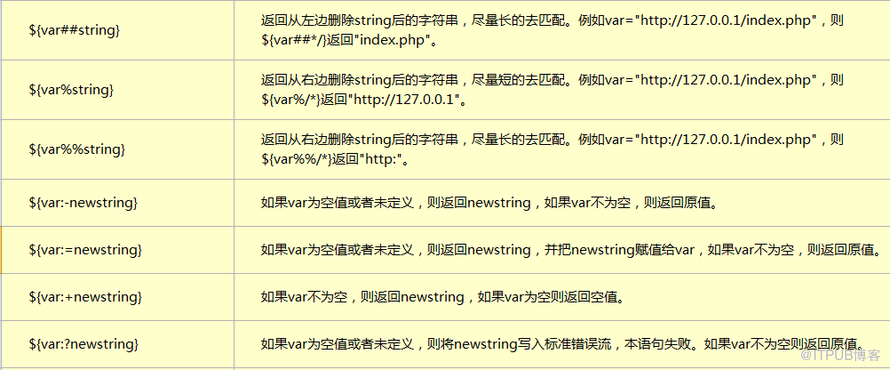
1.打印指定目录下的最大文件大小和名称:
#!/bin/bash
a=0
b=0
name="cs"
for filename in $(ls /usr/cs/cs)
do
a=$(ls -l /usr/cs/cs/$filename |awk '{print $5}')
if test $a -gt $b
then b=$a;
name=$filename
fi
done
echo $name
echo $b
2.判读输入的文件属于什么类型:
if [ -d $1 ]
then echo "目录"
elif [ -f $1 ] then echo "普通文件"
elif [ -c $1 ] then echo "字符特殊文件"
elif [ -b $1 ] then echo "块特殊文件"
else echo "不认识"
fi
3.计算器脚本:
#!/bin/bash
case $2 in
+) echo "$1 + $3 = $(expr $1 + $3)"
;;
-) echo "$1 - $3 = $(expr $1 - $3)"
;;
*) echo "$1 * $3 = $(expr $1 \* $3)"
;;
/)
if [ $3 = 0 ]
then echo "除数不能为0"
exit
else
echo "$1 / $3 = $(expr $1 / $3)"
fi
;;
*) echo "read error"
esac
4.查看网卡流量
#!/bin/bash
while : ; do
time='date +%m"-"%d" "%k":"%M'
day='date +%m"-"%d'
rx_before=`ifconfig eth0|sed -n "8"p|awk '{print $2}'|cut -c 7-`
tx_before=`ifconfig eth0|sed -n "8"p|awk '{print $6}'|cut -c 7-`
sleep 2
rx_after=`ifconfig eth0|sed -n "8"p|awk '{print $2}'|cut -c 7-`
tx_after=`ifconfig eth0|sed -n "8"p|awk '{print $6}'|cut -c 7-`
rx_result=$[(rx_after-rx_before)/256]
tx_result=$[(tx_after-tx_before)/256]
echo "$time Now_In_Speed: "$rx_result"kbps Now_OUt_Speed: "$tx_result"kbps"
sleep 2
done
5.打印出所有用户
#!/bin/bash
accounts=`cat /etc/passwd | cut -d':' -f1`
for account in $accounts
do
declare -i i=$i+1
echo "The $i account is $account"
done
6.遍历文件
#!/bin/bash
#方法1:
while read line
do
echo $line
done < 1.txt
unset $line
#方法2:
cat 1.txt |while read line
do
echo $line
done
7.循环输入到文件:
#!/bin/bash
for name in `cat /etc/passwd |cut -d ":" -f1`
do
echo $name
done > 2.txt
8.设置输入超时(输入多个参数 空格隔开):
#!/bin/bash
if read -t 5 -p "you name :" name1 name2
then
echo "5 miao nei";
else
echo "5 miao wai";
fi
echo $name1
echo $name2
9.将错误删除到文件而非屏幕:
#!/bin/bash
ls /usr/wwd 2> 3.txt
[root@nginx shell]# cat 3.txt
ls: 无法访问/usr/wwd: 没有那个文件或目录
10.以变量方式接收函数值:
#!/bin/bash
a() {
read -p "input:" num
echo `expr $num \* 2`
}
re=`a`
echo $re
11.接收值保存为array 然后遍历:
#!/bin/bash
newarray=(`echo "$@"`)
echo ${#newarray[@]}
#方法一:
for((i=0;i<${#newarray[@]};i++))
do
echo ${newarray[i]}
done
方法二:
for a in ${newarray[@]}
do
echo $a
done
12.函数返回数组:
#!/bin/bash
function fun1 {
echo ${newarray[@]}
}
newarray=(wang zeng xu)
twoarray=`fun1`
for i in ${twoarray[@]}
do
echo $i
done
13.正则表达式:
cat 2.txt |sed 's\sh\wzx\' s命令将第一个区间内的内容替换为第二个区间内的内容
^ : echo "hello wzx" |sed '/^hello/p' 必须以hello开头的
$ : echo "hello wzx" |sed '/wzx$/p' 必须以wzx结尾的
可组合使用 : echo "hello wzx" |sed '/^hello wzx$/p' 必须以hello开头的以wzx结尾的
cat 2.txt |sed '/^$/p' : ^和$之间无内容 可过滤出空白行
. : cat 3.txt |sed -n '/.at/p' at单词前边必须有字符 可以是任意字符 (空格也属于字符)
[] 字符组: cat 3.txt |sed -n '/[ch]at/p' 打印出包含cat 或者包含hat的行
echo "yes" |sed -n '/[Yy]es/p' 打印Yes 或者yes的行 echo "yes" |sed -n '/[Yy][Ee][Ss]/p' 可以使用多个
cat 4.txt |sed -n '/[124]/p' 打印出包含1或2或4的行 (可在任意位置) 可简写为:cat 4.txt |sed -n "/[1-24-4]/p"
cat 4.txt |sed -n '/[1-4]/p' 打印出包含1-4之间数字的行
cat 3.txt |sed -n '/[^ch]at/p' 不是cat或hat的其他带有at的行 但at前必须有字符 不能以at开头
echo "ik" |sed -n '/ie*k/p' 输出 ik *表示e字符出现0次或1次或多次
遍历PATH变量下的各目录下的文件数量
#!/bin/bash
mypath=`echo $PATH |sed 's/:/ /g'`
count=0
for fp in $mypath
do
check=`ls $fp`
for item in $check
do
count=`expr $count + 1`
done
echo "$fp - $count"
count=0
done
14.修改指定目录下的所有文件内容:
[root@CM cs]# ./cs.sh /usr/cs/cs
将$HADOOP_HOME修改为/usr/home/
#!/bin/bash
for f in `ls $1`
do
file=$1/$f
echo $file
sed -i "s#\$HADOOP_HOME#/usr/home/#g" $file
done
15.假设有 10 台主机,H1 到 H10,在开启 SSH 互信的情况下,编写一个或多个脚本实现
在所有的远程主机上执行脚本的功能。 例如:"ls -l /usr/cs"
#!/bin/bash
arr=(NN DN1 DN2 CM)
for a in ${arr[@]}
do
echo $a
ssh root@$a -p 35619 'ls -l /usr/cs'
done
echo "bye"
16.将指定目录下大于5000的文件移动到tmp目录下:
#!/bin/bash
for f in `ls -l $1 |awk '$6>5000 {print $10}'`
do
path=$1/$f
mv $path /tmp
done
17.bc非整数运算:
效率: let > expr > bc
a=1.5
b=2.89
c=`echo "scale=3;$a*$b"|bc` #scale指定小数位
echo $c
gawk浮点运算
a=1.5
b=2.89
var=`echo "$a $b"|gawk '{printf("%.3f\n",$1+$2)}'`
echo $var
18.删除视频目录下昨天创建的文件:
#!/bin/bash
d=`date +"%d"`
for f in `ls /usr/local/video`
do
temp=`echo $f |cut -c 7-8`
if [[ "$temp" < "$d" ]]
then
rm -rf /usr/local/video/$f
fi
done
exit 0
记录输入的值
read -t 5 -s -p "input: " bir
echo $bir
date | tee -a 1.txt 既输出到屏幕又追加到文件
./cs.sh & 加 & 可在后台运行 返回一个PID 使用 jobs命令查看运行的后台任务
curl下载文件
curl -s -o /usr/cs/shell/cs.zip https://dl.pandaidea.com/jarfiles/a/activemq-all/activemq-all-5.2.0.jar.zip
排序: -n -rn
ll ./ |awk '{print $5}' |sort -rn
其他sh文件引入:
. /usr/cs/shell/cs5.sh 格式: . 空格 文件名
打印出昨天年月日
echo `date -d "yesterday" +"%Y%m%d"`
打印当前日期和时间
echo `date +"%m/%d/%Y %k:%M:%S"`
shell统计nginx日志中访问前十的IP:
cat access.log |gawk '{a[$1]++} END {for(b in a) print b"\t"a[b]}' |sort -k 2 -rn |head -n 10
打印出包含指定字符并不包含指定字符的行:
grep -E 'baohan' 1.txt |grep -v 'bubaohan'
指定范围且不包含sh字符的
ls -l |gawk '{print $9}' |sed -n '2,8p' |grep -v "sh"
stringZ=abcABC123ABCabc
a=`echo ${stringZ//abc/wzx}` 将所有的abc替换为wzx
b=`echo ${stringZ/abc/wzx}` 将第一个abc替换为wzx
declare -f 常量 -i 整形变量
$RANDOM 随机数
echo "1.5 2.5" |gawk '{printf("%.2f\n",$1*$2)}' #gawk浮点运算保留2位小数 四舍五入
比较有意思的 break 2 用法 停掉2层循环
来自 “ ITPUB博客 ” ,链接:https://blog.itpub.net/29754888/viewspace-1393141/ ,如需转载,请注明出处,否则将追究法律责任。

