我真的不想吐槽mongodb,也可能是刚接触mongodb不久,mongodb数据库真的不是像传说中说的那么好上手。今天有个需求,需要从远程库导出json格式的数据文件,然后导入到另一个远程库。
当完事具备后,执行导入命令的时候,报了错。
相关数据库服务器信息:
源库操作系统:windows server 2008R2
数据库版本:mongodb 3.2.7
导出工具:mongoChef 3.6.0
目标端操作系统:LINUX redhat6.4
数据库版本:mongodb 3.2.7
导入工具:1、mongoChef 3.6.0 ;2、mongoimport
导出与导入数据文件格式:systemprofile.json
首先,在使用mongoChef进行导入时,报错如图:
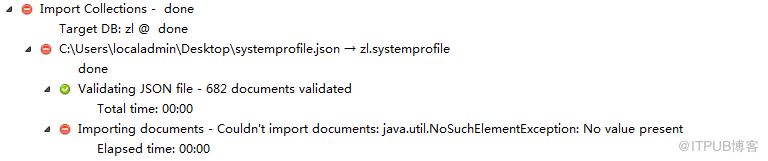
真的能让人闹心死,mongoChef能将数据导出,竟然导入不进去,想不通。
其次,尝试mongoimport导入,最终是能导入,但是碰到了2次错误。
成功导入方法记录如下:
[mongo@se122 ~]$ mongoimport --db zl --collection systemprofile --port 27000 --file /home/mongo/systemprofile.json --type json
2016-07-06T09:15:41.377+0800 connected to: localhost:27000
2016-07-06T09:15:42.540+0800 imported 682 documents
[mongo@se122 ~]$
碰到的2次错误:
报错一
[mongo@se122 ~]$ mongoimport --db zl --collection systemprofile --file /home/mongo/systemprofile.json --jsonArray
2016-07-06T09:04:24.903+0800 [........................] zl.systemprofile 0.0 B/2.0 MB (0.0%)
2016-07-06T09:04:25.407+0800 [........................] zl.systemprofile 0.0 B/2.0 MB (0.0%)
2016-07-06T09:04:25.407+0800 Failed: error connecting to db server: no reachable servers
2016-07-06T09:04:25.407+0800 imported 0 documents
[mongo@se122 ~]$
这个报错好理解,就是 mongoimport无法正常连接到zl数据库,如果mongodb启动使用的不是默认的27017,则需要指定数据库监听的端口号。看来,这方面mongo没有oracle智能。
报错二
[mongo@se122 ~]$ mongoimport --db zl --collection systemprofile --port 27000 --file /home/mongo/systemprofile.json --jsonArray
2016-07-06T09:05:30.381+0800 connected to: localhost:27000
2016-07-06T09:05:30.382+0800 Failed: error reading separator after document #1: bad JSON array format - found no opening bracket '[' in input source
2016-07-06T09:05:30.383+0800 imported 0 documents
[mongo@se122 ~]$
指定了端口号, mongoimport能连接到zl数据库了,但是又来个bad JSON array format - found no opening bracket '[' in input source
原因是数据格式指定的问题,需要将--jsonArray换成--type json。
使用修改后的命令mongoimport --db zl --collection systemprofile --port 27000 --file /home/mongo/systemprofile.json --type json就能将数据成功导入了。
[mongo@se122 ~]$ mongoimport --db zl --collection systemprofile --port 27000 --file /home/mongo/systemprofile.json --type json
2016-07-06T09:15:41.377+0800 connected to: localhost:27000
2016-07-06T09:15:42.540+0800 imported 682 documents
[mongo@se122 ~]$
当完事具备后,执行导入命令的时候,报了错。
相关数据库服务器信息:
源库操作系统:windows server 2008R2
数据库版本:mongodb 3.2.7
导出工具:mongoChef 3.6.0
目标端操作系统:LINUX redhat6.4
数据库版本:mongodb 3.2.7
导入工具:1、mongoChef 3.6.0 ;2、mongoimport
导出与导入数据文件格式:systemprofile.json
首先,在使用mongoChef进行导入时,报错如图:
真的能让人闹心死,mongoChef能将数据导出,竟然导入不进去,想不通。
其次,尝试mongoimport导入,最终是能导入,但是碰到了2次错误。
成功导入方法记录如下:
[mongo@se122 ~]$ mongoimport --db zl --collection systemprofile --port 27000 --file /home/mongo/systemprofile.json --type json
2016-07-06T09:15:41.377+0800 connected to: localhost:27000
2016-07-06T09:15:42.540+0800 imported 682 documents
[mongo@se122 ~]$
碰到的2次错误:
报错一
[mongo@se122 ~]$ mongoimport --db zl --collection systemprofile --file /home/mongo/systemprofile.json --jsonArray
2016-07-06T09:04:24.903+0800 [........................] zl.systemprofile 0.0 B/2.0 MB (0.0%)
2016-07-06T09:04:25.407+0800 [........................] zl.systemprofile 0.0 B/2.0 MB (0.0%)
2016-07-06T09:04:25.407+0800 Failed: error connecting to db server: no reachable servers
2016-07-06T09:04:25.407+0800 imported 0 documents
[mongo@se122 ~]$
这个报错好理解,就是 mongoimport无法正常连接到zl数据库,如果mongodb启动使用的不是默认的27017,则需要指定数据库监听的端口号。看来,这方面mongo没有oracle智能。
报错二
[mongo@se122 ~]$ mongoimport --db zl --collection systemprofile --port 27000 --file /home/mongo/systemprofile.json --jsonArray
2016-07-06T09:05:30.381+0800 connected to: localhost:27000
2016-07-06T09:05:30.382+0800 Failed: error reading separator after document #1: bad JSON array format - found no opening bracket '[' in input source
2016-07-06T09:05:30.383+0800 imported 0 documents
[mongo@se122 ~]$
指定了端口号, mongoimport能连接到zl数据库了,但是又来个bad JSON array format - found no opening bracket '[' in input source
原因是数据格式指定的问题,需要将--jsonArray换成--type json。
使用修改后的命令mongoimport --db zl --collection systemprofile --port 27000 --file /home/mongo/systemprofile.json --type json就能将数据成功导入了。
[mongo@se122 ~]$ mongoimport --db zl --collection systemprofile --port 27000 --file /home/mongo/systemprofile.json --type json
2016-07-06T09:15:41.377+0800 connected to: localhost:27000
2016-07-06T09:15:42.540+0800 imported 682 documents
[mongo@se122 ~]$
来自 “ ITPUB博客 ” ,链接:https://blog.itpub.net/29357786/viewspace-2121575/ ,如需转载,请注明出处,否则将追究法律责任。

请登录后发表评论
登录
全部评论
最新文章
- ORACLE 11.2.0.4 RAC Cluster not starting cssd with Cannot get GPnP profile
- oracle 19c打补丁遭遇OPATCHAUTO-72043&OPATCHAUTO-68061
- mysql GTID模式跳过错误GTID事务的正确方法
- oracle rac+adg调整redo日志组导致adg备库ogg抽取进程abend
- MySQL Linux服务器快照克隆引起的binlog日志无法正常删除导致文件系统满
- SQLServer 对象创建注意事项之dbo
- MongoDB 分片集群均衡器导致的性能下降
- SQLServer 难以接受的安全策略
- MongoDB server returned error on SASL authentication step: BSON field 'saslCo
- ORACLE expdp在表空间较多的情况下执行非常缓慢
