【Linux】Linux网络配置基础5 RHEL6 操作系统使用virtualbox NAT网络
Linux网络配置基础5
RHEL6 操作系统使用virtualbox NAT网络
RHEL6 操作系统使用virtualbox NAT网络
宿主机win7当前能够访问互联网
Virtualbox软件 管理-全局设定-网络中 添加NAT网络
linux虚拟机添加网卡使用NAT网络访问外网
1 全局设定中 添加nat网络
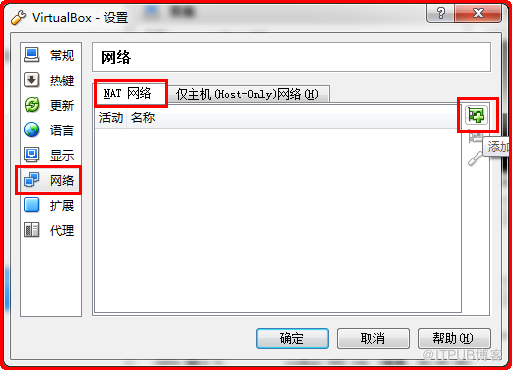
设置nat网络dhcp地址池,即虚拟机将获得的ip地址

2 虚拟机添加网卡,使用自定义的NAT网络
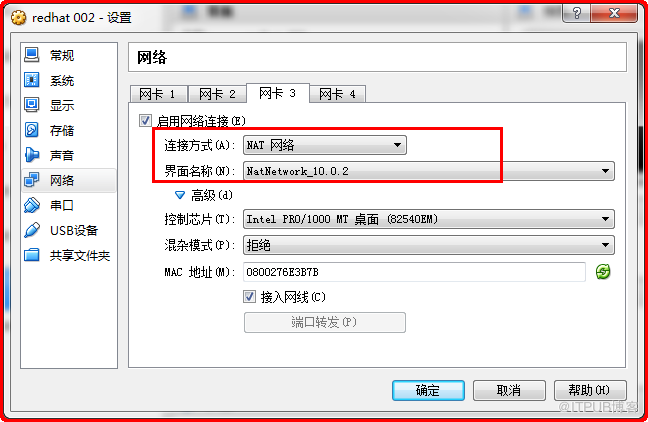

3 启动虚拟机,手动编辑配置网卡配置文件
查看当前网卡信息,此处eth2是新添加的nat网络
[root@rhel64 ~]# ifconfig -a
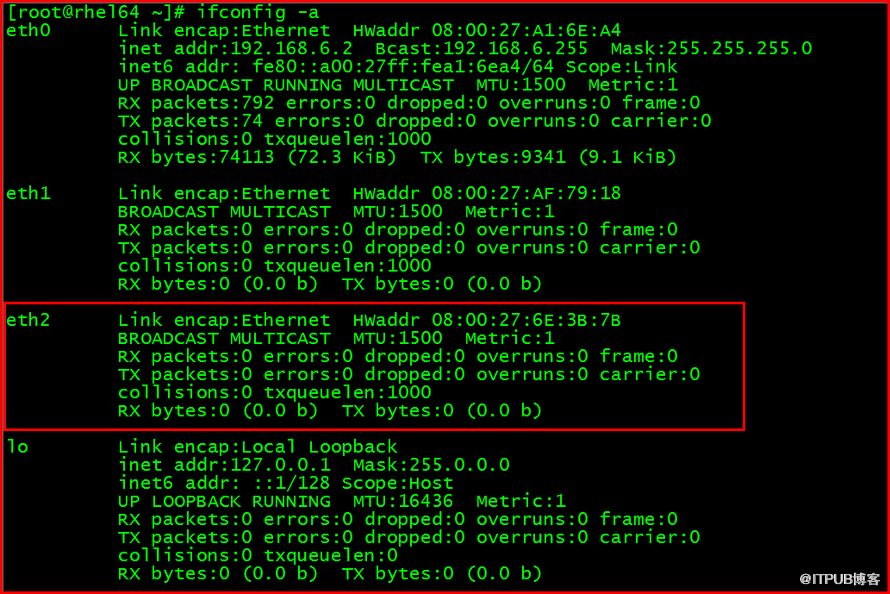
编写网卡配置文件
[root@rhel64 ~]# vi /etc/sysconfig/network-scripts/ifcfg-eth2
DEVICE=eth2
BOOTPROTO=dhcp
ONBOOT=yes

[root@rhel64 ~]# cat /etc/sysconfig/network-scripts/ifcfg-eth2

[root@rhel64 ~]# ifup eth2
[root@rhel64 ~]# ifconfig eth2

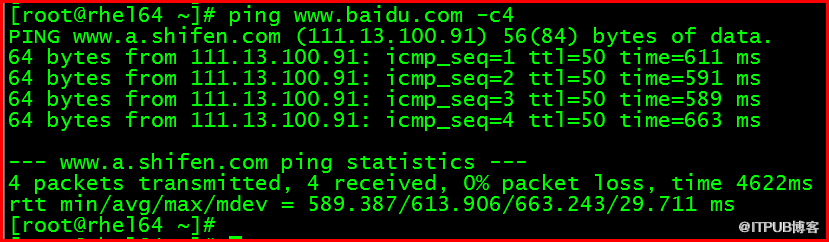
4 访问外网测试
[root@rhel64 ~]# ping -c4

吕星昊
2016.4.14
来自 “ ITPUB博客 ” ,链接:https://blog.itpub.net/29302187/viewspace-2092743/ ,如需转载,请注明出处,否则将追究法律责任。

请登录后发表评论
登录
全部评论
最新文章
- OGG-01705 CHECKPOINT RBA IS LARGER THAN LOCAL TRAIL SIZE问题
- ORA-29702:error occurred in Cluster Group Service operation错误解决
- Oracle中truncate table后的数据恢复(Oracle数据恢复工具-ODU)
- 利用ODU在ASM中恢复被Truncate掉的表的实例
- 利用PRM-DUL For Oracle恢复Oracle中被Truncate的表
- Oracle 11gR2 ASM实例内存管理(转载)
- 利用innodb_force_recovery 解决MySQL服务器crash无法重启问题 (转)
- iscsiadm基本用法
- Oracle GoldenGate Veridata 12.1.3
- 【MySQL】sync_binlog innodb_flush_log_at_trx_commit 浅析
