为什么要测试,测什么东西?
测试的种类非常多,测试的目的也非常多,我这里主要的目的就两个
-
测试MySQL的极限IO
-
对比不同版本MySQL,不同参数, 不同硬件,不同系统对MySQL的性能影响
为什么选择sysbench
-
因为MySQL官方的测试就是用sysbench哦
-
尽量选择最新版本的sysbench哦,大于0.4版本的sysbench有实时显示功能
如何下载sysbench
http://github.com/akopytov/sysbench
文档在哪里
http://github.com/akopytov/sysbench
如何安装
cd sysbench-1.0;
./autogen.sh;
./configure --with-mysql-includes=/usr/local/mysql/include --with-mysql-libs=/usr/local/mysql/lib/;
make;
make install;
sysbench: error while loading shared libraries: libmysqlclient.so.20: cannot open shared object file: No such file or directory
export LD_LIBRARY_PATH=/usr/local/mysql/lib/;
shell> sysbench --version sysbench 1.0
介绍sysbench的核心用法
-
它可以用来测试很多东西,测试io,cpu,mem,mysql,oracle,pg等等。
-
这里主要介绍我关心的两个,IO & MySQL
-
以下前半部分是0.4版本的用法,0.4以上的版本用法不一样,会注明。
一、通用语法
sysbench [common-options] --test=name [test-options] command
准备阶段,也就是装载数据。
filo test 中: 就是创建指定大小的文件
oltp test 中: 就是创建指定大小的表
实际测试阶段
收尾阶段,清除之前测试的数据。
只介绍常用的选项
|
选项
|
描述
|
默认值
|
|
--num-threads
|
多少个线程
|
1
|
|
--max-requests
|
多少个请求,0意味着无限制
|
1000
|
|
--max-time
|
测试多长时间,0意味着无限制
|
0
|
|
--test
|
测试什么模块
|
必须要求
|
|
--report-interval
|
阶段性的汇报测试统计信息,0.4以上版本新增
|
|
提前注明:--file-test-mode
* seqwr
sequential write
* seqrewr
sequential rewrite
* seqrd
sequential read
* rndrd random read
* rndwr random write
* rndrw
combined random read/write
|
选项
|
描述
|
默认值
|
|
--file-num
|
创建文件的数量
|
128
|
|
--file-block-size
|
IO操作的大小
|
16k
|
|
--file-total-size
|
所有文件的总大小
|
2G
|
|
--file-test-mode
|
seqwr,seqrewr, seqrd, rndrd, rndwr, rndwr(上面已经介绍)
|
必须
|
|
--file-io-mode
|
i/O 模式,sync, async, fastmmap, slowmmap
|
sync
|
|
--file-extra-flags
|
以额外的标记(O_SYNC,O_DSYNC,O_DIRECT)打开
|
-
|
|
--file-fsync-freq
|
多少请求后使用fsync
|
100
|
|
--file-fsync-all
|
每次写IO都必须fsync
|
no
|
|
--file-fsync-mode
|
用什么样的模式来同步文件fsync, fdatasync (see above)
|
fsync
|
|
--file-rw-ratio
|
随机读写请求的比例
|
1.5
|
举例:
$ sysbench --num-threads=16 --test=fileio --file-total-size=3G --file-test-mode=rndrw prepare
$ sysbench --num-threads=16 --test=fileio --file-total-size=3G --file-test-mode=rndrw run
$ sysbench --num-threads=16 --test=fileio --file-total-size=3G --file-test-mode=rndrw cleanup
OLTP-MySQL
此模式用于测试真实数据库性能。在prepare阶段创建表,sbtest默认
CREATE TABLE `sbtest` ( `id` int(10) unsigned NOT NULL auto_increment, `k` int(10) unsigned NOT NULL default '0', `c` char(120) NOT NULL default '', `pad` char(60) NOT NULL default '',
PRIMARY KEY (`id`), KEY `k` (`k`));
在run阶段
SELECT c FROM sbtest WHERE id=N
SELECT c FROM sbtest WHERE id=N
SELECT c FROM sbtest WHERE id BETWEEN N AND M
SELECT SUM(K) FROM sbtest WHERE id BETWEEN N and M
SELECT c FROM sbtest WHERE id between N and M ORDER BY c
SELECT DISTINCT c FROM sbtest WHERE id BETWEEN N and M ORDER BY c
UPDATE sbtest SET k=k+1 WHERE id=N
-
UPDATEs on non-index column:
UPDATE sbtest SET c=N WHERE id=M
DELETE FROM sbtest WHERE id=N
INSERT INTO sbtest VALUES (...)
|
选项
|
描述
|
默认值
|
|
--oltp-table-name
|
表的名字
|
sbtest
|
|
--oltp-table-size
|
表的行数
|
10000
|
|
--oltp-tables-count
|
表的个数
|
1
|
|
--oltp-dist-type
|
热点数据分布{uniform(均匀分布),Gaussian(高斯分布),special(空间分布)}。默认是special
|
special
|
|
--oltp-dist-pct
|
special:热点数据产生的比例
|
1
|
|
--oltp-dist-res
|
special:热点数据的访问频率
|
75
|
|
--oltp-test-mode
|
simple,complex(以上介绍)
|
complex
|
|
--oltp-read-only
|
只有select 请求
|
off
|
|
--oltp-skip-trx
|
不用事务
|
off
|
|
--oltp-point-selects
|
一个事务中简单select查询数量
|
10
|
|
--oltp-simple-ranges
|
一个事务中简单range查询的数量
|
1
|
|
--oltp-sum-ranges
|
sum range的数量
|
1
|
|
--oltp-order=ranges
|
order range的数量
|
1
|
--mysql-host=[LIST,...] MySQL server host [localhost]
--mysql-port=[LIST,...] MySQL server port [3306]
--mysql-socket=[LIST,...] MySQL socket
--mysql-user=STRING MySQL user [sbtest]
--mysql-password=STRING MySQL password []
--mysql-db=STRING MySQL database name [sbtest]
--mysql-table-engine=STRING storage engine to use for the test table {myisam,innodb,bdb,heap,ndbcluster,federated} [innodb]
--mysql-engine-trx=STRING whether storage engine used is transactional or not {yes,no,auto} [auto]
--mysql-ssl=[on|off] use SSL connections, if available in the client library [off]
--mysql-ssl-cipher=STRING use specific cipher for SSL connections []
--mysql-compression=[on|off] use compression, if available in the client library [off]
--myisam-max-rows=N max-rows parameter for MyISAM tables [1000000]
--mysql-debug=[on|off] dump all client library calls [off]
--mysql-ignore-errors=[LIST,...]list of errors to ignore, or "all" [1213,1020,1205]
--mysql-dry-run=[on|off] Dry run, pretent that all MySQL client API calls are successful without executing them [off]
以上0.4版本的语法介绍完毕。
接下来是大于0.4版本的新语法,尤其是--test=oltp模块
用--test=xx.lua (完整路径来传递)来代替
[szq@upright91 local]$ locate select.lua
/home/szq/sysbench-1.0.3/src/lua/oltp_point_select.lua
/home/szq/sysbench-1.0.3/tests/include/oltp_legacy/select.lua
/usr/local/share/sysbench/oltp_point_select.lua
/usr/local/share/sysbench/tests/include/oltp_legacy/select.lua
[szq@upright91 local]$ ll /home/szq/sysbench-1.0.3/tests/include/oltp_legacy
总用量 52
-rw-r--r-- 1 szq szq 1195 2月 26 05:12 bulk_insert.lua
-rw-r--r-- 1 szq szq 4696 2月 26 05:12 common.lua
-rw-r--r-- 1 szq szq 366 2月 26 05:12 delete.lua
-rw-r--r-- 1 szq szq 1171 2月 26 05:12 insert.lua
-rw-r--r-- 1 szq szq 3004 2月 26 05:12 oltp.lua
-rw-r--r-- 1 szq szq 368 2月 26 05:12 oltp_simple.lua
-rw-r--r-- 1 szq szq 527 2月 26 05:12 parallel_prepare.lua
-rw-r--r-- 1 szq szq 369 2月 26 05:12 select.lua
-rw-r--r-- 1 szq szq 1448 2月 26 05:12 select_random_points.lua
-rw-r--r-- 1 szq szq 1556 2月 26 05:12 select_random_ranges.lua
-rw-r--r-- 1 szq szq 369 2月 26 05:12 update_index.lua
-rw-r--r-- 1 szq szq 578 2月 26 05:12 update_non_index.lua
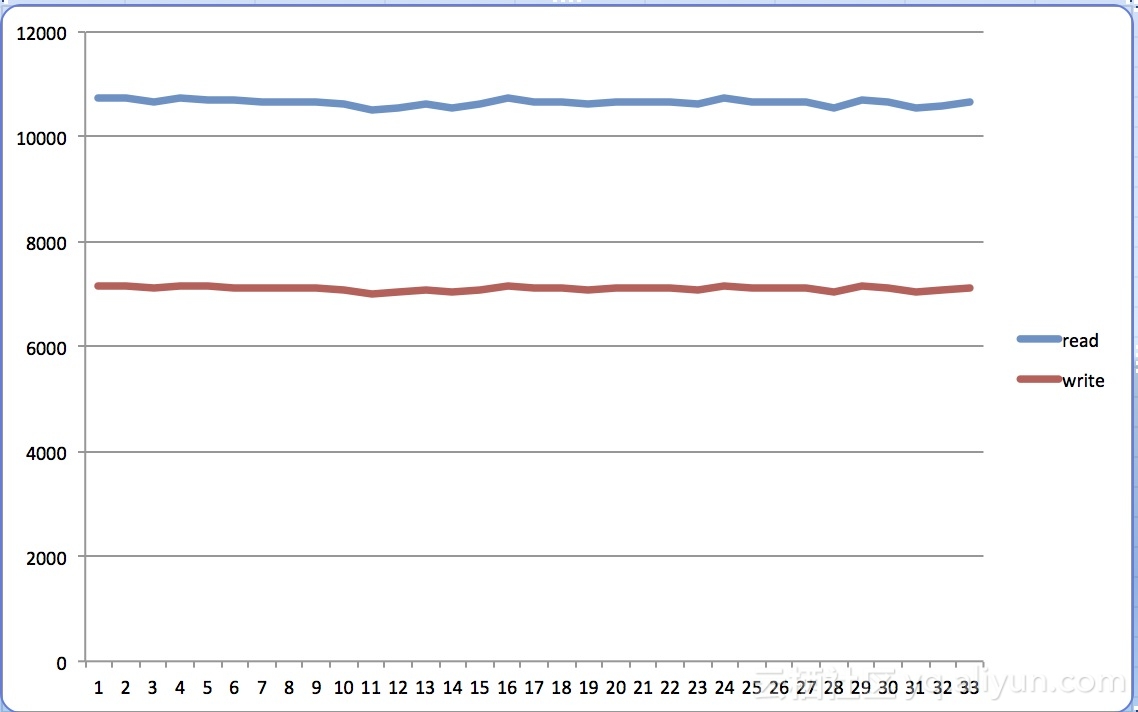
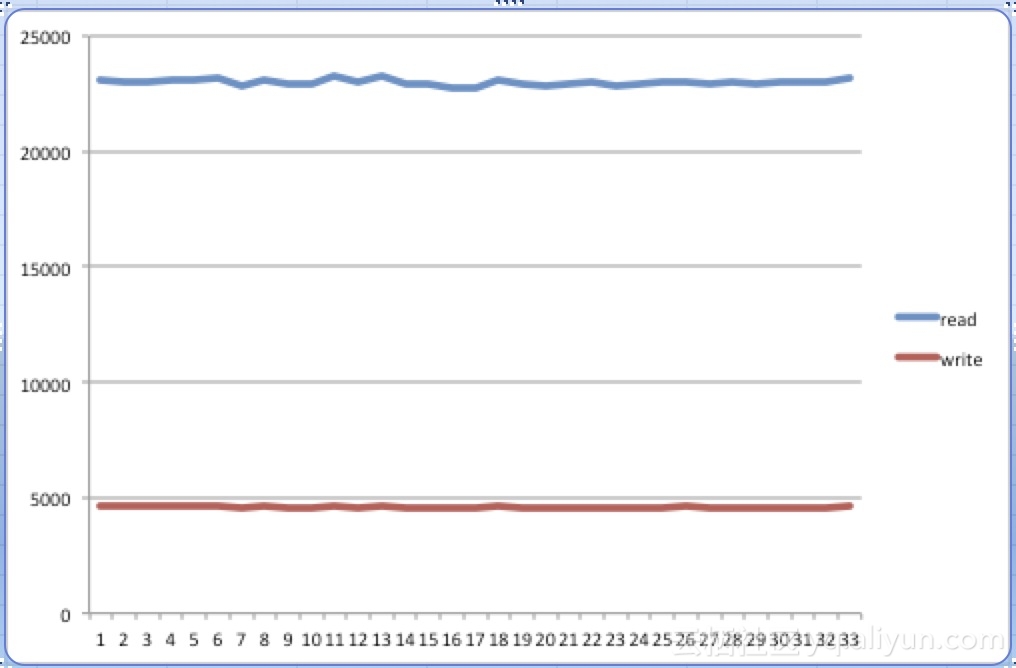
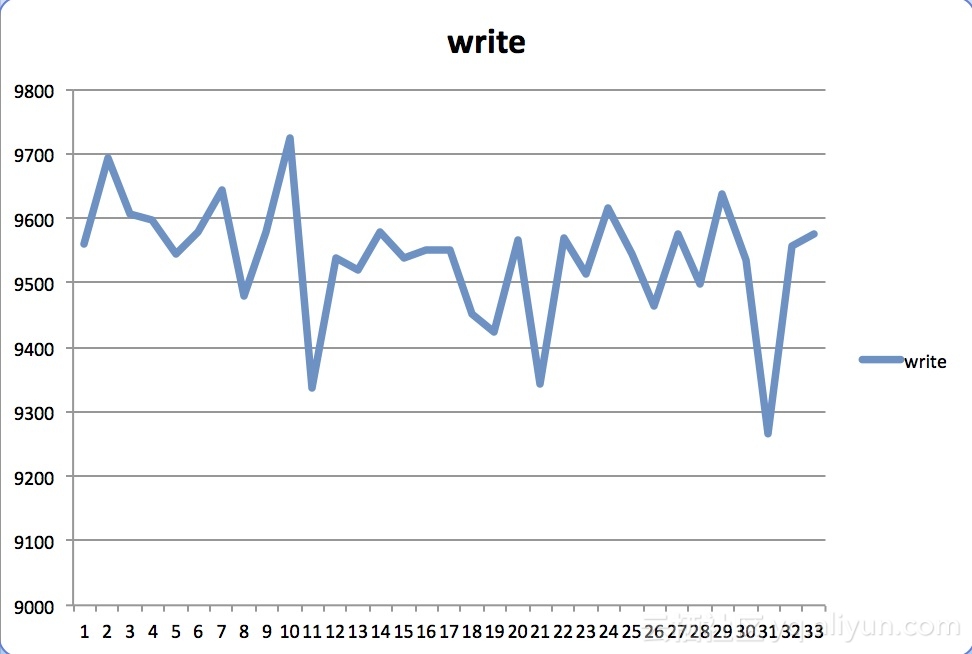
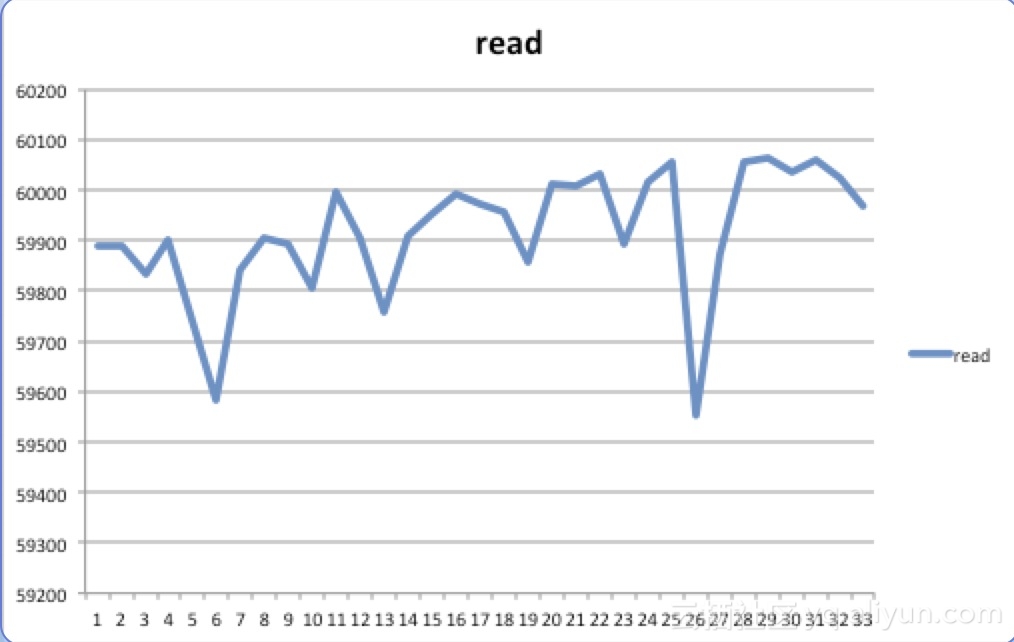
FileIO实战
磁盘:S3610 * 6 raid10, 内存128G
测试出相关场景下的极限IOPS
--- --- --- --- -- --- ---- \
---- ---- ----
--- --- --- --- -- --- ---- \
---- ---- ---- ----
--- --- --- --- -- --- ---- \
---- ---- ----
--- --- --- --- -- --- ---- \
---- ---- ----
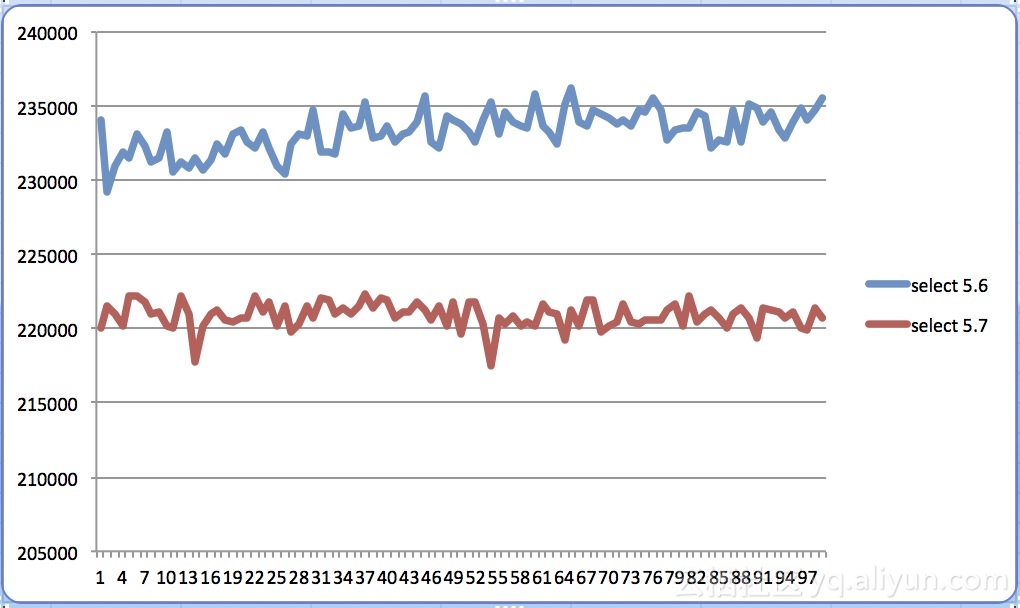
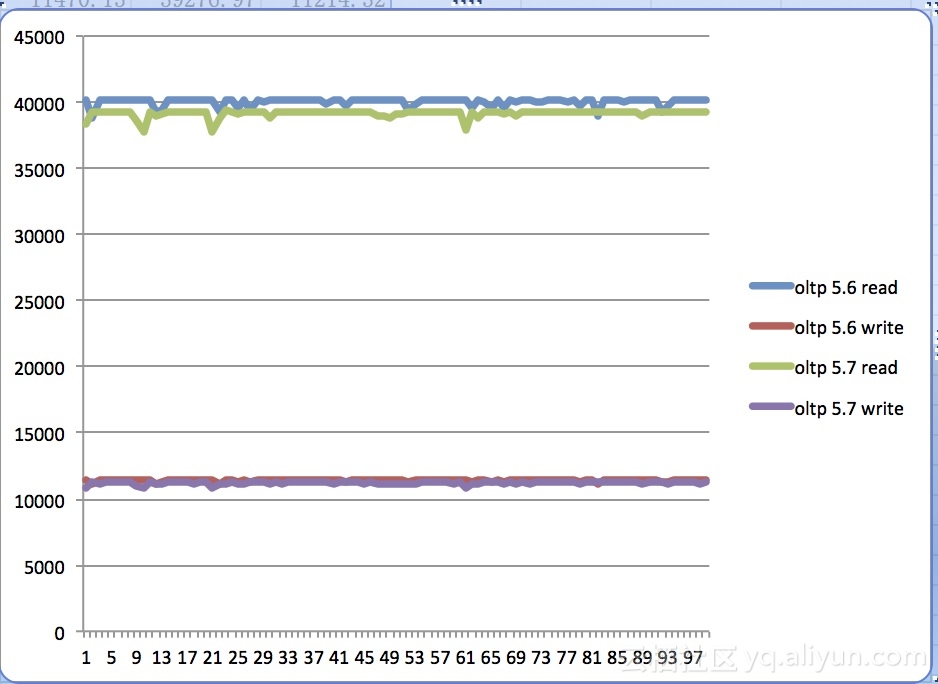
MySQL5.6 vs MySQL5.7 测试
磁盘:S3610 * 6 raid10, 内存128G
--- --- --- --- ---.. \
---- ---- --- --- ---- --- ---
--- --- --- --- ---.. \
---- ---- --- --- ---- --- ---
--- --- --- --- ---.. \
---- ---- --- --- ---- --- ---
--- --- --- --- ---.. \
---- ---- --- --- ---- --- ---
结论
-
在性能方面,虽然官方号称5.7性能比5.6快3倍,但是在实际测试中5.7比5.6却稍微差一点点
-
是否会选择5.7生产环境?当然,因为5.7的新特性太诱人了
参考:
https://www.percona.com/blog/2016/04/07/mysql-5-7-sysbench-oltp-read-results-really-faster/
http://dimitrik.free.fr/blog/archives/2013/09/mysql-performance-reaching-500k-qps-with-mysql-57.html
https://github.com/akopytov/sysbench
http://www.mysql.com/why-mysql/benchmarks/

