Apache
支持cgi
1
、打开Apache配置文件httpd.conf,搜索“cgi”,找到下面的一段,去掉“addhandler”前面的“#“,这样就开启了Apache的cgi功能
|
[root@localhost ~]#
gedit
/etc/httpd/conf/httpd.conf
# AddHandler allows you to map certain file extensions to "handlers":
# actions unrelated to filetype. These can be either built into the server
# or added with the Action directive (see below)
#
# To use CGI scripts outside of ScriptAliased directories:
# (You will also need to add "ExecCGI" to the "Options" directive.)
#
AddHandler cgi-script .cgi
|
2
、cgi的目录在“/var/www/cgi-bin/”,在这里创建一个测试文件“test.cgi”输入内容如下
|
[root@localhost ~]#

touch
/var/www/cgi-bin/test.cgi
#!/usr/bin/perl
print "Content-type: text/html\n\n";
print "hello cgi";
|
3
、将“cgi-bin”的权利改为777
|
[root@localhost ~]#
chmod
–
R 777 /var/www/cgi-bin
|
4
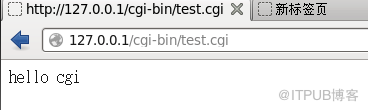
、在浏览器输入“127.0.0.1/cgi-bin/test.cgi”可以看到下面的结果
做了一个Linux学习的平台,目前出来一个雏形,各位可以参考使用
链接:
https://pan.baidu.com/s/1GOLVU2CbpBNGtunztVpaCQ
密码:n7bk

来自 “ ITPUB博客 ” ,链接:https://blog.itpub.net/29270124/viewspace-2221038/
,如需转载,请注明出处,否则将追究法律责任。

