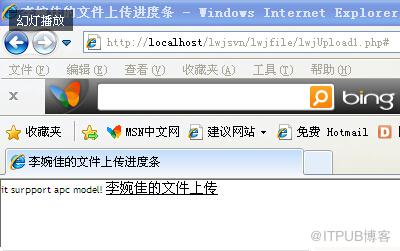
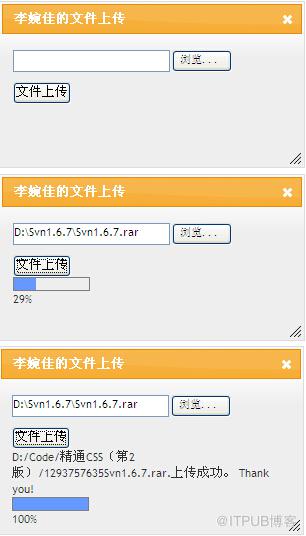
实现效果:
准备工作:
1、参考IBM的PHP V5.2 中的新增功能,第 5 部分: 跟踪文件上传进度,以下是链接地址:http://www.ibm.com/developerworks/cn/opensource/os-php-v525/
这篇文章对php文件上传进度讲得很详细,不过,是用iframe实现的。
2、下载php_apc.dll。在网上很容易搜到php_apc.dll的下载地址。
将php_apc.dll放在ext文件夹下,比如:C:\AppServ\php5\ext。在C:\WINDOWS的php.ini文件中找到;extension=php_zip.dll这行,在这行之后添加:
extension=php_apc.dll
;apc.enabled = 1
;apc.shm_segments = 1
;apc.shm_size = 64
;apc.optimization = 0
;apc.num_files_hint = 1000
;apc.ttl = 0
;apc.gc_ttl = 3600
;apc.cache_by_default = On
;apc.slam_defense = 0
;apc.file_update_protection = 2
;apc.enable_cli = 0
;apc.stat=0
apc.rfc1867=1
apc.max_file_size = 100M
upload_max_filesize = 100M
post_max_size = 100M
以上被注释掉的内容,是另外一些对配置的设置的说法。我发现,如果这样设置,每次网页文件修改后,都必须重启服务器,才能刷新,否则,修改后,无法看到修改后的网页内容。
修改完配置,记得重启服务器。
3、因为实现提交和显示进度条用到jQuery的内容,上传文件也采用了jQuery的弹出对话框的方式,所以,要下载jQuery的核心文件和UI文件。
jQuery的核心文件在jQuery的首页上就可以下载,文件名为jquery-1.4.3.js,注意版本号,如果下载的版本号与后续程序中的不一致,记得修改程序中的文件名。
UI文件的下载地址:http://jqueryui.com/download
可以将可选组件全部勾选。下载的文件夹名jquery-ui-1.8.6.custom。在后续程序中用到的js文件和css文件全部可以在这个文件夹中找到。注意:在该文件夹的development-bundle子文件夹中,必须有jquery-1.4.3.js(或者其它版本)文件存在,否则,文件夹中的demos子文件夹中的例子程序,都无法运行。
还要下载jQuery的表单插件,下载地址:http://malsup.com/jquery/form/#download
页面组成
1、lwjUpload1.php 显示文件上传的客户端页面
2、lwjfileUp.php 处理文件上传的服务器端页面
3、getProgress.php 获得文件上传进度缓存的服务器端页面
程序实现
lwjUpload1.php 显示文件上传的客户端页面
http://www.w3.org/TR/xhtml1/DTD/xhtml1-transitional.dtd">
http://www.w3.org/1999/xhtml">
//这一段用来检查apc是否可用
if (function_exists('apc_fetch')) {
lwjfileUp.php 处理文件上传的服务器端页面
$upfile.上传成功。 Thank you!
?>
getProgress.php 获得文件上传进度缓存的服务器端页面
if(isset($_GET['progress_key'])) {
$status = apc_fetch('upload_'.$_GET['progress_key']);
echo 'it surpport apc model!';
} else {
echo "it's not support apc model!";
}
?>
李婉佳的文件上传
header("Content-Type:text/html; charset=utf-8");
if($_SERVER['REQUEST_METHOD']=='POST')
{
$dirName = 'D:/Code/精通CSS(第2版)/'; //存放上传文件的服务器端文件夹路径
$dirName = iconv("utf-8","gb2312//IGNORE",$dirName); //转换字符编码,否则,中文路径会出错
$temp = $_FILES['myfile']['name'];
$temp = iconv("utf-8","gb2312//IGNORE",$temp);
$upfile = $dirName.time().$temp;
//$upfile = $dirName.time().$_FILES['myfile']['name'];
if(!move_uploaded_file($_FILES["myfile"]["tmp_name"], $upfile))
{
echo '不能将文件移动到指定目录';
exit;
}
$upfile = iconv("gb2312","utf-8//IGNORE",$upfile);
echo "
}
if($status['total'] == 0)
{
$temp = 0;
}
else
{
$temp = $status['current']/$status['total']*100;
}
echo ceil($temp);
}
?>
--------->>转载于:http://blog.sina.com.cn/s/blog_48ed03c80100nrzq.html
来自 “ ITPUB博客 ” ,链接:https://blog.itpub.net/29119536/viewspace-1193203/ ,如需转载,请注明出处,否则将追究法律责任。

最新文章
- Oracle 数据库启动 startup和startup force的区别
- ORA-1092 : opitsk aborting process问题解决
- ORA-00600: internal error code, arguments: [kcratr_scan_lastbwr]错误处理
- Just For Today (Sibyl F. Partridge)
- centos linux成功安装hadoop
- shmall参数设置不当引起数据库启动时报out of memory报错
- java多线程实例
- Windows下SVN命令行工具使用详解(附加TortoiseSVN)
- MySQL错误1042-Can't get hostname for your address
- 公众号的秘密,知道一个biz就够了
