先看效果:
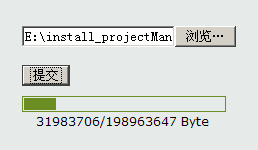
在struts2中上传是很简单的,struts2会先把文件写到临时文件中,以后在提供这个文件的File对象到action中。具体原理看这里:
http://blog.csdn.net/tom_221x/archive/2009/01/12/3761390.aspx。
利用servlet和common-upload.jar很容易实现显示文件上传的进度,在common-upload组件中实现一个ProgressListener接口,组件会把上传的实时进度传给你。但是想在struts2中,实时的显示进度是有些困难的。因为struts2把request对象给封装了,在Action中拿到request对象,如果是上传文件,那么struts2已经把文件写到文件系统里去了。
struts2上传文件的时候封装request对象其实是org.apache.struts2.dispatcher.multipart.MultiPartRequestWrapper,也就是说在action中拿到的实际类型是MultiPartRequestWrapper。片段如下:
- public class MultiPartRequestWrapper extends StrutsRequestWrapper {
- protected static final Logger LOG = LoggerFactory.getLogger(MultiPartRequestWrapper.class);
-
Collection
errors; - MultiPartRequest multi;
- /**
- * Process file downloads and log any errors.
- *
- * @param request Our HttpServletRequest object
- * @param saveDir Target directory for any files that we save
- * @param multiPartRequest Our MultiPartRequest object
- */
- public MultiPartRequestWrapper(MultiPartRequest multiPartRequest, HttpServletRequest request, String saveDir) {
- super(request);
- multi = multiPartRequest;
- try {
- multi.parse(request, saveDir);
- for (Object o : multi.getErrors()) {
- String error = (String) o;
- addError(error);
- }
- } catch (IOException e) {
- addError("Cannot parse request: "+e.toString());
- }
- }
- public class MultiPartRequestWrapper extends StrutsRequestWrapper {
- protected static final Logger LOG = LoggerFactory.getLogger(MultiPartRequestWrapper.class);
-
Collection
errors; - MultiPartRequest multi;
- /**
- * Process file downloads and log any errors.
- *
- * @param request Our HttpServletRequest object
- * @param saveDir Target directory for any files that we save
- * @param multiPartRequest Our MultiPartRequest object
- */
- public MultiPartRequestWrapper(MultiPartRequest multiPartRequest, HttpServletRequest request, String saveDir) {
- super(request);
- multi = multiPartRequest;
- try {
- multi.parse(request, saveDir);
- for (Object o : multi.getErrors()) {
- String error = (String) o;
- addError(error);
- }
- } catch (IOException e) {
- addError("Cannot parse request: "+e.toString());
- }
- }
可以看到在构造的时候,调用multi.parse(request, saveDir)把上传的数据给封装了。这个MultiPartRequest的解析功能是在struts-default.xml中配置的,如下:
- <bean type="org.apache.struts2.dispatcher.multipart.MultiPartRequest" name="struts" class="org.apache.struts2.dispatcher.multipart.JakartaMultiPartRequest" scope="default"/>
- !-- 文件解析器类 -->
- <bean type="org.apache.struts2.dispatcher.multipart.MultiPartRequest" name="jakarta" class="org.apache.struts2.dispatcher.multipart.JakartaMultiPartRequest" scope="default" />
- !-- 这就是struts2的文件解析器设置 -->
- <constant name="struts.multipart.handler" value="jakarta" />
- <bean
- type="org.apache.struts2.dispatcher.multipart.MultiPartRequest"
- name="struts"
- class="org.apache.struts2.dispatcher.multipart.JakartaMultiPartRequest"
- scope="default"/>
- <!-- 文件解析器类 -->
- <bean
- type="org.apache.struts2.dispatcher.multipart.MultiPartRequest"
- name="jakarta"
- class="org.apache.struts2.dispatcher.multipart.JakartaMultiPartRequest"
- scope="default" />
- <!-- 这就是struts2的文件解析器设置 -->
- <constant name="struts.multipart.handler" value="jakarta" />
现在的设想是,strut2不要帮我解析上传的文件,留到action中,我自己设置。所以我们要覆盖这是配置,如下:
- <!-- 重写文件上传解析方法 -->
- <bean type="org.apache.struts2.dispatcher.multipart.MultiPartRequest" name="myRequestParser"
- class="com.*.*.utils.MyRequestParseWrapper" scope="default" optional="true" />
- ;constant name="struts.multipart.handler" value="myRequestParser" />
- <!-- 重写文件上传解析方法 -->
- <bean type="org.apache.struts2.dispatcher.multipart.MultiPartRequest" name="myRequestParser"
- class="com.*.*.utils.MyRequestParseWrapper" scope="default" optional="true" />
- ;constant name="struts.multipart.handler" value="myRequestParser" />
这个MyRequestParseWrapper如下:
- /**
- * 重写struts2的request封装类
- *
- * @author scott.Cgi
- */
- public class MyRequestParseWrapper extends JakartaMultiPartRequest {
- /*
- * (non-Javadoc)
- * @see
- * org.apache.struts2.dispatcher.multipart.JakartaMultiPartRequest#parse
- * (javax.servlet.http.HttpServletRequest, java.lang.String)
- */
- @Override
- public void parse(HttpServletRequest servletRequest, String saveDir)
- throws IOException {
- //什么也不做
- }
- }
- /**
- * 重写struts2的request封装类
- *
- * @author scott.Cgi
- */
- public class MyRequestParseWrapper extends JakartaMultiPartRequest {
- /*
- * (non-Javadoc)
- * @see
- * org.apache.struts2.dispatcher.multipart.JakartaMultiPartRequest#parse
- * (javax.servlet.http.HttpServletRequest, java.lang.String)
- */
- @Override
- public void parse(HttpServletRequest servletRequest, String saveDir)
- throws IOException {
- //什么也不做
- }
- }
这样一来,在action中拿到的request就是带有上传文件的了。
接下来,所以说实现原理,依然使用common-uplaod.jar组件:
1. 页面有2个iframe,一个上传数据,一个显示进度。
2. 当然有2个action,一个上传数据,一个回写进度。
3. 上传的时候首先请求的是更新进度的iframe, 这个iframe执行客户端js发起上传文件请求,第二个iframe开始上传数据。与此同时,第一个iframe开始回写进度。进度对象保存在 session中,通过request的hashcode为key。进度从第一个进度iframe,传递到第二个上传iframe中,实现进度信息的通信。
说明一下,2个iframe是因为,request未结束,不可以向客户端写数据,所以文件超大,就会阻塞回写信息。
具体的上传我封装了一下,具体代码如下:
- import java.io.File;
- import java.io.FileOutputStream;
- import java.io.IOException;
- import java.io.InputStream;
- import java.io.PrintWriter;
- import java.util.List;
- import javax.servlet.http.HttpServletRequest;
- import javax.servlet.http.HttpServletResponse;
- import org.apache.commons.fileupload.FileItem;
- import org.apache.commons.fileupload.ProgressListener;
- import org.apache.commons.fileupload.disk.DiskFileItemFactory;
- import org.apache.commons.fileupload.servlet.ServletFileUpload;
- import org.apache.log4j.Logger;
- /**
- * upload file
- *
- * @author scott.Cgi
- */
- public class UploadFile {
- private static final Logger LOG = Logger.getLogger(UploadFile.class);
- /**
- * 上传文件
- *
- * @param request
- * http request
- * @param response
- * htp response
- * @throws IOException
- * IOException
- */
- @SuppressWarnings("unchecked")
- public static void upload(HttpServletRequest request,
- HttpServletResponse response) throws IOException {
- LOG.info("客户端提交类型: " + request.getContentType());
- if (request.getContentType() == null) {
- throw new IOException(
- "the request doesn't contain a multipart/form-data stream");
- }
- String key = request.getParameter("key");
- Progress p = (Progress)request.getSession().getAttribute(key);
- // 设置上传文件总大小
- p.setLength(request.getContentLength());
- LOG.info("上传文件大小为 : " + p.getLength());
- // 上传临时路径
- String path = request.getSession().getServletContext().getRealPath("/");
- LOG.info("上传临时路径 : " + path);
- // 设置上传工厂
- DiskFileItemFactory factory = new DiskFileItemFactory();
- factory.setRepository(new File(path));
- // 阀值,超过这个值才会写到临时目录
- factory.setSizeThreshold(1024 * 1024 * 10);
- ServletFileUpload upload = new ServletFileUpload(factory);
- // 最大上传限制
- upload.setSizeMax(1024 * 1024 * 200);
- // 设置监听器监听上传进度
- upload.setProgressListener(p);
- try {
- LOG.info("解析上传文件....");
-
List
items = upload.parseRequest(request); - LOG.info("上传数据...");
- for (FileItem item : items) {
- // 非表单域
- if (!item.isFormField()) {
- LOG.info("上传路径 : " + path + item.getName());
- FileOutputStream fos = new FileOutputStream(path + item.getName());
- // 文件全在内存中
- if (item.isInMemory()) {
- fos.write(item.get());
- p.setComplete(true);
- } else {
- InputStream is = item.getInputStream();
- byte[] buffer = new byte[1024];
- int len;
- while ((len = is.read(buffer)) > 0) {
- fos.write(buffer, 0, len);
- }
- is.close();
- }
- fos.close();
- LOG.info("完成上传文件!");
- item.delete();
- LOG.info("删除临时文件!");
- p.setComplete(true);
- LOG.info("更新progress对象状态为完成状态!");
- }
- }
- } catch (Exception e) {
- LOG.error("上传文件出现异常, 错误原因 : " + e.getMessage());
- // 发生错误,进度信息对象设置为完成状态
- p.setComplete(true);
- request.getSession().removeAttribute(key);
- }
- }
- /**
- * 执行客户端脚本
- *
- * @param response
- * http response
- * @param script
- * javscript string
- * @throws IOException
- * IOException
- */
- public static void execClientScript(HttpServletResponse resposne,
- String script) throws IOException {
- PrintWriter out = resposne.getWriter();
-
out.println("
- " + script + "
- // -->");
- // fix ie problem
- out.println("---------------------------------------------------");
- out.println("---------------------------------------------------");
- out.println("---------------------------------------------------");
- out.println("---------------------------------------------------");
- out.println("---------------------------------------------------");
- out.println("---------------------------------------------------");
- out.println("---------------------------------------------------");
- out.flush();
- }
- /**
- * 上传文件进度信息
- *
- * @author wanglei
- * @version 0.1
- */
- public static class Progress implements ProgressListener {
- // 文件总长度
- private long length = 0;
- // 已上传的文件长度
- private long currentLength = 0;
- // 上传是否完成
- private boolean isComplete = false;
- /*
- * (non-Javadoc)
- * @see org.apache.commons.fileupload.ProgressListener#update(long,
- * long, int)
- */
- @Override
- public void update(long bytesRead, long contentLength, int items) {
- this.currentLength = bytesRead;
- }
- /**
- * the getter method of length
- *
- * @return the length
- */
- public long getLength() {
- return length;
- }
- /**
- * the getter method of currentLength
- *
- * @return the currentLength
- */
- public long getCurrentLength() {
- return currentLength;
- }
- /**
- * the getter method of isComplete
- *
- * @return the isComplete
- */
- public boolean isComplete() {
- return isComplete;
- }
- /**
- * the setter method of the length
- *
- * @param length
- * the length to set
- */
- public void setLength(long length) {
- this.length = length;
- }
- /**
- * the setter method of the currentLength
- *
- * @param currentLength
- * the currentLength to set
- */
- public void setCurrentLength(long currentLength) {
- this.currentLength = currentLength;
- }
- /**
- * the setter method of the isComplete
- *
- * @param isComplete
- * the isComplete to set
- */
- public void setComplete(boolean isComplete) {
- this.isComplete = isComplete;
- }
- }
- }
- import java.io.File;
- import java.io.FileOutputStream;
- import java.io.IOException;
- import java.io.InputStream;
- import java.io.PrintWriter;
- import java.util.List;
- import javax.servlet.http.HttpServletRequest;
- import javax.servlet.http.HttpServletResponse;
- import org.apache.commons.fileupload.FileItem;
- import org.apache.commons.fileupload.ProgressListener;
- import org.apache.commons.fileupload.disk.DiskFileItemFactory;
- import org.apache.commons.fileupload.servlet.ServletFileUpload;
- import org.apache.log4j.Logger;
- /**
- * upload file
- *
- * @author scott.Cgi
- */
- public class UploadFile {
- private static final Logger LOG = Logger.getLogger(UploadFile.class);
- /**
- * 上传文件
- *
- * @param request
- * http request
- * @param response
- * htp response
- * @throws IOException
- * IOException
- */
- @SuppressWarnings("unchecked")
- public static void upload(HttpServletRequest request,
- HttpServletResponse response) throws IOException {
- LOG.info("客户端提交类型: " + request.getContentType());
- if (request.getContentType() == null) {
- throw new IOException(
- "the request doesn't contain a multipart/form-data stream");
- }
- String key = request.getParameter("key");
- Progress p = (Progress)request.getSession().getAttribute(key);
- // 设置上传文件总大小
- p.setLength(request.getContentLength());
- LOG.info("上传文件大小为 : " + p.getLength());
- // 上传临时路径
- String path = request.getSession().getServletContext().getRealPath("/");
- LOG.info("上传临时路径 : " + path);
- // 设置上传工厂
- DiskFileItemFactory factory = new DiskFileItemFactory();
- factory.setRepository(new File(path));
- // 阀值,超过这个值才会写到临时目录
- factory.setSizeThreshold(1024 * 1024 * 10);
- ServletFileUpload upload = new ServletFileUpload(factory);
- // 最大上传限制
- upload.setSizeMax(1024 * 1024 * 200);
- // 设置监听器监听上传进度
- upload.setProgressListener(p);
- try {
- LOG.info("解析上传文件....");
-
List
items = upload.parseRequest(request); - LOG.info("上传数据...");
- for (FileItem item : items) {
- // 非表单域
- if (!item.isFormField()) {
- LOG.info("上传路径 : " + path + item.getName());
- FileOutputStream fos = new FileOutputStream(path + item.getName());
- // 文件全在内存中
- if (item.isInMemory()) {
- fos.write(item.get());
- p.setComplete(true);
- } else {
- InputStream is = item.getInputStream();
- byte[] buffer = new byte[1024];
- int len;
- while ((len = is.read(buffer)) > 0) {
- fos.write(buffer, 0, len);
- }
- is.close();
- }
- fos.close();
- LOG.info("完成上传文件!");
- item.delete();
- LOG.info("删除临时文件!");
- p.setComplete(true);
- LOG.info("更新progress对象状态为完成状态!");
- }
- }
- } catch (Exception e) {
- LOG.error("上传文件出现异常, 错误原因 : " + e.getMessage());
- // 发生错误,进度信息对象设置为完成状态
- p.setComplete(true);
- request.getSession().removeAttribute(key);
- }
- }
- /**
- * 执行客户端脚本
- *
- * @param response
- * http response
- * @param script
- * javscript string
- * @throws IOException
- * IOException
- */
- public static void execClientScript(HttpServletResponse resposne,
- String script) throws IOException {
- PrintWriter out = resposne.getWriter();
-
out.println("
- " + script + "
- // -->");
- // fix ie problem
- out.println("---------------------------------------------------");
- out.println("---------------------------------------------------");
- out.println("---------------------------------------------------");
- out.println("---------------------------------------------------");
- out.println("---------------------------------------------------");
- out.println("---------------------------------------------------");
- out.println("---------------------------------------------------");
- out.flush();
- }
- /**
- * 上传文件进度信息
- *
- * @author wanglei
- * @version 0.1
- */
- public static class Progress implements ProgressListener {
- // 文件总长度
- private long length = 0;
- // 已上传的文件长度
- private long currentLength = 0;
- // 上传是否完成
- private boolean isComplete = false;
- /*
- * (non-Javadoc)
- * @see org.apache.commons.fileupload.ProgressListener#update(long,
- * long, int)
- */
- @Override
- public void update(long bytesRead, long contentLength, int items) {
- this.currentLength = bytesRead;
- }
- /**
- * the getter method of length
- *
- * @return the length
- */
- public long getLength() {
- return length;
- }
- /**
- * the getter method of currentLength
- *
- * @return the currentLength
- */
- public long getCurrentLength() {
- return currentLength;
- }
- /**
- * the getter method of isComplete
- *
- * @return the isComplete
- */
- public boolean isComplete() {
- return isComplete;
- }
- /**
- * the setter method of the length
- *
- * @param length
- * the length to set
- */
- public void setLength(long length) {
- this.length = length;
- }
- /**
- * the setter method of the currentLength
- *
- * @param currentLength
- * the currentLength to set
- */
- public void setCurrentLength(long currentLength) {
- this.currentLength = currentLength;
- }
- /**
- * the setter method of the isComplete
- *
- * @param isComplete
- * the isComplete to set
- */
- public void setComplete(boolean isComplete) {
- this.isComplete = isComplete;
- }
- }
- }
action代码:
- import java.io.IOException;
- import com.ufinity.mars.utils.UploadFile;
- import com.ufinity.mars.utils.UploadFile.Progress;
- import com.ufinity.savor.service.FileService;
- /**
- * file action
- *
- * @author scott.Cgi
- */
- public class FileAction extends AbstractAction {
- /** {field's description} */
- private static final long serialVersionUID = 6649027352616232244L;
- private FileService fileService;
- /**
- * 上传文件页面
- *
- * @return page view
- */
- public String preupload() {
- return SUCCESS;
- }
- /**
- * 上传文件
- *
- * @return page view
- */
- public String uploadfile() {
- try {
- UploadFile.upload(this.request, this.response);
- } catch (IOException e) {
- LOG.error("上传文件发生异常,错误原因 : " + e.getMessage());
- }
- return null;
- }
- /**
- * 显示上传文件进度进度
- *
- * @return page view
- */
- public String progress() {
- String callback1 = this.request.getParameter("callback1");
- String callback2 = this.request.getParameter("callback2");
- // 缓存progress对象的key值
- String key = Integer.toString(request.hashCode());
- // 新建当前上传文件的进度信息对象
- Progress p = new Progress();
- // 缓存progress对象
- this.request.getSession().setAttribute(key, p);
- response.setContentType("text/html;charset=UTF-8");
- response.setHeader("pragma", "no-cache");
- response.setHeader("cache-control", "no-cache");
- response.setHeader("expires", "0");
- try {
- UploadFile.execClientScript(response, callback1 + "(" + key + ")");
- long temp = 0l;
- while (!p.isComplete()) {
- if (temp != p.getCurrentLength()) {
- temp = p.getCurrentLength();
- // 向客户端显示进度
- UploadFile.execClientScript(response, callback2 + "("
- + p.getCurrentLength() + "," + p.getLength() + ")");
- } else {
- //LOG.info("progress的状态 :" + p.isComplete());
- //LOG.info("progress上传的数据量 :+ " + p.getCurrentLength());
- //上传进度没有变化时候,不向客户端写数据,写数据过于频繁会让chrome没响应
- Thread.sleep(300);
- }
- }
- } catch (Exception e) {
- LOG.error("调用客户端脚本错误,原因 :" + e.getMessage());
- p.setComplete(true);
- }
- this.request.getSession().removeAttribute(key);
- LOG.info("删除progress对象的session key");
- return null;
- }
- /**
- * the getter method of fileService
- *
- * @return the fileService
- */
- public FileService getFileService() {
- return fileService;
- }
- /**
- * the setter method of the fileService
- *
- * @param fileService
- * the fileService to set
- */
- public void setFileService(FileService fileService) {
- this.fileService = fileService;
- }
- }
- import java.io.IOException;
- import com.ufinity.mars.utils.UploadFile;
- import com.ufinity.mars.utils.UploadFile.Progress;
- import com.ufinity.savor.service.FileService;
- /**
- * file action
- *
- * @author scott.Cgi
- */
- public class FileAction extends AbstractAction {
- /** {field's description} */
- private static final long serialVersionUID = 6649027352616232244L;
- private FileService fileService;
- /**
- * 上传文件页面
- *
- * @return page view
- */
- public String preupload() {
- return SUCCESS;
- }
- /**
- * 上传文件
- *
- * @return page view
- */
- public String uploadfile() {
- try {
- UploadFile.upload(this.request, this.response);
- } catch (IOException e) {
- LOG.error("上传文件发生异常,错误原因 : " + e.getMessage());
- }
- return null;
- }
- /**
- * 显示上传文件进度进度
- *
- * @return page view
- */
- public String progress() {
- String callback1 = this.request.getParameter("callback1");
- String callback2 = this.request.getParameter("callback2");
- // 缓存progress对象的key值
- String key = Integer.toString(request.hashCode());
- // 新建当前上传文件的进度信息对象
- Progress p = new Progress();
- // 缓存progress对象
- this.request.getSession().setAttribute(key, p);
- response.setContentType("text/html;charset=UTF-8");
- response.setHeader("pragma", "no-cache");
- response.setHeader("cache-control", "no-cache");
- response.setHeader("expires", "0");
- try {
- UploadFile.execClientScript(response, callback1 + "(" + key + ")");
- long temp = 0l;
- while (!p.isComplete()) {
- if (temp != p.getCurrentLength()) {
- temp = p.getCurrentLength();
- // 向客户端显示进度
- UploadFile.execClientScript(response, callback2 + "("
- + p.getCurrentLength() + "," + p.getLength() + ")");
- } else {
- //LOG.info("progress的状态 :" + p.isComplete());
- //LOG.info("progress上传的数据量 :+ " + p.getCurrentLength());
- //上传进度没有变化时候,不向客户端写数据,写数据过于频繁会让chrome没响应
- Thread.sleep(300);
- }
- }
- } catch (Exception e) {
- LOG.error("调用客户端脚本错误,原因 :" + e.getMessage());
- p.setComplete(true);
- }
- this.request.getSession().removeAttribute(key);
- LOG.info("删除progress对象的session key");
- return null;
- }
- /**
- * the getter method of fileService
- *
- * @return the fileService
- */
- public FileService getFileService() {
- return fileService;
- }
- /**
- * the setter method of the fileService
- *
- * @param fileService
- * the fileService to set
- */
- public void setFileService(FileService fileService) {
- this.fileService = fileService;
- }
- }
页面代码:
- <mce:style type="text/css"><!--
- iframe{
- border:none;
- width:0;
- height:0;
- }
- #p_out{
- width:200px;
- height:12px;
- margin:10px 0 0 0;
- padding:1px;
- font-size:10px;
- border:solid #6b8e23 1px;
- }
- #p_in{
- width:0%;
- height:100%;
- background-color:#6b8e23;
- margin:0;
- padding:0;
- }
- #dis{
- margin:0;
- padding:0;
- text-align:center;
- font-size:12px;
- height:12px;
- width:200px;
- }
- -->mce:style><style type="text/css" mce_bogus="1"> iframe{
- border:none;
- width:0;
- height:0;
- }
- #p_out{
- width:200px;
- height:12px;
- margin:10px 0 0 0;
- padding:1px;
- font-size:10px;
- border:solid #6b8e23 1px;
- }
- #p_in{
- width:0%;
- height:100%;
- background-color:#6b8e23;
- margin:0;
- padding:0;
- }
- #dis{
- margin:0;
- padding:0;
- text-align:center;
- font-size:12px;
- height:12px;
- width:200px;
- }
- style>
- head>
- <body>
- <div class="main">
- <div class="top">
- <jsp:include page="/top.jsp" />
- div>
- <div style="width: 250px; margin: 0 auto;">
- <div class="errorbox">
- <s:actionerror/>
- div>
- <form id="uploadfile_form" name="uploadfile_form" enctype="multipart/form-data"
- method="post" target="uploadfile_iframe">
- <input type="file" name="file" />
- <br><br>
- <button onclick="progress()">提交button>
- <div id="p_out"><div id="p_in">div>div>
- <div id="dis">div>
- form>
- <iframe frameborder="0" id="uploadfile_iframe" name="uploadfile_iframe" src="javascript:void(0)" mce_src="javascript:void(0)">iframe>
- <iframe frameborder="0" id="progress_iframe" name="progress_iframe" src="javascript:void(0)" mce_src="javascript:void(0)">iframe>
- div>
- div>
- body>
- <mce:script type="text/javascript"><!--
- //上传文件
- function uploadFile(key){
- document.forms[0].action = 'uploadfile.action?callback=parent.upload&key='+key;
- document.forms[0].submit();
- document.getElementById('dis').innerHTML = "开始传送数据...";
- }
- //获取文件上传进度
- function progress(){
- document.getElementById('progress_iframe').src = 'progress.action?callback1=parent.uploadFile&callback2=parent.upload';
- document.getElementById('dis').innerHTML = '初始化数据...';
- document.getElementById('p_in').style.width = "0%";
- }
- //更新进度
- function upload(len, total){
- document.getElementById('p_in').style.width = (Math.round(len/total*100))+'%';
- document.getElementById('dis').innerHTML = len + '/' + total + ' Byte';
- if(len === total) {
- document.getElementById('dis').innerHTML = "文件上传完成!";
- }
- }
- // -->mce:script>
- html>
- <mce:style type="text/css"><!--
- iframe{
- border:none;
- width:0;
- height:0;
- }
- #p_out{
- width:200px;
- height:12px;
- margin:10px 0 0 0;
- padding:1px;
- font-size:10px;
- border:solid #6b8e23 1px;
- }
- #p_in{
- width:0%;
- height:100%;
- background-color:#6b8e23;
- margin:0;
- padding:0;
- }
- #dis{
- margin:0;
- padding:0;
- text-align:center;
- font-size:12px;
- height:12px;
- width:200px;
- }
- -->mce:style><style type="text/css" mce_bogus="1">
- iframe{
- border:none;
- width:0;
- height:0;
- }
- #p_out{
- width:200px;
- height:12px;
- margin:10px 0 0 0;
- padding:1px;
- font-size:10px;
- border:solid #6b8e23 1px;
- }
- #p_in{
- width:0%;
- height:100%;
- background-color:#6b8e23;
- margin:0;
- padding:0;
- }
- #dis{
- margin:0;
- padding:0;
- text-align:center;
- font-size:12px;
- height:12px;
- width:200px;
- }
- style>
- head>
- <body>
- <div class="main">
- <div class="top">
- <jsp:include page="/top.jsp" />
- div>
- <div style="width: 250px; margin: 0 auto;">
- <div class="errorbox">
- <s:actionerror/>
- div>
- <form id="uploadfile_form" name="uploadfile_form"
- enctype="multipart/form-data"
- method="post" target="uploadfile_iframe">
- <input type="file" name="file" />
- <br><br>
- <button onclick="progress()">提交button>
- <div id="p_out"><div
- id="p_in">div>div>
- <div id="dis">div>
- form>
- <iframe frameborder="0" id="uploadfile_iframe"
- name="uploadfile_iframe" src="javascript:void(0)"
- mce_src="javascript:void(0)">iframe>
- <iframe frameborder="0" id="progress_iframe"
- name="progress_iframe" src="javascript:void(0)"
- mce_src="javascript:void(0)">iframe>
- div>
- div>
- body>
- <mce:script type="text/javascript"><!--
- //上传文件
- function uploadFile(key){
- document.forms[0].action =
- 'uploadfile.action?callback=parent.upload&key='+key;
- document.forms[0].submit();
- document.getElementById('dis').innerHTML = "开始传送数据...";
- }
- //获取文件上传进度
- function progress(){
- document.getElementById('progress_iframe').src =
- 'progress.action?callback1=parent.uploadFile&callback2=parent.upload';
- document.getElementById('dis').innerHTML = '初始化数据...';
- document.getElementById('p_in').style.width = "0%";
- }
- //更新进度
- function upload(len, total){
- document.getElementById('p_in').style.width =
- (Math.round(len/total*100))+'%';
- document.getElementById('dis').innerHTML = len + '/' + total + '
- Byte';
- if(len === total) {
- document.getElementById('dis').innerHTML = "文件上传完成!";
- }
- }
- // -->mce:script>
- html>
注意: common-upload.jar依赖common-io.jar
最后,以前写过一个servlet的上传文件显示进度(很久以前的事了,唉。。。),在这里:
http://blog.csdn.net/tom_221x/archive/2009/01/14/3777064.aspx
有兴趣的实现一个试试吧,还以加入多个文件的队列上传,或是多线程上传,还可以加入断点续传。哈哈,实现了记得要开源噢!
----------------------------------------->>转载于:http://blog.csdn.net/lufeng66/article/details/7354281
来自 “ ITPUB博客 ” ,链接:https://blog.itpub.net/29119536/viewspace-1175521/ ,如需转载,请注明出处,否则将追究法律责任。

最新文章
- Oracle 数据库启动 startup和startup force的区别
- ORA-1092 : opitsk aborting process问题解决
- ORA-00600: internal error code, arguments: [kcratr_scan_lastbwr]错误处理
- Just For Today (Sibyl F. Partridge)
- centos linux成功安装hadoop
- shmall参数设置不当引起数据库启动时报out of memory报错
- java多线程实例
- Windows下SVN命令行工具使用详解(附加TortoiseSVN)
- MySQL错误1042-Can't get hostname for your address
- 公众号的秘密,知道一个biz就够了
