本文主要介绍使用Anemometer基于pt-query-digest将MySQL慢查询可视化,因为网上资料相对较少,且都是英文的,遇到报错也没有相关的参考资料,因此写此文。
欢迎转载,请注明作者、出处。
作者:张正
blog:http://space.itpub.net/26355921
QQ:176036317
如有疑问,欢迎联系。
1.MySQL开启慢查询
2.安装Percona Toolkit
rpm -qa|grep percona
percona-toolkit-2.2.7-1
3.下载Anemometer
官网:https://github.com/box/Anemometer
4.准备好php相关模块(或者yum)
5.启动apache服务
rpm -qa|grep http
httpd-2.2.3-45.el5
安装:
1.安装Percona Toolkit:
rpm -ivh percona-toolkit-2.2.7-1.noarch.rpm
2.将Anemometer文件包解压,重命名为anemometer,并移动到/var/www/html 下(apache默认路径)
pwd
/var/www/html/anemometer
3.安装php相关模块:
rpm -qa|grep php
php53-common-5.3.3-1.el5
php53-bcmath-5.3.3-1.el5
php53-mysql-5.3.3-1.el5
php53-dba-5.3.3-1.el5
php53-cli-5.3.3-1.el5
php53-gd-5.3.3-1.el5
php53-5.3.3-1.el5
php53-pdo-5.3.3-1.el5
NOTE:
PHP版本要大于5.3,否则就报错,如:
Anemometer requires PHP 5.3 or newer. You have 5.1.6
除此之外还需要:bcmath
rpm -qa|grep bcmath
php53-bcmath-5.3.3-1.el5
4.执行setup 脚本,创建用户:
[root@/var/www/html/anemometer]mysql -uroot -pxxx < install.sql
[root@/var/www/html/anemometer]mysql -uroot -pxxx
mysql > grant all on slow_query_log.* to 'anemometer'@'%' identified by 'test';
mysql > grant select on *.* to 'anemometer'@'%';
mysql > grant all on slow_query_log.* to 'anemometer'@'localhost';
mysql > grant select on *.* to 'anemometer'@'localhost';
5.将慢查询日志通过pt-query-digest分析后存入数据库中:
pt 版本小于2.2版本的语句:
pt-query-digest --user=anemometer --password=test \
--review h=db.example.com,D=slow_query_log,t=global_query_review \
--review-history h=db.example.com,D=slow_query_log,t=global_query_review_history \
--no-report --limit=0% \
--filter=" \$event->{Bytes} = length(\$event->{arg}) and \$event->{hostname}=\"$HOSTNAME\"" \
/root/test/localhost-slow.log
pt 版本大于2.2版本的语句:
pt-query-digest --user=anemometer --password=test --review h=hd-119-186,D=slow_query_log,t=global_query_review --history h=hd-119-186,D=slow_query_log,t=global_query_review_history --no-report --limit=0% --filter=" \$event->{Bytes} = length(\$event->{arg}) and \$event->{hostname}=\"$HOSTNAME\"" /root/test/localhost-slow.log
执行这个操作后,将会把慢日志分析后存入mysql的slow_query_log数据库。
NOTE:
记得保证相应 '用户'@'主机' 的访问权限
6.修改可视界面的配置信息:
cd /var/www/html/anemometer/conf
cp sample.config.inc.php config.inc.php
vi config.inc.php
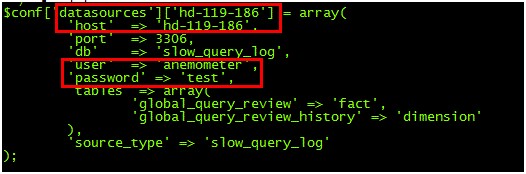
以及:
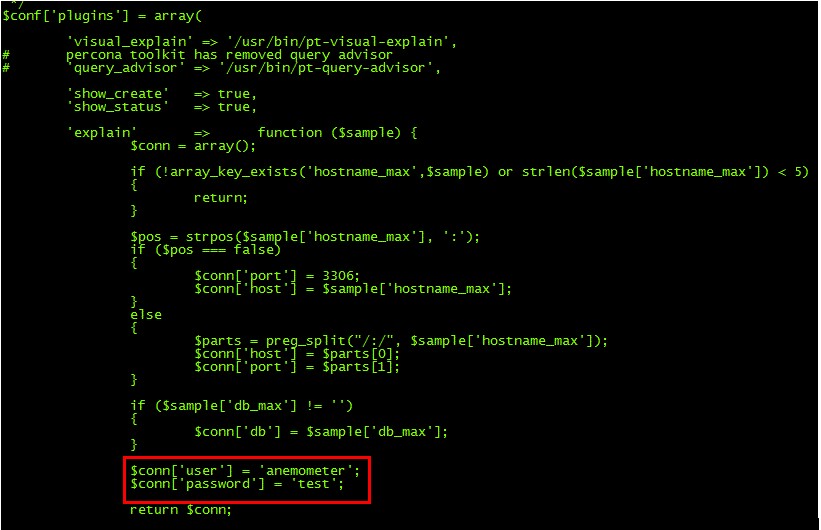
NOTE:
主机名一定要修改正确,不能保留为localhost,否则会导致最终界面无法访问。
7.最终本地通过IP访问:
http://192.168.44.130/anemometer
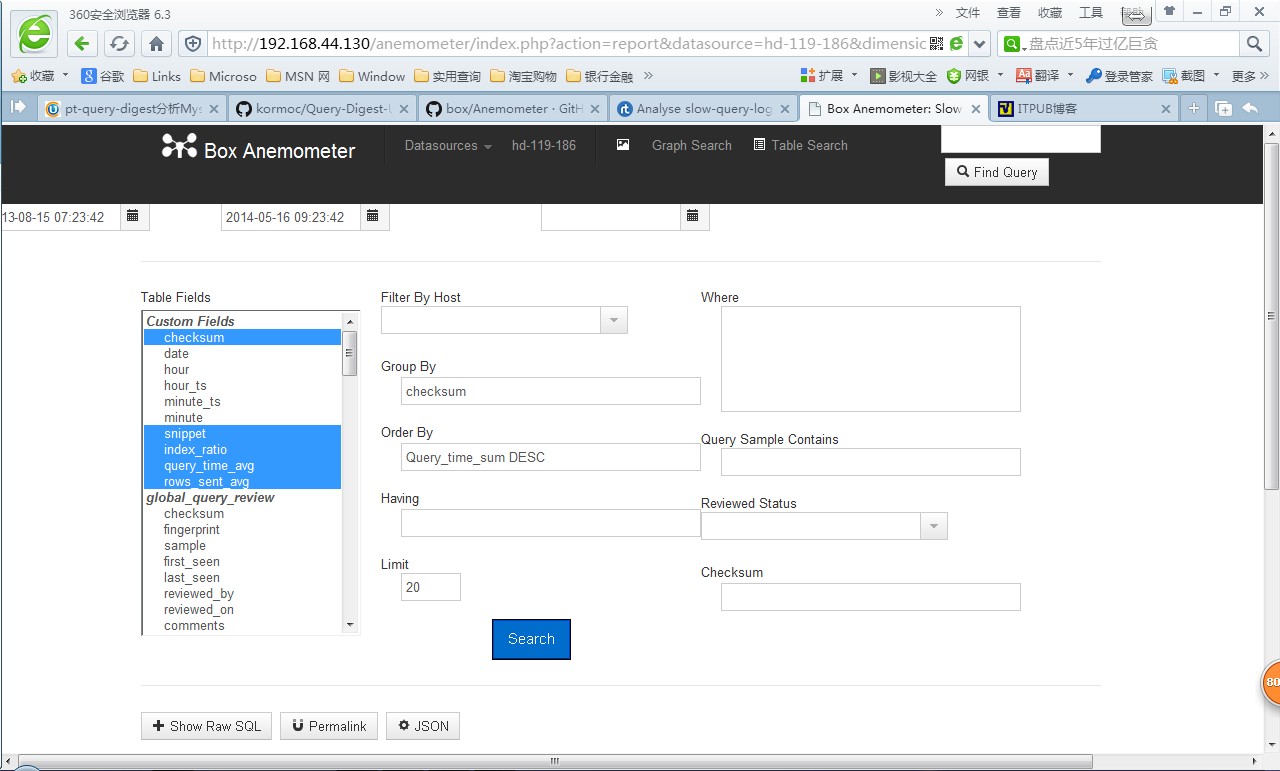
查询后可获得慢查询日志的结果:
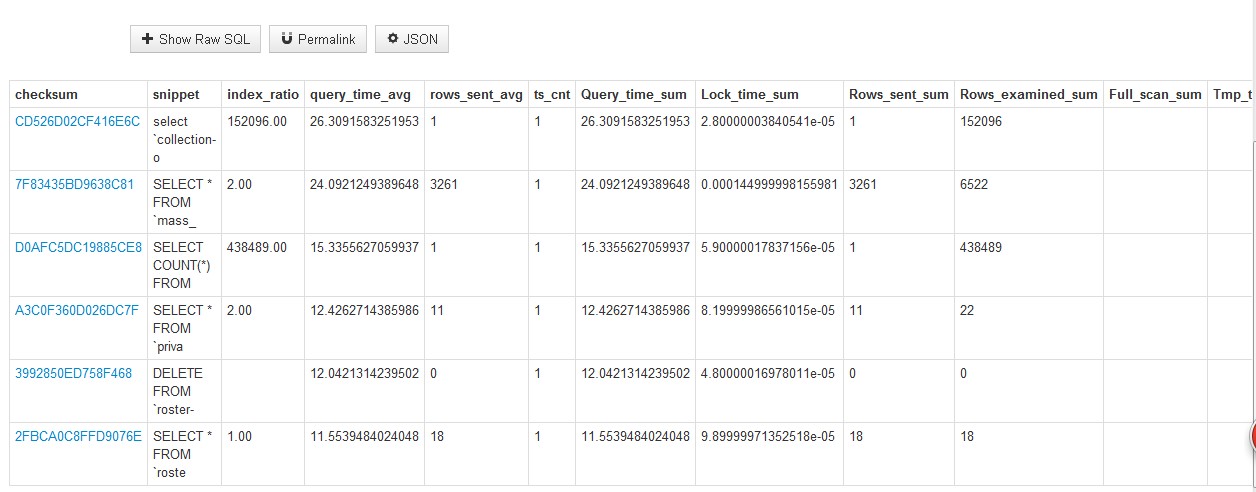
补充:如何监控多个数据库
-
[root@RZ-SI1-DB-14 conf]# ll
-
total 40
-
-rwxr-xr-x 1 root root 15504 Oct 12 14:51 config.inc.php ###新版都不需要修改里面的配置了,只需要修改下面的datasource
-
-rwxrwxrwx 1 root root 314 Oct 12 14:54 datasource_si1.inc.php
-
-rwxr-xr-x 1 root root 314 Oct 12 15:05 datasource_st1.inc.php ---配置多个datasource,si1 st1 机器上分别导入install.sql 并pt-query-digest 慢日志进去
-
-rwxrwxrwx 1 root root 0 Oct 13 2016 index.html
- -rwxrwxrwx 1 root root 15487 Oct 13 2016 sample.config.inc.php
[root@RZ-SI1-DB-14 conf]# more datasource_si1.inc.php
<?php
$conf['datasources']['si1'] = array(
'host' => '10.38.96.132',
'port' => 3306,
'db' => 'slow_query_log',
'user' => 'xxxxxx',
'password' => 'xxxxxx',
'tables' => array(
'global_query_review' => 'fact',
'global_query_review_history' => 'dimension'
),
'source_type' => 'slow_query_log'
);
[root@RZ-SI1-DB-14 conf]# more datasource_st1.inc.php
<?php
$conf['datasources']['st1'] = array(
'host' => '10.38.96.128',
'port' => 3306,
'db' => 'slow_query_log',
'user' => 'xxxxxxx',
'password' => 'xxxxxxxx',
'tables' => array(
'global_query_review' => 'fact',
'global_query_review_history' => 'dimension'
),
'source_type' => 'slow_query_log'
);
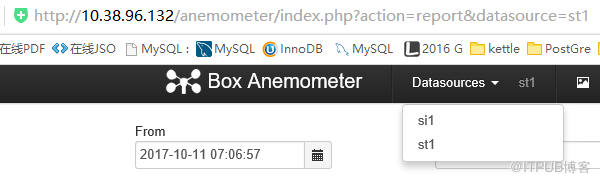
参考文章:
https://github.com/box/Anemometer
https://rtcamp.com/tutorials/mysql/slow-query-log-anemometer/
来自 “ ITPUB博客 ” ,链接:https://blog.itpub.net/29096438/viewspace-2076695/ ,如需转载,请注明出处,否则将追究法律责任。
上一篇:
【Mysql】捕获线上sql

请登录后发表评论
登录
全部评论
最新文章
- [Mysql]Mysql5.7并行复制
- 【Redis】错误:failed: Hostname must not be empty or null
- 【Python】python map()函数和lambda表达式
- 【Mysql】MySQL中interactive_timeout和wait_timeout的区别
- 【Mysql】修改mysql时区
- MySQL(Innodb)索引的原理
- 【Redis】修改redis-trib.rb使其import支持密码
- 【Redis】redis-cluster需要注意的几个地方
- 【Mongodb】mongo复制集只剩一个secondery节点的解决办法
- 【Redis】redis-cluster到redis-cluster的快速复制
