【Linux】Linux网络配置基础2 system-config-network配置网卡访问外网
Linux网络配置基础2
system-config-network配置网卡访问外网
OS:Red Hat Enterprise Linux 6.4

当前电脑无线网卡使用DHCP自动获取,可以访问互联网(外网)
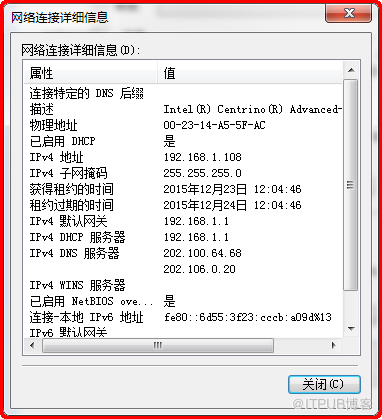
1 禁用NetworkManager
[root@rhel64 ~]# service NetworkManager status
[root@rhel64 ~]# chkconfig --list NetworkManager

如果没有禁用 使用一下命令关闭、禁用
[root@rhel64 ~]# service NetworkManager stop
[root@rhel64 ~]# chkconfig NetworkManager off
2 正常关闭操作系统
[root@rhel64 ~]# init 0
或
[root@rhel64 ~]# shutdown -h now
3 启动网卡2 桥接无线网卡

4 启动虚拟机 查看网卡信息
[root@rhel64 ~]# ifconfig

[root@rhel64 ~]# ifconfig -a

[root@rhel64 ~]# ls /etc/sysconfig/network-scripts/ifcfg-eth*

当前linux能够识别到网卡存在eth1 ,使用ifconfig -a可以查看
但没有具体配置文件。
使用ifconfig eth1 up 启用eth1后,ifconfig可以查看,但无ip信息。
[root@rhel64 ~]# ifconfig eth1 up
[root@rhel64 ~]# ifconfig

5 使用system-config-network 配置网卡
5.1 设置当前会话字符编码为UTF-8

[root@rhel64 ~]# system-config-network

5.2 查看eth0配置


5.3 增加设备配置eth1 配ip


5.4 重启network服务
[root@rhel64 ~]# service network restart

5.5 查看ip及配置文件变化
[root@rhel64 ~]# ifconfig

[root@rhel64 ~]# cat /etc/sysconfig/network

全局配置文件中GATEWAY一项被删除
[root@rhel64 ~]# cat /etc/sysconfig/network-scripts/ifcfg-eth1

[root@rhel64 ~]# cat /etc/resolv.conf

[root@rhel64 ~]# route -n
[root@rhel64 ~]# ip route

5.6 网络访问测试
win7 cmd执行 ping命令 测试 能够ping通eth1地址

linux ping 外网访问测试 能够ping通
[root@rhel64 ~]# ping -c4

6 使用浏览器访问外网

6.1 设置中文拼音输入法
ctrl + 空格 切换输入法
shift 切换中英文


6.2 flash-plugin插件
查看网络视频缺少插件 可以yum安装flash-plugin
[root@rhel64 ~]# yum install flash*

吕星昊
2016.1.18
来自 “ ITPUB博客 ” ,链接:https://blog.itpub.net/28451092/viewspace-2131660/ ,如需转载,请注明出处,否则将追究法律责任。
上一篇:
没有了~
下一篇:
没有了~

请登录后发表评论
登录
全部评论
