思科路由上配置访问控制列表 ACL
搭建网路环境如下
实现ACL效果 1.1.1.10和2.2.2.10不能相互ping通
实现ACL效果 1.1.1.20和2.2.2.20不能相互ping通
实现ACL效果 1.1.1.30和2.2.2.30不能相互ping通
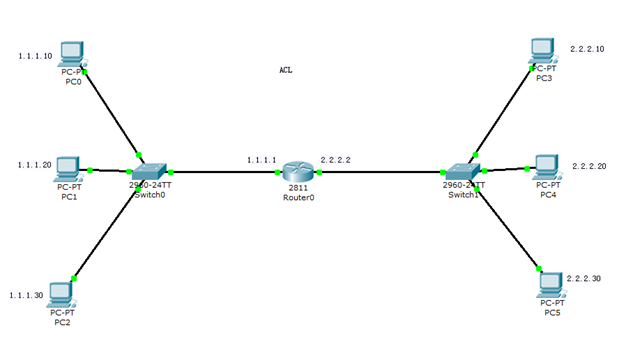
配置PC ip
双击PC,在如下位置配置,逐一配置
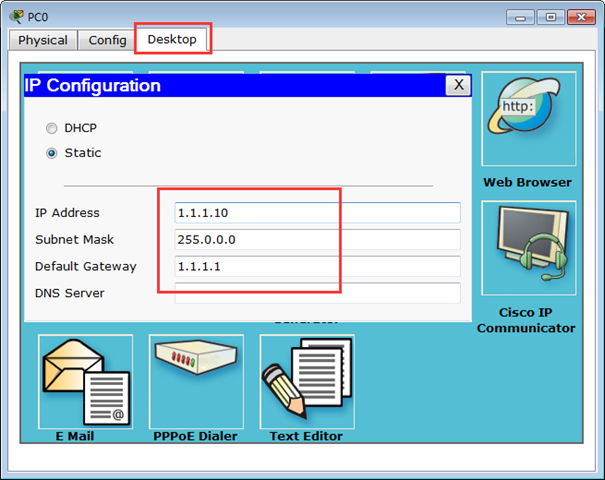
交换机无需配置,连线即可
给路由配置IP,两个端口分别为 0/0 0/1
Router>enable
Router#configure terminal
Router(config)#interface fastEthernet 0/0
Router(config-if)#ip address 1.1.1.1 255.0.0.0
Router(config-if)#no shutdown
Router(config)#interface fastEthernet 0/1
Router(config-if)#ip address 2.2.2.2 255.0.0.0
Router(config-if)#no shutdown
配置ACL,使用扩展的访问控制列表
标准的控制列表是处在1~99和1300~1999范围内的.
扩展访问控制列表的范围是100~199和2000~2699
执行以下命令 ping命令使用IP协议 ,Ping 命令是icmp协议
host代表所有端口
Router(config)#access-list 100 deny ip host 1.1.1.10 host 2.2.2.10
Router(config)#access-list 100 deny ip host 1.1.1.20 host 2.2.2.20
Router(config)#access-list 100 deny ip host 1.1.1.30 host 2.2.2.30
Router(config)#access-list 100 deny ip host 2.2.2.10 host 1.1.1.10
Router(config)#access-list 100 deny ip host 2.2.2.20 host 1.1.1.20
Router(config)#access-list 100 deny ip host 2.2.2.30 host 1.1.1.30
Router(config)#access-list 100 permit ip any any
启用ACL,如果只配置ACL不配置到接口上不会启作用,
一个网络接口只能挂接一个访问列表
int f0/0
ip access-group 100 in
配置完成show running-config 看一下当前配置
Router#show running-config
Building configuration...
Current configuration : 854 bytes
!
version 12.4
no service timestamps log datetime msec
no service timestamps debug datetime msec
no service password-encryption
!
hostname Router
interface FastEthernet0/0
ip address 1.1.1.1 255.0.0.0
ip access-group 100 in
duplex auto
speed auto
!
interface FastEthernet0/1
ip address 2.2.2.2 255.0.0.0
ip access-group 100 in
duplex auto
speed auto
!
interface Vlan1
no ip address
shutdown
!
ip classless
!
!
access-list 100 deny ip host 1.1.1.10 host 2.2.2.10
access-list 100 deny ip host 1.1.1.20 host 2.2.2.20
access-list 100 deny ip host 1.1.1.30 host 2.2.2.30
access-list 100 deny ip host 2.2.2.10 host 1.1.1.10
access-list 100 deny ip host 2.2.2.20 host 1.1.1.20
access-list 100 deny ip host 2.2.2.30 host 1.1.1.30
access-list 100 permit ip any any
!
line con 0
line vty 0 4
login
!
!
!
end
测试效果
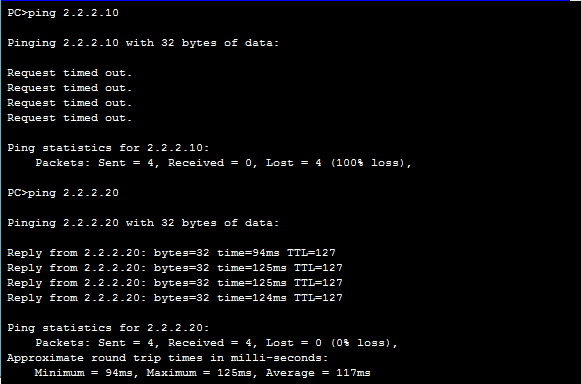
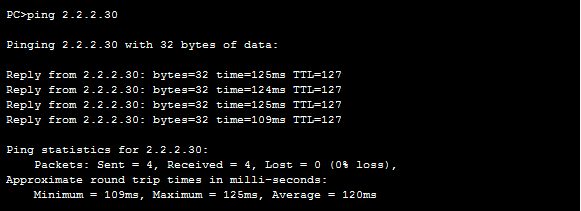
1.1.1.10 ping 2.2.2.10 不通
ping 2.2.2.20通
ping 2.2.2.30通
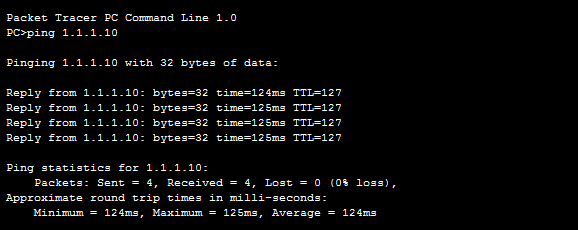
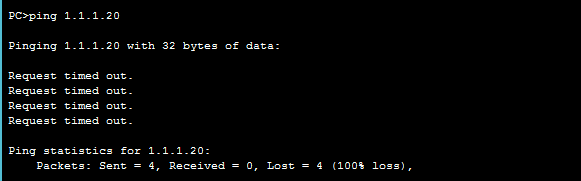
配置完成
来自 “ ITPUB博客 ” ,链接:https://blog.itpub.net/27771627/viewspace-1604105/ ,如需转载,请注明出处,否则将追究法律责任。

最新文章
- 重启openstack的openstack-service命令不存在
- <转载> 共建数据库软件全生态,新数科技宣布 ShinSight 开放共享!
- SAP basis t-code ST12 和 ST05比较
- Diskpart 删除OEM分区方法,set id=07 override 无效处理方法
- Solman系列 安装SAP Solution Manager 7.1 on Suse Linux
- Omnibus系列之 WebGUI组件安装
- Omnibus系列之 创建ObjectServer并配置
- Omnibus系列之 Omnibus gateway组件安装 for BMC remedy
- Omnibus系列之 Syslog Probe组件安装
- Omnibus系列之 Object Server安装 on RHEL6.2
