From:http://www.cnblogs.com/huxi/archive/2010/07/04/1771073.html
1. 正则表达式基础
1.1. 简单介绍
正则表达式并不是Python的一部分。正则表达式是用于处理字符串的强大工具,拥有自己独特的语法以及一个独立的处理引擎,效率上可能不如str自带的方法,但功能十分强大。得益于这一点,在提供了正则表达式的语言里,正则表达式的语法都是一样的,区别只在于不同的编程语言实现支持的语法数量不同;但不用担心,不被支持的语法通常是不常用的部分。如果已经在其他语言里使用过正则表达式,只需要简单看一看就可以上手了。
下图展示了使用正则表达式进行匹配的流程: 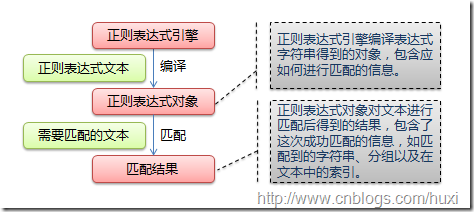
正则表达式的大致匹配过程是:依次拿出表达式和文本中的字符比较,如果每一个字符都能匹配,则匹配成功;一旦有匹配不成功的字符则匹配失败。如果表达式中有量词或边界,这个过程会稍微有一些不同,但也是很好理解的,看下图中的示例以及自己多使用几次就能明白。
下图列出了Python支持的正则表达式元字符和语法: 
1.2. 数量词的贪婪模式与非贪婪模式
正则表达式通常用于在文本中查找匹配的字符串。Python里数量词默认是贪婪的(在少数语言里也可能是默认非贪婪),总是尝试匹配尽可能多的字符;非贪婪的则相反,总是尝试匹配尽可能少的字符。例如:正则表达式"ab*"如果用于查找"abbbc",将找到"abbb"。而如果使用非贪婪的数量词"ab*?",将找到"a"。
1.3. 反斜杠的困扰
与大多数编程语言相同,正则表达式里使用"\"作为转义字符,这就可能造成反斜杠困扰。假如你需要匹配文本中的字符"\",那么使用编程语言表示的正则表达式里将需要4个反斜杠"\\\\":前两个和后两个分别用于在编程语言里转义成反斜杠,转换成两个反斜杠后再在正则表达式里转义成一个反斜杠。Python里的原生字符串很好地解决了这个问题,这个例子中的正则表达式可以使用r"\\"表示。同样,匹配一个数字的"\\d"可以写成r"\d"。有了原生字符串,你再也不用担心是不是漏写了反斜杠,写出来的表达式也更直观。
1.4. 匹配模式
正则表达式提供了一些可用的匹配模式,比如忽略大小写、多行匹配等,这部分内容将在Pattern类的工厂方法re.compile(pattern[, flags])中一起介绍。
2. re模块
2.1. 开始使用re
Python通过re模块提供对正则表达式的支持。使用re的一般步骤是先将正则表达式的字符串形式编译为Pattern实例,然后使用Pattern实例处理文本并获得匹配结果(一个Match实例),最后使用Match实例获得信息,进行其他的操作。
|
1
2
3
4
5
6
7
8
9
10
11
12
13
14
15 |
# encoding:
UTF-8
import
re
#
将正则表达式编译成Pattern对象
pattern
= re.compile(r'hello')
#
使用Pattern匹配文本,获得匹配结果,无法匹配时将返回None
match = pattern.match('hello world!')
if match:
# 使用Match获得分组信息
print match.group()
### 输出 ###
#
hello |
re.compile(strPattern[, flag]):
这个方法是Pattern类的工厂方法,用于将字符串形式的正则表达式编译为Pattern对象。
第二个参数flag是匹配模式,取值可以使用按位或运算符'|'表示同时生效,比如re.I |
re.M。另外,你也可以在regex字符串中指定模式,比如re.compile('pattern', re.I |
re.M)与re.compile('(?im)pattern')是等价的。
可选值有:
- re.I(re.IGNORECASE): 忽略大小写(括号内是完整写法,下同)
- M(MULTILINE): 多行模式,改变'^'和'$'的行为(参见上图)
- S(DOTALL): 点任意匹配模式,改变'.'的行为
- L(LOCALE): 使预定字符类 \w \W \b \B \s \S 取决于当前区域设定
- U(UNICODE): 使预定字符类 \w \W \b \B \s \S \d \D 取决于unicode定义的字符属性
- X(VERBOSE): 详细模式。这个模式下正则表达式可以是多行,忽略空白字符,并可以加入注释。以下两个正则表达式是等价的:
|
1
2
3
4 |
a = re.compile(r"""\d + # the integral part
\. #
the decimal point
\d * #
some fractional digits""", re.X)
b = re.compile(r"\d+\.\d*") |
re提供了众多模块方法用于完成正则表达式的功能。这些方法可以使用Pattern实例的相应方法替代,唯一的好处是少写一行re.compile()代码,但同时也无法复用编译后的Pattern对象。这些方法将在Pattern类的实例方法部分一起介绍。如上面这个例子可以简写为:
|
1
2 |
m = re.match(r'hello', 'hello world!')
print
m.group() |
re模块还提供了一个方法escape(string),用于将string中的正则表达式元字符如*/+/?等之前加上转义符再返回,在需要大量匹配元字符时有那么一点用。
2.2. Match
Match对象是一次匹配的结果,包含了很多关于此次匹配的信息,可以使用Match提供的可读属性或方法来获取这些信息。
属性:
- string: 匹配时使用的文本。
- re: 匹配时使用的Pattern对象。
- pos: 文本中正则表达式开始搜索的索引。值与Pattern.match()和Pattern.seach()方法的同名参数相同。
- endpos: 文本中正则表达式结束搜索的索引。值与Pattern.match()和Pattern.seach()方法的同名参数相同。
- lastindex: 最后一个被捕获的分组在文本中的索引。如果没有被捕获的分组,将为None。
- lastgroup: 最后一个被捕获的分组的别名。如果这个分组没有别名或者没有被捕获的分组,将为None。
方法:
- group([group1, …]):
获得一个或多个分组截获的字符串;指定多个参数时将以元组形式返回。group1可以使用编号也可以使用别名;编号0代表整个匹配的子串;不填写参数时,返回group(0);没有截获字符串的组返回None;截获了多次的组返回最后一次截获的子串。 - groups([default]):
以元组形式返回全部分组截获的字符串。相当于调用group(1,2,…last)。default表示没有截获字符串的组以这个值替代,默认为None。 - groupdict([default]):
返回以有别名的组的别名为键、以该组截获的子串为值的字典,没有别名的组不包含在内。default含义同上。 - start([group]):
返回指定的组截获的子串在string中的起始索引(子串第一个字符的索引)。group默认值为0。 - end([group]):
返回指定的组截获的子串在string中的结束索引(子串最后一个字符的索引+1)。group默认值为0。 - span([group]):
返回(start(group), end(group))。 - expand(template):
将匹配到的分组代入template中然后返回。template中可以使用\id或\g、\g 引用分组,但不能使用编号0。\id与\g 是等价的;但\10将被认为是第10个分组,如果你想表达\1之后是字符'0',只能使用\g<1>0。
|
1
2
3
4
5
6
7
8
9
10
11
12
13
14
15
16
17
18
19
20
21
22
23
24
25
26
27
28
29
30
31
32 |
import
re
m = re.match(r'(\w+) (\w+)(?P
print
"m.string:", m.string
print
"m.re:", m.re
print
"m.pos:", m.pos
print
"m.endpos:", m.endpos
print
"m.lastindex:",
m.lastindex
print
"m.lastgroup:",
m.lastgroup
print
"m.group(1,2):",
m.group(1,
2)
print
"m.groups():", m.groups()
print
"m.groupdict():",
m.groupdict()
print
"m.start(2):",
m.start(2)
print
"m.end(2):",
m.end(2)
print
"m.span(2):",
m.span(2)
print
r"m.expand(r'\2
\1\3'):", m.expand(r'\2 \1\3')
### output ###
# m.string:
hello world!
# m.re:
<_sre.SRE_Pattern object at 0x016E1A38>
# m.pos: 0
# m.endpos: 12
# m.lastindex:
3
# m.lastgroup:
sign
#
m.group(1,2): ('hello', 'world')
# m.groups():
('hello', 'world', '!')
#
m.groupdict(): {'sign': '!'}
# m.start(2):
6
# m.end(2): 11
# m.span(2):
(6, 11)
#
m.expand(r'\2 \1\3'): world
hello! |
2.3. Pattern
Pattern对象是一个编译好的正则表达式,通过Pattern提供的一系列方法可以对文本进行匹配查找。
Pattern不能直接实例化,必须使用re.compile()进行构造。
Pattern提供了几个可读属性用于获取表达式的相关信息:
- pattern: 编译时用的表达式字符串。
- flags: 编译时用的匹配模式。数字形式。
- groups: 表达式中分组的数量。
- groupindex: 以表达式中有别名的组的别名为键、以该组对应的编号为值的字典,没有别名的组不包含在内。
|
1
2
3
4
5
6
7
8
9
10
11
12
13 |
import
re
p = re.compile(r'(\w+) (\w+)(?P
print
"p.pattern:", p.pattern
print
"p.flags:", p.flags
print
"p.groups:", p.groups
print
"p.groupindex:",
p.groupindex
### output ###
# p.pattern:
(\w+) (\w+)(?P
# p.flags: 16
# p.groups: 3
#
p.groupindex: {'sign':
3} |
实例方法[ | re模块方法]:
- match(string[, pos[, endpos]]) | re.match(pattern, string[, flags]):
这个方法将从string的pos下标处起尝试匹配pattern;如果pattern结束时仍可匹配,则返回一个Match对象;如果匹配过程中pattern无法匹配,或者匹配未结束就已到达endpos,则返回None。
pos和endpos的默认值分别为0和len(string);re.match()无法指定这两个参数,参数flags用于编译pattern时指定匹配模式。
注意:这个方法并不是完全匹配。当pattern结束时若string还有剩余字符,仍然视为成功。想要完全匹配,可以在表达式末尾加上边界匹配符'$'。
示例参见2.1小节。 - search(string[, pos[, endpos]]) | re.search(pattern, string[, flags]):
这个方法用于查找字符串中可以匹配成功的子串。从string的pos下标处起尝试匹配pattern,如果pattern结束时仍可匹配,则返回一个Match对象;若无法匹配,则将pos加1后重新尝试匹配;直到pos=endpos时仍无法匹配则返回None。
pos和endpos的默认值分别为0和len(string));re.search()无法指定这两个参数,参数flags用于编译pattern时指定匹配模式。
12345678910111213141516# encoding: UTF-8import re# 将正则表达式编译成Pattern对象pattern = re.compile(r'world')# 使用search()查找匹配的子串,不存在能匹配的子串时将返回None# 这个例子中使用match()无法成功匹配match = pattern.search('hello world!')if match:# 使用Match获得分组信息print match.group()### 输出 #### world - split(string[, maxsplit]) | re.split(pattern, string[, maxsplit]):
按照能够匹配的子串将string分割后返回列表。maxsplit用于指定最大分割次数,不指定将全部分割。
1234567import rep = re.compile(r'\d+')print p.split('one1two2three3four4')### output #### ['one', 'two', 'three', 'four', ''] - findall(string[, pos[, endpos]]) | re.findall(pattern, string[, flags]):
搜索string,以列表形式返回全部能匹配的子串。
1234567import rep = re.compile(r'\d+')print p.findall('one1two2three3four4')### output #### ['1', '2', '3', '4'] - finditer(string[, pos[, endpos]]) | re.finditer(pattern, string[,
flags]):
搜索string,返回一个顺序访问每一个匹配结果(Match对象)的迭代器。
12345678import rep = re.compile(r'\d+')for m in p.finditer('one1two2three3four4'):print m.group(),### output #### 1 2 3 4 - sub(repl, string[, count]) | re.sub(pattern, repl, string[, count]):
使用repl替换string中每一个匹配的子串后返回替换后的字符串。
当repl是一个字符串时,可以使用\id或\g、\g 引用分组,但不能使用编号0。
当repl是一个方法时,这个方法应当只接受一个参数(Match对象),并返回一个字符串用于替换(返回的字符串中不能再引用分组)。
count用于指定最多替换次数,不指定时全部替换。
123456789101112131415import rep = re.compile(r'(\w+) (\w+)')s = 'i say, hello world!'print p.sub(r'\2 \1', s)def func(m):return m.group(1).title() + ' ' + m.group(2).title()print p.sub(func, s)### output #### say i, world hello!# I Say, Hello World! - subn(repl, string[, count]) |re.sub(pattern, repl, string[, count]):
返回 (sub(repl, string[, count]), 替换次数)。
123456789101112131415import rep = re.compile(r'(\w+) (\w+)')s = 'i say, hello world!'print p.subn(r'\2 \1', s)def func(m):return m.group(1).title() + ' ' + m.group(2).title()print p.subn(func, s)### output #### ('say i, world hello!', 2)# ('I Say, Hello World!', 2)
来自 “ ITPUB博客 ” ,链接:https://blog.itpub.net/27042095/viewspace-756927/ ,如需转载,请注明出处,否则将追究法律责任。

最新文章
- 限制 ssh 从某些 IP 登录( authorized_keys )
- 用dpkg命令制作deb包方法总结
- cygwin 多用户 /bin/bash: Operation not permitted
- 侏罗纪世界 1080 BT
- SQL Server 2008“阻止保存要求重新创建表的更改
- ORA-02396: 超出最大空闲时间, 请重新连接
- 用来察看系统数据库的getent命令
- Oracle_11g_R2_RAC集群系统在_Solaris10_x86_64_上的安装.pdf
- Solaris11.1 Oracle11.2.0.4部署手册
- oracle下数据的排序分组row_number() over()--分析函数,可用于去重
