应用要求:
只有shell和sqlplus,怎样在sqlplus中实现循环
比如说数据库表中学生信息,只有shell,和sqlplus,我想弄个批处理,实现输入学号即可输出该生信息至以该生名字命名的文本文件中,假如学号从01-50,如何实现将01-50的学生信息全部输出,如何实现只输出固定的如02、03、08、25等学生信息。
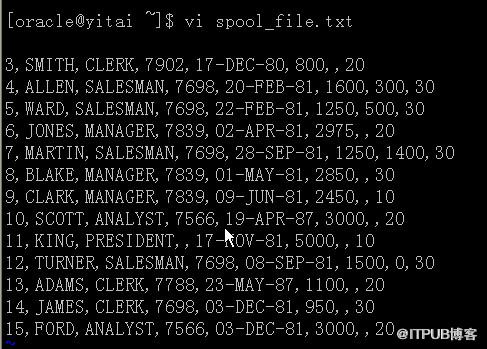
解答:1.SQl语句中没有循环的语句。 正确。但pl/sql有。 2.这是shell 和 sqlplus 交互的问题。有多种实现。 途径: 1)可以在shell中处理sql, 2)也可以在plsql中处理调用shell. 1)只需写shell脚本即可。 2)需要配extproc,虽然有效,比较麻烦。不建议。 3.如果让sqlplus 在shell循环,要重复连接很多次,不建议。建议先将所有学号的学生先一次性导出,再每条单独输出处理。-------------------------------利用sequence-改造emp表为student表---------利用scott.emp表改变一下:SQL>create sequence seq1 increment by 1 maxvalue 10000 minvalue 1 cycle cache 20;SQL > select seq1.nextvalue from dual;SQL > select seq1.nextvalue from dual;SQL > select seq1.nextvalue from dual;SQL > select seq1.nextvalue from dual;nextvalue----------------3SQL > create table student as select * from emp;SQL > create or replace procedure update_studentiscursor stu_cur is select * from student for update;beginfor rec in stu_cur loopupdate student set empno=seq1.next_value where current of stu_cur;end loop;end ;/SQL > exec update_student;SQL > SQL> select * from student; EMPNO ENAME JOB MGR HIREDATE SAL COMM DEPTNO ---------- ---------- --------- ---------- --------- ---------- ---------- ---------- 3 SMITH CLERK 7902 17-DEC-80 800 20 4 ALLEN SALESMAN 7698 20-FEB-81 1600 300 30 5 WARD SALESMAN 7698 22-FEB-81 1250 500 30 6 JONES MANAGER 7839 02-APR-81 2975 20 7 MARTIN SALESMAN 7698 28-SEP-81 1250 1400 30 8 BLAKE MANAGER 7839 01-MAY-81 2850 30 9 CLARK MANAGER 7839 09-JUN-81 2450 10 10 SCOTT ANALYST 7566 19-APR-87 3000 20 11 KING PRESIDENT 17-NOV-81 5000 10 12 TURNER SALESMAN 7698 08-SEP-81 1500 0 30 13 ADAMS CLERK 7788 23-MAY-87 1100 20 EMPNO ENAME JOB MGR HIREDATE SAL COMM DEPTNO ---------- ---------- --------- ---------- --------- ---------- ---------- ---------- 14 JAMES CLERK 7698 03-DEC-81 950 30 15 FORD ANALYST 7566 03-DEC-81 3000 20 16 MILLER CLERK 7782 23-JAN-82 1300 10------------------先用function spool_out 3 15 输出文件spool_file.txt-----function spool_out() { sqlplus -S ${UnP} </dev/null set pagesize 0 heading off echo off termout off feedback off linesize 200 colsep "," trimspool on trimout on spool spool_file.txt select * from student where empno between $1 and $2; spool off exit EOF } #$1 $2 is the position parameter of the file output_student.sh spool_out $1 $2
#cut out the whitespace in the spool_file.txt
sed -i 's/ //g' spool_file.txt
-----------------再用output_student 3 15 生成<人名>.txt文件------------
function output_student()
{
# $1 $2 is the position parameter of the funcion output_emp
for each in `seq $1 $2` ;do
#create file under the diretory ./student/
#awk -v v_out=$each 'BEGIN {FS="," ; FS=","}
#{ print $0 >"student/" $2".txt"}' spool_file.txt #$1 is the first field by sepearator ',' in the awk file
awk -v v_out=$each 'BEGIN {FS="," ; FS=","}
{if(v_out==$1) print $0 > "student/"$2".txt" }' spool_file.txt
done
}
#$1 $2 is the file output_emp.sh position parameter
output_student $1 $2
------------------------综合上述,完整的脚步如下:-------------------------------
#!/bin/bash
#file_name: output_student.sh
#Usage : output_student.sh ${start_value}  ${end_value}. For example ./output_student.sh  3 15

if [ $# -le 2 ] ; then
 echo 'Usage:output_student.sh ${start_value}  ${end_value}. For example ./output_student.sh  3 15'
 exit
fi


# database's  username and password
UnP='scott/oracle'

if [ !  -d student ] ;then
        mkdir student
fi

function spool_out()
{
sqlplus -S ${UnP} < /dev/null
set pagesize 0 heading off echo off termout off feedback off linesize 200  colsep "," trimspool  on trimout on
spool spool_file.txt
select * from student where empno between $1 and $2;
spool off
exit
EOF
}
#$1 $2 is  the  position parameter  of the file output_emp.sh
spool_out  $1 $2

#cut out the whitespace in the spool_file.txt
sed -i 's/ //g' spool_file.txt

function output_student()
{
# $1 $2 is the position parameter of the funcion output_emp
for each in `seq $1 $2` ;do

#create file under  the diretory ./student/
#awk -v v_out=$each 'BEGIN {FS="," ; FS=","}
#{ print $0 >"student/" $2".txt"}' spool_file.txt #$1 is the first field by sepearator ',' in the awk file

awk -v v_out=$each 'BEGIN {FS="," ; FS=","}
{if(v_out==$1)  print $0 > "student/"$2".txt" }' spool_file.txt
done
}

#$1 $2 is  the file  output_emp.sh  position parameter
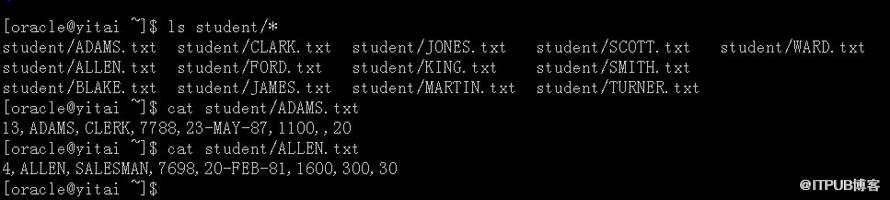
output_student $1 $2
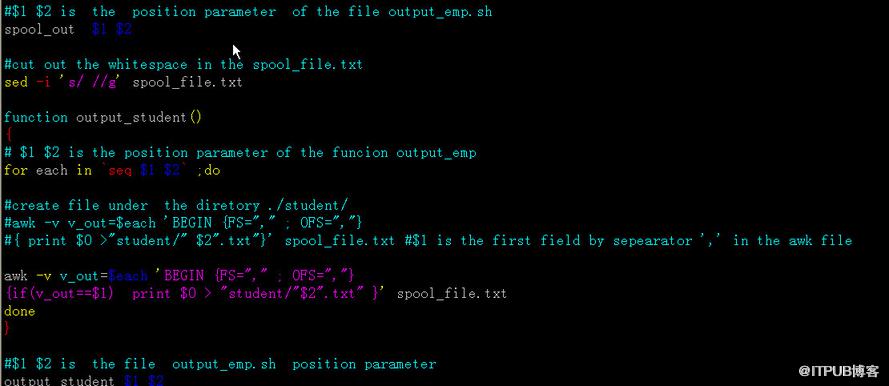
------------------------------------语法着色截图如下(可放大)----------------------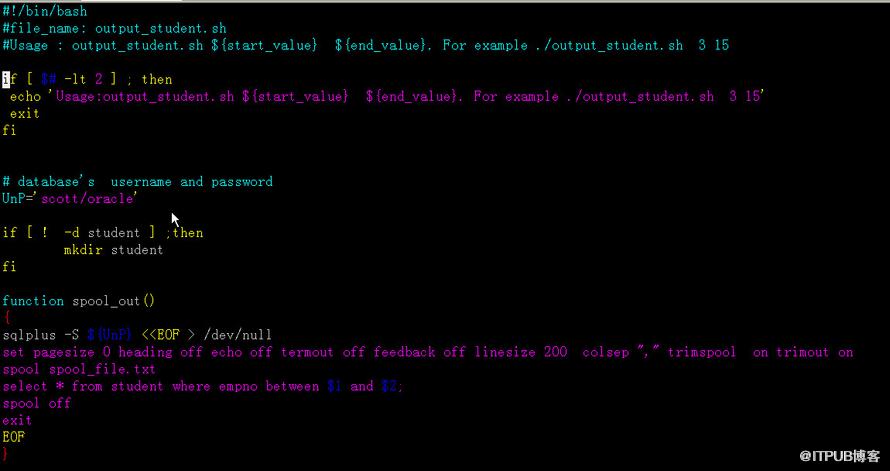
 output1.jpg
来自 “ ITPUB博客 ” ,链接:https://blog.itpub.net/27042095/viewspace-743639/ ,如需转载,请注明出处,否则将追究法律责任。
下一篇:
shell差异拷贝(带md5检验)

请登录后发表评论
登录
全部评论
最新文章
- 限制 ssh 从某些 IP 登录( authorized_keys )
- 用dpkg命令制作deb包方法总结
- cygwin 多用户 /bin/bash: Operation not permitted
- 侏罗纪世界 1080 BT
- SQL Server 2008“阻止保存要求重新创建表的更改
- ORA-02396: 超出最大空闲时间, 请重新连接
- 用来察看系统数据库的getent命令
- Oracle_11g_R2_RAC集群系统在_Solaris10_x86_64_上的安装.pdf
- Solaris11.1 Oracle11.2.0.4部署手册
- oracle下数据的排序分组row_number() over()--分析函数,可用于去重
