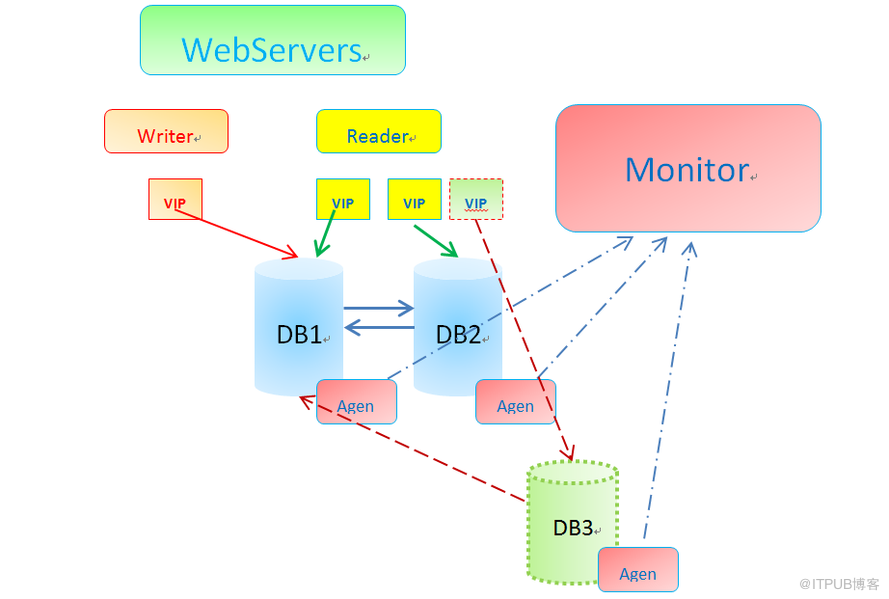
环境规划
|
角色 |
IP |
VIP |
用途 |
|
DB1 |
192.168.56.101 |
192.168.56.111/113 |
主Master提供wirte+read |
|
DB2 |
192.168.56.102 |
192.168.56.112 |
备Master提供read |
|
DB3&&Monitor Server |
192.168.56.103 |
192.156.56.114 |
MMM监控节点&&MySQL slave节点 |
添加到MMM环境中
1) 配置DB3的Master为DB1
D> show slave status\G
*************************** 1. row ***************************
Slave_IO_State: Waiting for master to send event
Master_Host: 192.168.56.101
Master_User: slave
Master_Port: 3306
Connect_Retry: 60
Master_Log_File: master_slave.000026
Read_Master_Log_Pos: 411
Relay_Log_File: MySQL_Manager-relay-bin.000002
Relay_Log_Pos: 286
Relay_Master_Log_File: master_slave.000026
Slave_IO_Running: Yes
Slave_SQL_Running: Yes
Replicate_Do_DB:
Replicate_Ignore_DB:
Replicate_Do_Table:
Replicate_Ignore_Table:
Replicate_Wild_Do_Table:
Replicate_Wild_Ignore_Table:
Last_Errno: 0
Last_Error:
Skip_Counter: 0
Exec_Master_Log_Pos: 411
Relay_Log_Space: 467
Until_Condition: None
Until_Log_File:
Until_Log_Pos: 0
Master_SSL_Allowed: No
Master_SSL_CA_File:
Master_SSL_CA_Path:
Master_SSL_Cert:
Master_SSL_Cipher:
Master_SSL_Key:
Seconds_Behind_Master: 0
Master_SSL_Verify_Server_Cert: No
Last_IO_Errno: 0
Last_IO_Error:
Last_SQL_Errno: 0
Last_SQL_Error:
Replicate_Ignore_Server_Ids:
Master_Server_Id: 1
Master_UUID: 64e874c1-6a35-11e4-bcc1-0800276fc92d
Master_Info_File: /data/mysql/master.info
SQL_Delay: 0
SQL_Remaining_Delay: NULL
Slave_SQL_Running_State: Slave has read all relay log; waiting for the slave I/O thread to update it
Master_Retry_Count: 86400
Master_Bind:
Last_IO_Error_Timestamp:
Last_SQL_Error_Timestamp:
Master_SSL_Crl:
Master_SSL_Crlpath:
Retrieved_Gtid_Set:
Executed_Gtid_Set:
Auto_Position: 0
1 row in set (0.00 sec)
2) 创建MMM代理和监控账号
#创建监控账号
DB3> GRANT REPLICATION CLIENT ON *.* TO 'mmm_monitor'@'192.168.56.%' IDENTIFIED BY 'monitor_password';
Query OK, 0 rows affected (0.02 sec)
#创建代理账号
DB3>GRANT SUPER,REPLICATION CLIENT,PROCESS ON *.* TO 'mmm_agent'@'192.168.56.%' IDENTIFIED BY 'agent_password';
Query OK, 0 rows affected (0.00 sec)
DB3>flush privileges;
Query OK, 0 rows affected (0.03 sec)
3) 添加DB3到MMM中
a) mmm_common.conf
~]# cat /etc/mysql-mmm/mmm_common.conf
active_master_role writer
cluster_interface eth1
pid_path /var/run/mmm_agentd.pid
bin_path /usr/lib/mysql-mmm/
replication_user slave
replication_password mysqlab
agent_user mmm_agent
agent_password agent_password
ip 192.168.56.101
mode master
peer db1
ip 192.168.56.102
mode master
peer db2
ip 192.168.56.103
mode slave
peer db3
hosts db1, db2
ips 192.168.56.113
mode exclusive
hosts db1, db2,db3
ips 192.168.56.111,192.168.56.112,192.168.56.114
mode balanced
所有Node节点都修改为一致
b) mmm_agent.conf
#DB3上编辑mmm_agent.conf
Monitor~]# cat /etc/mysql-mmm/mmm_agent.conf
include mmm_common.conf
this db3
c) mmm_mon.conf
~]# cat /etc/mysql-mmm/mmm_mon.conf
include mmm_common.conf
ip 127.0.0.1
pid_path /var/run/mmm_mond.pid
bin_path /usr/lib/mysql-mmm/
status_path /var/lib/misc/mmm_mond.status
ping_ips 192.168.56.101, 192.168.56.102,192.168.56.103
auto_set_online 60
monitor_user mmm_monitor
monitor_password monitor_password
debug 0
4) 启动MMM代理
DB1、DB2、DB3所有节点上启动agent服务
~]# /etc/init.d/mysql-mmm-agent start
Daemon bin: '/usr/sbin/mmm_agentd'
Daemon pid: '/var/run/mmm_agentd.pid'
Starting MMM Agent daemon... Ok
#在监控主机上
~]# /etc/init.d/mysql-mmm-monitor start
Daemon bin: '/usr/sbin/mmm_mond'
Daemon pid: '/var/run/mmm_mond.pid'
Starting MMM Monitor daemon: Ok
5) 查看状态
~]# mmm_control show
db1(192.168.56.101) master/ONLINE. Roles: reader(192.168.56.111), writer(192.168.56.113)
db2(192.168.56.102) master/ONLINE. Roles: reader(192.168.56.114)
db3(192.168.56.103) slave/ONLINE. Roles: reader(192.168.56.112)
~]# mmm_control checks
db2 ping [last change: 2014/12/03 14:45:49] OK
db2 mysql [last change: 2014/12/03 15:16:30] OK
db2 rep_threads [last change: 2014/12/03 14:45:49] OK
db2 rep_backlog [last change: 2014/12/03 14:45:49] OK: Backlog is null
db3 ping [last change: 2014/12/03 14:45:49] OK
db3 mysql [last change: 2014/12/03 15:16:58] OK
db3 rep_threads [last change: 2014/12/03 14:45:49] OK
db3 rep_backlog [last change: 2014/12/03 14:45:49] OK: Backlog is null
db1 ping [last change: 2014/12/03 14:45:49] OK
db1 mysql [last change: 2014/12/03 14:45:49] OK
db1 rep_threads [last change: 2014/12/03 14:45:49] OK
db1 rep_backlog [last change: 2014/12/03 14:45:49] OK: Backlog is nulldb1 rep_threads [last change: 2014/12/03 14:45:49] OK
db1 rep_backlog [last change: 2014/12/03 14:45:49] OK: Backlog is null
6) 测试slave的Master转移
#正常
~]# mmm_control show
db1(192.168.56.101) master/ONLINE. Roles: reader(192.168.56.112), writer(192.168.56.113)
db2(192.168.56.102) master/ONLINE. Roles: reader(192.168.56.114)
db3(192.168.56.103) slave/ONLINE. Roles: reader(192.168.56.111)
#103节点的master是101,接下来stop 101上的mysql在查看
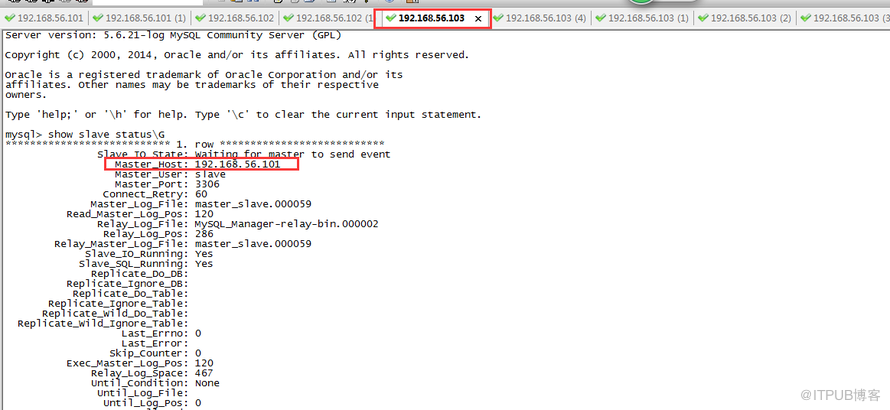
#看监控节点mond.log
2014/12/10 20:21:28 WARN Check 'rep_threads' on 'db1' is in unknown state! Message: UNKNOWN: Connect error (host = 192.168.56.101:3306, user = mmm_monitor)! Lost connection to MySQL server at 'reading initial communication packet', system error: 111
2014/12/10 20:21:33 WARN Check 'rep_backlog' on 'db1' is in unknown state! Message: UNKNOWN: Connect error (host = 192.168.56.101:3306, user = mmm_monitor)! Lost connection to MySQL server at 'reading initial communication packet', system error: 111
2014/12/10 20:21:42 ERROR Check 'mysql' on 'db1' has failed for 10 seconds! Message: ERROR: Connect error (host = 192.168.56.101:3306, user = mmm_monitor)! Lost connection to MySQL server at 'reading initial communication packet', system error: 111
2014/12/10 20:21:45 FATAL State of host 'db1' changed from ONLINE to HARD_OFFLINE (ping: OK, mysql: not OK)
2014/12/10 20:21:45 INFO Removing all roles from host 'db1':
2014/12/10 20:21:45 INFO Removed role 'reader(192.168.56.112)' from host 'db1'
2014/12/10 20:21:45 INFO Removed role 'writer(192.168.56.113)' from host 'db1'
2014/12/10 20:21:45 INFO Orphaned role 'writer(192.168.56.113)' has been assigned to 'db2'
2014/12/10 20:21:45 INFO Orphaned role 'reader(192.168.56.112)' has been assigned to 'db3'
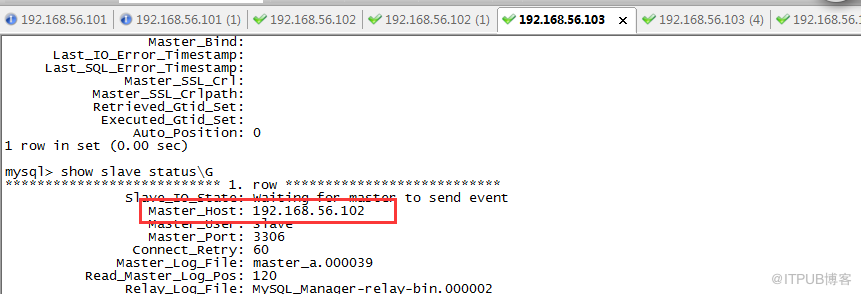
#查看103的master已经转移为102
从而实现了slave的master转移
来自 “ ITPUB博客 ” ,链接:https://blog.itpub.net/27000195/viewspace-1368152/ ,如需转载,请注明出处,否则将追究法律责任。

