VirtualBox Linux下无法上网的解决方法
在网卡设置里,将连接方式设为'桥接网卡'
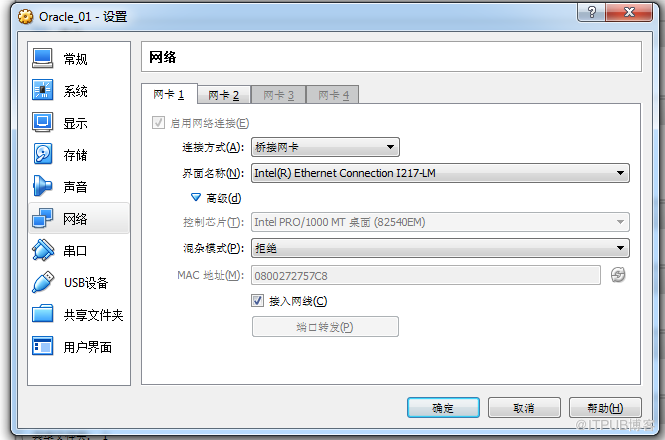
更改网卡配置文件
[root@localhost tab]# cat /etc/sysconfig/network-scripts/ifcfg-eth0
DEVICE=eth0
HWADDR=08:00:27:27:57:C8
TYPE=Ethernet
#UUID=500d1445-843f-4312-9ab0-ac228338bad8
ONBOOT=yes
NM_CONTROLLED=yes
BOOTPROTO=dhcp
IPV6INIT=no
USERCTL=no
重启网络
[root@localhost tab]# service network restart
之后可以正常连接到网络
[root@localhost tab]# ping
PING (103.235.46.39) 56(84) bytes of data.
64 bytes from 103.235.46.39: icmp_seq=1 ttl=49 time=47.0 ms
64 bytes from 103.235.46.39: icmp_seq=2 ttl=49 time=45.4 ms
更改网卡配置文件
[root@localhost tab]# cat /etc/sysconfig/network-scripts/ifcfg-eth0
DEVICE=eth0
HWADDR=08:00:27:27:57:C8
TYPE=Ethernet
#UUID=500d1445-843f-4312-9ab0-ac228338bad8
ONBOOT=yes
NM_CONTROLLED=yes
BOOTPROTO=dhcp
IPV6INIT=no
USERCTL=no
重启网络
[root@localhost tab]# service network restart
之后可以正常连接到网络
[root@localhost tab]# ping
PING (103.235.46.39) 56(84) bytes of data.
64 bytes from 103.235.46.39: icmp_seq=1 ttl=49 time=47.0 ms
64 bytes from 103.235.46.39: icmp_seq=2 ttl=49 time=45.4 ms
来自 “ ITPUB博客 ” ,链接:https://blog.itpub.net/26506993/viewspace-2132570/ ,如需转载,请注明出处,否则将追究法律责任。

请登录后发表评论
登录
全部评论
最新文章
- MySQL执行语句报Incorrect key file for table '/tmp/#sql_.MYI'; try to repair it
- MySQL启动报错InnoDB: The innodb_system data file './ibdata1' is of a different
- Redis 5.02官方集群搭建
- MySQL报错Table 'plugin' is read only [ERROR] Can't open the mysql.plugin table.
- MySQL报错Slave: received end packet from server, apparent master shutdown
- MySQL 5.6因为OOM导致数据库重启
- Django报错ValueError: invalid literal for int() with base 10:
- MySQL 5.6复制报错Error_code: 1032; handler error HA_ERR_KEY_NOT_FOUND;
- MySQL [ERROR] Slave I/O: Found a Gtid_log_event or Previous_gtids_log_event
- MySQL 5.6执行DDL报错ERROR 1050 (42S01): Table 'sms/#sql-ib752' already exist
