Routing Options
The following topics explain routing for specific gateways or connections in your VPC.
Options
Route Tables for an Internet Gateway
You can make a subnet a public subnet by adding a route to an Internet gateway. To do this, create and attach an Internet gateway to your VPC, and then add a route with a destination of 0.0.0.0/0 for IPv4 traffic or ::/0 for IPv6 traffic/ the public IPv4 address of your company's public endpoints outside of AWS or EIP of the EC2 instance outside your VPC, and a target of the Internet gateway ID (igw-xxxxxxxx). For more information, see Internet Gateways .
To enable access to or from the internet for instances in a VPC subnet, you must do the following:
-
Attach an internet gateway to your VPC.
-
Ensure that your subnet's route table points to the internet gateway.
-
Ensure that instances in your subnet have a globally unique IP address (public IPv4 address, Elastic IP address, or IPv6 address).
-
Ensure that your network access control and security group rules allow the relevant traffic to flow to and from your instance.
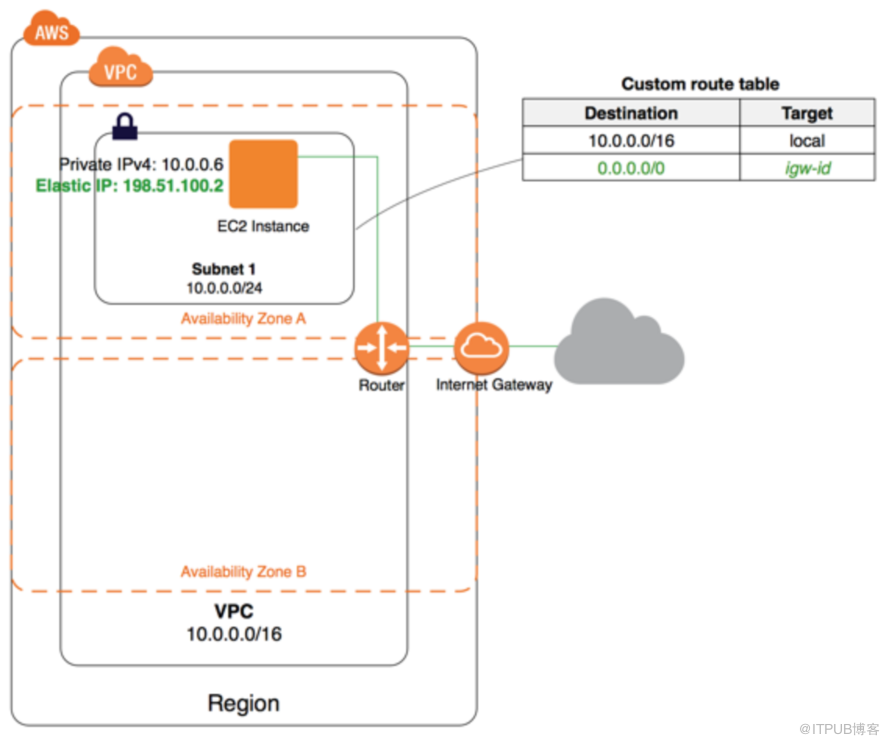
Note: In the diagram, Subnet 1 in the VPC is associated with a custom route table that points all internet-bound IPv4 traffic to an internet gateway. The instance has an Elastic IP address, which enables communication with the internet.
Route Tables for a NAT Device
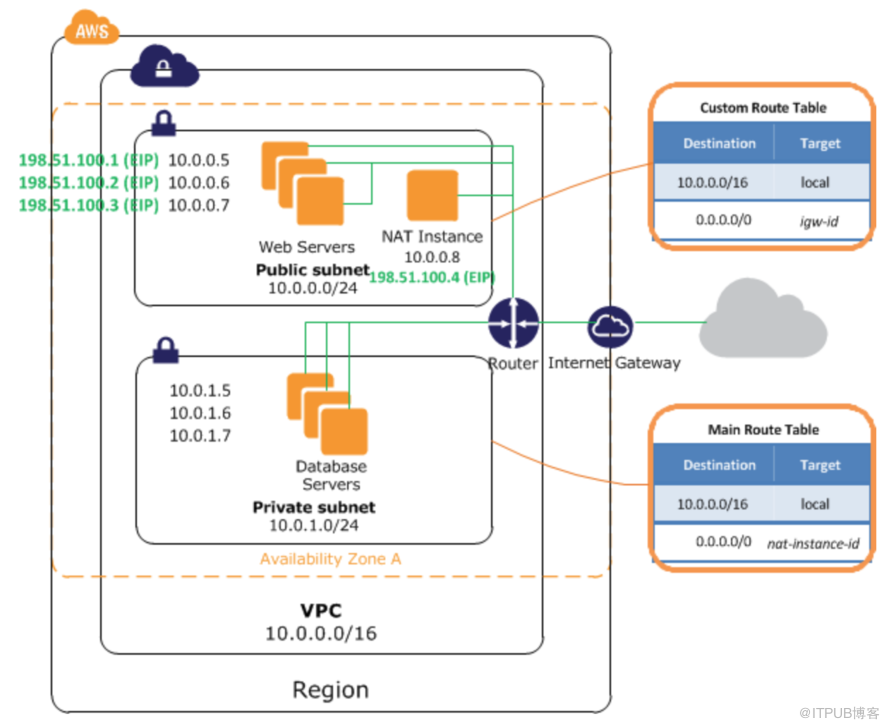
To enable instances in a private subnet to connect to the Internet, you can create a NAT gateway or launch a NAT instance in a public subnet , and then add a route for the private subnet that routes IPv4 Internet traffic (0.0.0.0/0) to the NAT device. For more information, see NAT Gateways and NAT Instances . NAT devices cannot be used for IPv6 traffic.
Route Tables for a Virtual Private Gateway
You can use an AWS managed VPN connection to enable instances in your VPC to communicate with your own network. To do this, create and attach a virtual private gateway to your VPC, and then add a route with the destination of your network and a target of the virtual private gateway (vgw-xxxxxxxx) . You can then create and configure your VPN connection. For more information, see AWS Managed VPN Connections .
We currently do not support IPv6 traffic over a VPN connection. However, we support IPv6 traffic routed through a virtual private gateway to an AWS Direct Connect connection. For more information, see the AWS Direct Connect User Guide .
Route Tables for a VPC Peering Connection
A VPC peering connection is a networking connection between two VPCs that allows you to route traffic between them using private IPv4 addresses. Instances in either VPC can communicate with each other as if they are part of the same network.
To enable the routing of traffic between VPCs in a VPC peering connection, you must add a route to one or more of your VPC route tables that points to the VPC peering connection to access all or part of the CIDR block of the other VPC in the peering connection. Similarly, the owner of the other VPC must add a route to their VPC route table to route traffic back to your VPC.
For example, you have a VPC peering connection (pcx-1a2b1a2b) between two VPCs, with the following information:
-
VPC A: vpc-1111aaaa, CIDR block is 10.0.0.0/16
-
VPC B: vpc-2222bbbb, CIDR block is 172.31.0.0/16
To enable traffic between the VPCs and allow access to the entire IPv4 CIDR block of either VPC, the VPC A route table is configured as follows.
| Destination | Target |
|---|---|
| 10.0.0.0/16 | Local |
| 172.31.0.0/16 | pcx-1a2b1a2b |
The VPC B route table is configured as follows.
| Destination | Target |
|---|---|
| 172.31.0.0/16 | Local |
| 10.0.0.0/16 | pcx-1a2b1a2b |
Your VPC peering connection can also support IPv6 communication between instances in the VPCs, provided the VPCs and instances are enabled for IPv6 communication. For more information, see VPCs and Subnets . To enable the routing of IPv6 traffic between VPCs, you must add a route to your route table that points to the VPC peering connection to access all or part of the IPv6 CIDR block of the peer VPC.
For example, using the same VPC peering connection (
pcx-1a2b1a2b
) above, assume the VPCs have the following information:
-
VPC A: IPv6 CIDR block is
2001:db8:1234:1a00::/56 -
VPC B: IPv6 CIDR block is
2001:db8:5678:2b00::/56
To enable IPv6 communication over the VPC peering connection, add the following route to the route table for VPC A:
| Destination | Target |
|---|---|
| 10.0.0.0/16 | Local |
| 172.31.0.0/16 | pcx-1a2b1a2b |
| 2001:db8:5678:2b00::/56 | pcx-1a2b1a2b |
Add the following route to the route table for VPC B:
| Destination | Target |
|---|---|
| 172.31.0.0/16 | Local |
| 10.0.0.0/16 | pcx-1a2b1a2b |
| 2001:db8:1234:1a00::/56 | pcx-1a2b1a2b |
来自 “ ITPUB博客 ” ,链接:https://blog.itpub.net/26477398/viewspace-2213206/ ,如需转载,请注明出处,否则将追究法律责任。

