ob mysql pg压测对比
本次测试为学习测试使用,留作参考。
本文压测用到的软件:
链接: https://pan.baidu.com/s/1HigLJl87Jch5naR2Qx-b-A
提取码:hf7q
mysql采用rpm安装,
pg采用编译安装,因为安装官网rpm安装失败。
ob采用obd web安装。
修改参数:
ob:没有修改参数,安装默认
mysql:修改 innodb_buffer_pool_size=1073741824,my.cnf中添加,然后systemctl restart mysqld
pg:修改 shared_buffers = 1024MB, maintenance_work_mem = 64MB及log相关参数( log_directory, log_filename ),然后pg_ctl restart -D $PGDATA
数据库和压测工具版本:
sysbench版本:
[root@centos7 sysbenchpgsql]# sysbench --version
sysbench 1.0.20
ob版本:
obclient [oceanbase]> select build_version from __all_server;
+-------------------------------------------------------------------------------------------+
| build_version |
+-------------------------------------------------------------------------------------------+
| 4.1.0.2_103000072023081111-694f84c4faf0067e2512e18ea2c9a3687fa013c7(Aug 11 2023 11:38:01) |
+-------------------------------------------------------------------------------------------+
1 row in set (0.007 sec)
mysql版本:
mysql> select version();
+-----------+
| version() |
+-----------+
| 8.0.36 |
+-----------+
1 row in set (0.04 sec)
pg版本:
postgres=# select version();
version
---------------------------------------------------------------------------------------------------------
PostgreSQL 16.2 on x86_64-pc-linux-gnu, compiled by gcc (GCC) 4.8.5 20150623 (Red Hat 4.8.5-44), 64-bit
(1 row)
服务器配置:
ob:
[root@centos7 ~]# free -m
total used free shared buff/cache available
Mem: 16028 8178 3513 11 4336 7478
Swap: 2047 0 2047
[root@centos7 ~]# cat /etc/redhat-release
CentOS Linux release 7.6.1810 (Core)
mysql:
[root@mysql8 rpms]# free -m
total used free shared buff/cache available
Mem: 1980 1678 69 1 232 124
Swap: 2047 32 2015
[root@mysql8 rpms]# cat /etc/redhat-release
CentOS Linux release 7.6.1810 (Core)
pg:
[postgres@pg16 data]$ free -m
total used free shared buff/cache available
Mem: 1980 75 285 882 1619 840
Swap: 2047 46 2001
[postgres@pg16 data]$ cat /etc/redhat-release
CentOS Linux release 7.6.1810 (Core)
数据库配置:
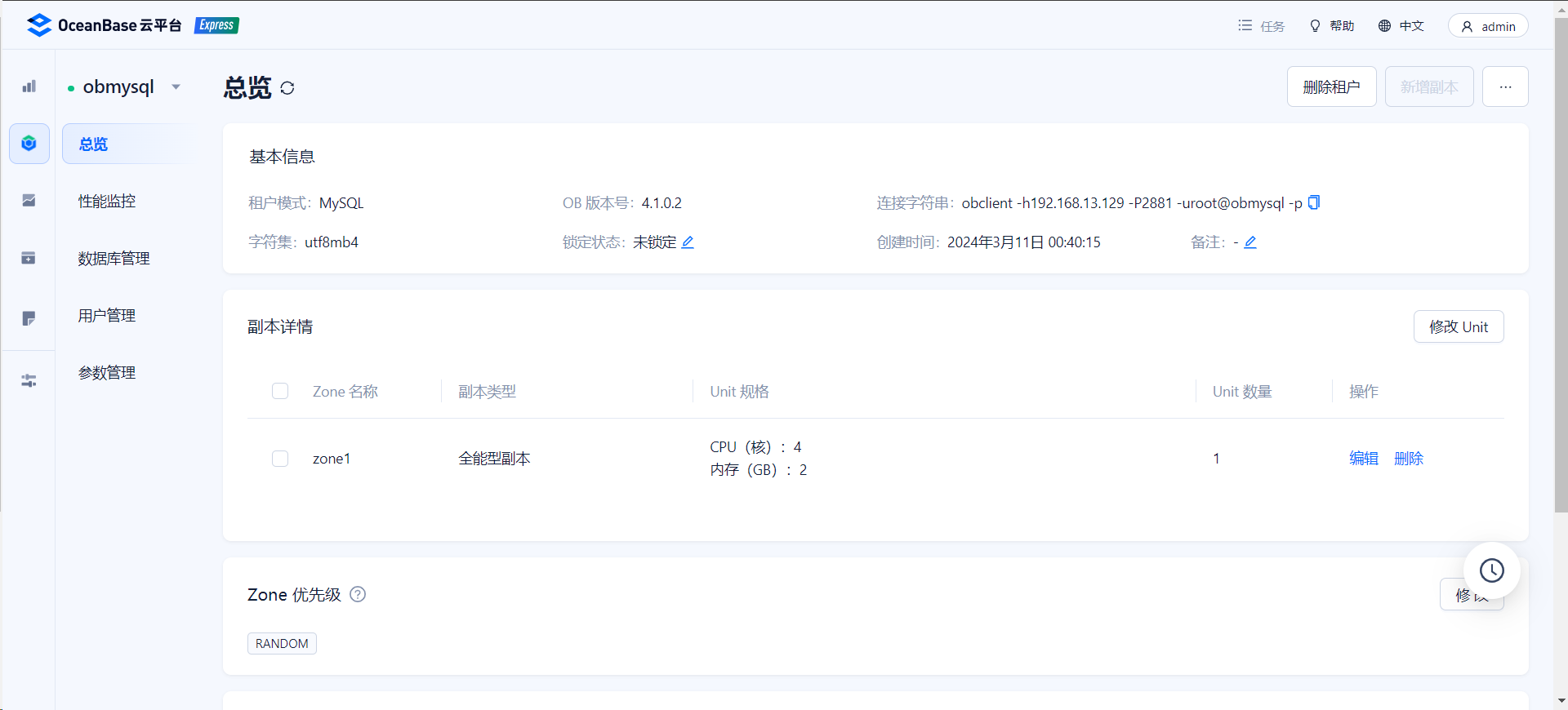
ob租户资源:
数据准备:
ob:
sysbench --mysql-host=192.168.13.129 --mysql-port=2883 --mysql-user=root@obmysql --mysql-password='!QAZ@WSX3edc4rfv' --mysql-db=test --report-interval=3 --threads=10 --db-ps-mode=disable --percentile=99 --auto_inc=on --tables=10 --mysql-ignore-errors=6002,6004,4012,2013,4016,1062 --table_size=500000 --time=30 /usr/local/sysbench/share/sysbench/oltp_read_write.lua prepare
mysql:
sysbench --mysql-host=192.168.13.132 --mysql-port=3306 --mysql-user=root --mysql-password='Root@123456' --mysql-db=test --report-interval=3 --threads=10 --db-ps-mode=disable --percentile=99 --auto_inc=on --tables=10 --mysql-ignore-errors=6002,6004,4012,2013,4016,1062 --table_size=500000 --time=30 /usr/local/sysbench/share/sysbench/oltp_read_write.lua prepare
pg:
sysbench --db-driver=pgsql --pgsql-host=192.168.13.131 --pgsql-port=5432 --pgsql-user=postgres --pgsql-password='Root@123456' --pgsql-db=test --report-interval=3 --threads=10 --db-ps-mode=disable --percentile=99 --auto_inc=on --tables=10 --table_size=500000 --time=120 /usr/local/sysbench/share/sysbench/oltp_read_write.lua prepare
压测脚本:
cat >>lua.lst<<EOF
oltp_delete.lua
oltp_point_select.lua
oltp_read_only.lua
oltp_read_write.lua
oltp_update_index.lua
oltp_update_non_index.lua
oltp_write_only.lua
select_random_points.lua
select_random_ranges.lua
EOF
ob:
for i in `cat lua.lst`
do
for j in {10..100..10}
do
echo "sysbench --mysql-host=192.168.13.129 --mysql-port=2883 --mysql-user=root@obmysql --mysql-password='!QAZ@WSX3edc4rfv' --mysql-db=test --report-interval=3 --threads=$j --db-ps-mode=disable --percentile=99 --auto_inc=on --tables=10 --mysql-ignore-errors=6002,6004,4012,2013,4016,1062 --table_size=500000 --time=120 /usr/local/sysbench/share/sysbench/$i run"
sysbench --mysql-host=192.168.13.129 --mysql-port=2883 --mysql-user=root@obmysql --mysql-password='!QAZ@WSX3edc4rfv' --mysql-db=test --report-interval=3 --threads=$j --db-ps-mode=disable --percentile=99 --auto_inc=on --tables=10 --mysql-ignore-errors=6002,6004,4012,2013,4016,1062 --table_size=500000 --time=120 /usr/local/sysbench/share/sysbench/$i run
done
done
mysql:
for i in `cat lua.lst`
do
for j in {10..100..10}
do
echo "sysbench --mysql-host=192.168.13.132 --mysql-port=3306 --mysql-user=root --mysql-password='Root@123456' --mysql-db=test --report-interval=3 --threads=$j --db-ps-mode=disable --percentile=99 --auto_inc=on --tables=10 --mysql-ignore-errors=6002,6004,4012,2013,4016,1062 --table_size=500000 --time=120 /usr/local/sysbench/share/sysbench/$i run"
sysbench --mysql-host=192.168.13.132 --mysql-port=3306 --mysql-user=root --mysql-password='Root@123456' --mysql-db=test --report-interval=3 --threads=$j --db-ps-mode=disable --percentile=99 --auto_inc=on --tables=10 --mysql-ignore-errors=6002,6004,4012,2013,4016,1062 --table_size=500000 --time=120 /usr/local/sysbench/share/sysbench/$i run
done
done
pg:
for i in `cat lua.lst`
do
for j in {10..100..10}
do
echo "sysbench --db-driver=pgsql --pgsql-host=192.168.13.131 --pgsql-port=5432 --pgsql-user=postgres --pgsql-password='Root@123456' --pgsql-db=test --report-interval=3 --threads=$j --db-ps-mode=disable --percentile=99 --auto_inc=on --tables=10 --table_size=500000 --time=120 /usr/local/sysbench/share/sysbench/$i run"
sysbench --db-driver=pgsql --pgsql-host=192.168.13.131 --pgsql-port=5432 --pgsql-user=postgres --pgsql-password='Root@123456' --pgsql-db=test --report-interval=3 --threads=$j --db-ps-mode=disable --percentile=99 --auto_inc=on --tables=10 --table_size=500000 --time=120 /usr/local/sysbench/share/sysbench/$i run
done
done
测试结果:
ob:

mysql:
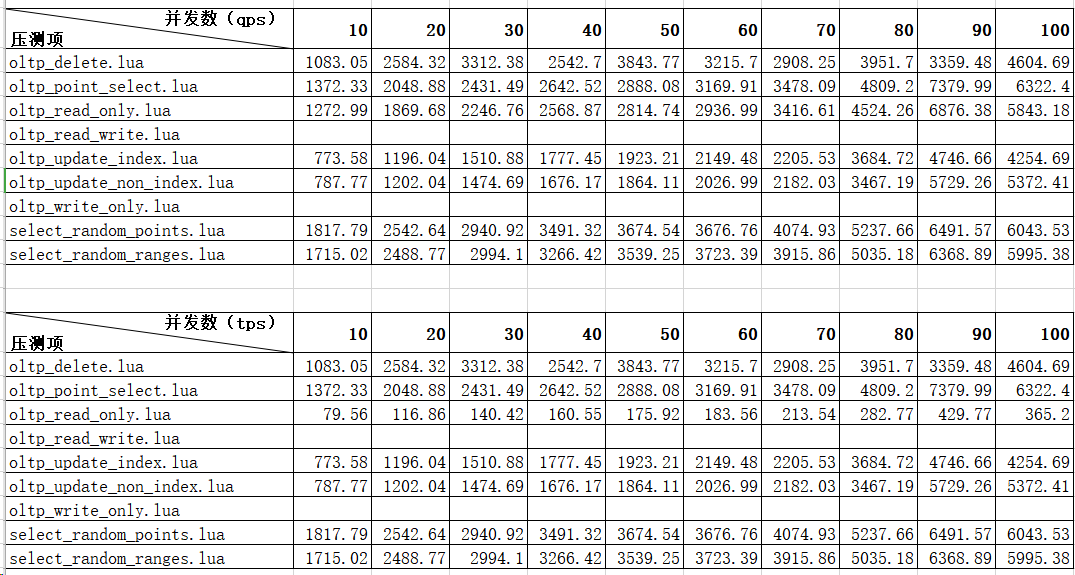
pg:

结论:
傻瓜式使用(即不修改参数或极少参数下)或硬件资源有限情况下,还是传统数据库更强。
但也希望国产库越来越好。
来自 “ ITPUB博客 ” ,链接:https://blog.itpub.net/26224914/viewspace-3008634/ ,如需转载,请注明出处,否则将追究法律责任。

