用过数据库的朋友都知道,要想将数据存入表中,需要将表建立多个字段,对于这些字段要有合理的类型来匹配,因为是初学Mysql,所以在此做些小的总结与记录,以便自己以后学习。
- 数值类型
严格(INTEGER,SMALLINT,DECIMAL,MUMERIC)
近似(FLOAT,REAL,DOUBLE,PRECISION)
扩展(TINYINT,MEDIUMINT,BIGINT)
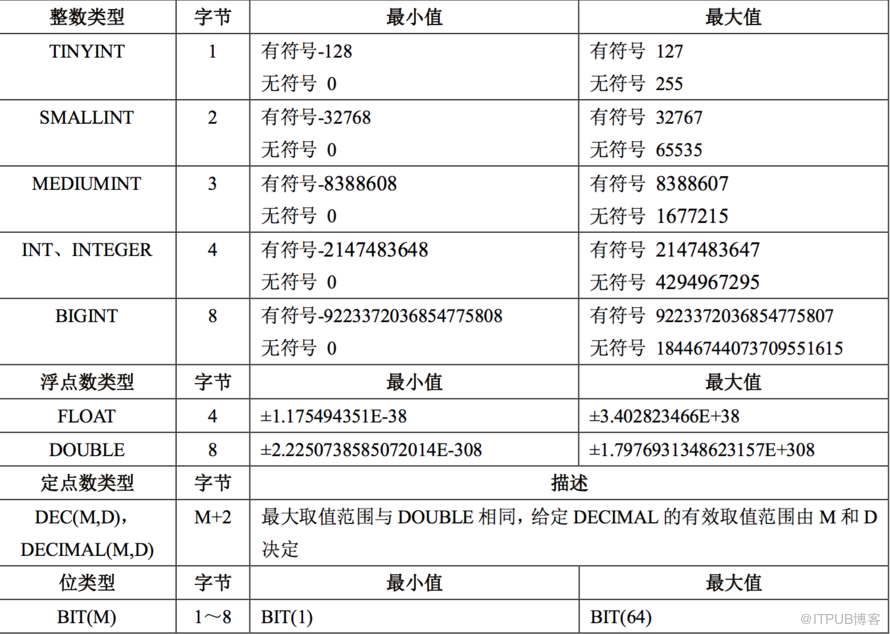
- zerofill 使用说明,例如 int(5)表示当数值宽度小于 5 位的时候在数字前面加’0’填满宽度,如果不显示指定宽度则默认为 int(11),zerofill默认为int(10)。注:当使用zerofill 时,默认会自动加unsigned(无符号)属性,使用unsigned属性后,数值范围是原值的2倍,例如,有符号为-128~+127,无符号为0~256。
(1)连接测试数据库mydata
[mysql@suzzy ~]$ mysql -uroot -p
Enter password:
Welcome to the MySQL monitor. Commands end with ; or \g.
Your MySQL connection id is 1
Server version: 5.6.22-enterprise-commercial-advanced MySQL Enterprise Server - Advanced Edition (Commercial)
Copyright (c) 2000, 2014, Oracle and/or its affiliates. All rights reserved.
Oracle is a registered trademark of Oracle Corporation and/or its
affiliates. Other names may be trademarks of their respective
owners.
Type 'help;' or '\h' for help. Type '\c' to clear the current input statement.
mysql> show databases;
+--------------------+
| Database |
+--------------------+
| information_schema |
| mydata |
| mysql |
| performance_schema |
+--------------------+
4 rows in set (0.00 sec)
mysql> use mydata;
Reading table information for completion of table and column names
You can turn off this feature to get a quicker startup with -A
Database changed
(2)创建测试表T1
mysql> create table t1 (id1 int,id2 int(5));
Query OK, 0 rows affected (0.01 sec)
mysql> desc t1;
+-------+---------+------+-----+---------+-------+
| Field | Type | Null | Key | Default | Extra |
+-------+---------+------+-----+---------+-------+
| id1 | int(11) | YES | | NULL | |
| id2 | int(5) | YES | | NULL | |
+-------+---------+------+-----+---------+-------+
2 rows in set (0.01 sec)
(3)插入数据直接查询,未能看到两个字段的不同
mysql> insert into t1 values (1,1);
Query OK, 1 row affected (0.00 sec)
mysql> select * from t1;
+------+------+
| id1 | id2 |
+------+------+
| 1 | 1 |
+------+------+
1 row in set (0.00 sec)
(4)改变id1,id2两个字段为zerofill,id1为默认长度’10’,id2为长度为’5’
mysql> alter table t1 modify id1 int zerofill;
Query OK, 1 row affected (0.01 sec)
Records: 1 Duplicates: 0 Warnings: 0
mysql> alter table t1 modify id2 int(5) zerofill;
Query OK, 1 row affected (0.02 sec)
Records: 1 Duplicates: 0 Warnings: 0
mysql> desc t1;
+-------+---------------------------+------+-----+---------+-------+
| Field | Type | Null | Key | Default | Extra |
+-------+---------------------------+------+-----+---------+-------+
| id1 | int(10) unsigned zerofill | YES | | NULL | |
| id2 | int(5) unsigned zerofill | YES | | NULL | |
+-------+---------------------------+------+-----+---------+-------+
2 rows in set (0.00 sec)
(5)查询两列数据,数值前面用’0’被全位数
mysql> select * from t1;
+------------+-------+
| id1 | id2 |
+------------+-------+
| 0000000001 | 00001 |
+------------+-------+
1 row in set (0.00 sec)
(6)插入超出给定范围的值,可以正常存入
mysql> insert into t1 values (1,1234567);
Query OK, 1 row affected (0.00 sec)
mysql> select * from t1;
+------------+---------+
| id1 | id2 |
+------------+---------+
| 0000000001 | 00001 |
| 0000000001 | 1234567 |
+------------+---------+
2 rows in set (0.00 sec)
来自 “ ITPUB博客 ” ,链接:https://blog.itpub.net/26148431/viewspace-1966310/ ,如需转载,请注明出处,否则将追究法律责任。

请登录后发表评论
登录
全部评论
