minigui/ncs控件集中的Spinbox控件存在一个问题,如下图,即使设置了字体,在运行时也不会应用指定的字体。
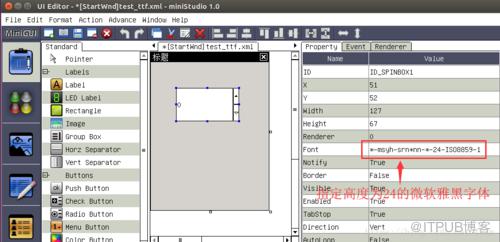
通过查看libmgncs-1.2.0的源码,找到了原因,Spinbox控件中用于显示数字的子控件是SLEdit,
以下是mSpinBox.c代码片段,createBody用于创建子控件,可以看到editor为一个SLEdit对象
static mObject* mSpinBox_createBody(mSpinBox *self)
{
    mObject *body;
    DWORD dwStyle = GetWindowStyle(self->hwnd);
    NCS_EVENT_HANDLER editor_handlers[] = {
        {MSG_CHAR, editor_onChar},
        {MSG_SETPIECE_PROPERTY, editor_onSetPieceProperty},
        {NCS_NOTIFY_CODE(NCSN_EDIT_CHANGE), editor_onChanged},
        {0, NULL}
    };    //create a editor
    mWidget * editor = ncsCreateWindow(NCSCTRL_SLEDIT, "",
        spinbox_style_to_editor_style(dwStyle),
        WS_EX_NONE,        100,        0, 0, 0, 0,
        self->hwnd,
        NULL,
        NULL, //rdr_info
        editor_handlers, //handlers,
        (DWORD)self);

    body = create_pieces(self, editor, dwStyle);    return body;
}
SLEdit本身是可以正常响应MSG_FONTCHANGED消息的,但是Spinbox作为容器控件并没有处理MSG_FONTCHANGED消息。所以SLEdit作为子控件根本收不到MSG_FONTCHANGED消息的,也就无法改变字体,只能使用默认的系统字体。
以下是mSpinBox.c的消息处理函数,可以看出,mSpinBox只处理了MSG_SETFOCUS,MSG_KILLFOCUS消息,就把控制权交给了父类(mSpinner)的消息处理函数。
static LRESULT mSpinBox_wndProc (mSpinBox* self, UINT message, WPARAM wParam, LPARAM lParam)
{    switch(message) {        case MSG_SETFOCUS:
        {            if ((GetWindowStyle(self->hwnd) & NCSS_SPNBOX_AUTOFOCUS))
                SetFocusChild (GetDlgItem(self->hwnd, 100));            break;
        }        case MSG_KILLFOCUS:
        {
            SendDlgItemMessage (self->hwnd, 100, MSG_KILLFOCUS, 0, 0);            break;
        }        default:        break;
    }    return Class(mSpinner).wndProc((mSpinner*)self, message, wParam, lParam);
}
知道原因就有了解决办法
原文出处
来自 “ ITPUB博客 ” ,链接:https://blog.itpub.net/2613/viewspace-2810884/ ,如需转载,请注明出处,否则将追究法律责任。

请登录后发表评论
登录
全部评论
