Go 语言读写 Excel
Excelize是 Golang 编写的一个用来操作 Office Excel 文档类库,基于 ECMA-376 Office OpenXML 标准。可以使用它来读取、写入 XLSX 文件。相比较其他的开源类库,Excelize 支持写入原本带有图片(表)的文档,还支持向 Excel 中插入图片,并且在保存后不会丢失图表样式。
项目主页 https://github.com/360EntSecGroup-Skylar/excelize
安装
go get github.com/360EntSecGroup-Skylar/excelize
创建 XLSX
package main
import (
"fmt"
"github.com/360EntSecGroup-Skylar/excelize"
)
func main() {
xlsx := excelize.NewFile()
// Create a new sheet.
index := xlsx.NewSheet("Sheet2")
// Set value of a cell.
xlsx.SetCellValue("Sheet2", "A2", "Hello world.")
xlsx.SetCellValue("Sheet1", "B2", 100)
// Set active sheet of the workbook.
xlsx.SetActiveSheet(index)
// Save xlsx file by the given path.
err := xlsx.SaveAs("./Book1.xlsx")
if err != nil {
fmt.Println(err)
}
}
读取已有文档
package main
import (
"fmt"
"github.com/360EntSecGroup-Skylar/excelize"
)
func main() {
xlsx, err := excelize.OpenFile("./Book1.xlsx")
if err != nil {
fmt.Println(err)
return
}
// Get value from cell by given worksheet name and axis.
cell := xlsx.GetCellValue("Sheet1", "B2")
fmt.Println(cell)
// Get all the rows in the Sheet1.
rows := xlsx.GetRows("Sheet1")
for _, row := range rows {
for _, colCell := range row {
fmt.Print(colCell, "\t")
}
fmt.Println()
}
}
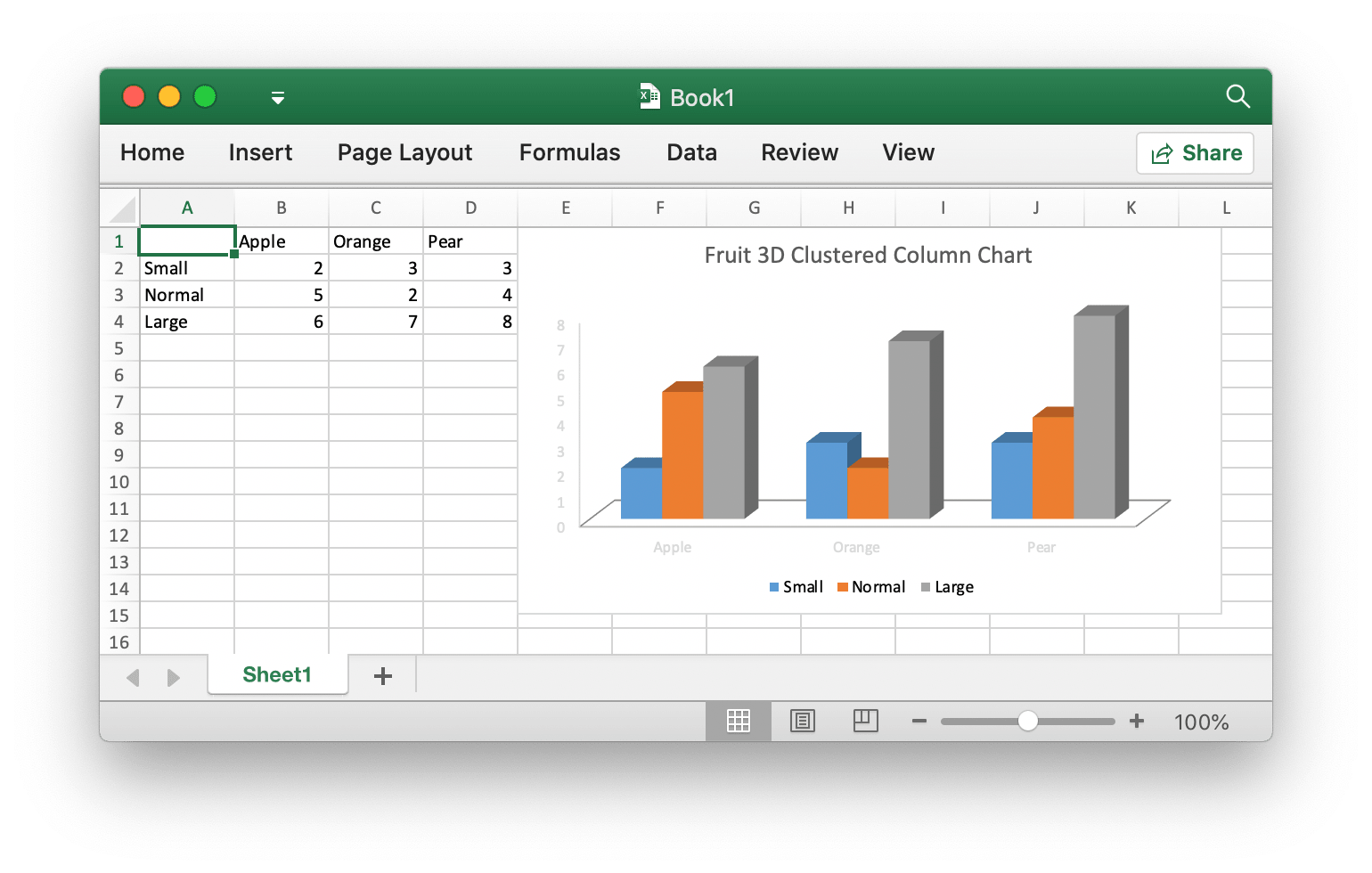
向 Excel 文档中插入图表
package main
import (
"fmt"
"github.com/360EntSecGroup-Skylar/excelize"
)
func main() {
categories := map[string]string{"A2": "Small", "A3": "Normal", "A4": "Large", "B1": "Apple", "C1": "Orange", "D1": "Pear"}
values := map[string]int{"B2": 2, "C2": 3, "D2": 3, "B3": 5, "C3": 2, "D3": 4, "B4": 6, "C4": 7, "D4": 8}
xlsx := excelize.NewFile()
for k, v := range categories {
xlsx.SetCellValue("Sheet1", k, v)
}
for k, v := range values {
xlsx.SetCellValue("Sheet1", k, v)
}
xlsx.AddChart("Sheet1", "E1", `{"type":"col3DClustered","series":[{"name":"=Sheet1!$A$2","categories":"=Sheet1!$B$1:$D$1","values":"=Sheet1!$B$2:$D$2"},{"name":"=Sheet1!$A$3","categories":"=Sheet1!$B$1:$D$1","values":"=Sheet1!$B$3:$D$3"},{"name":"=Sheet1!$A$4","categories":"=Sheet1!$B$1:$D$1","values":"=Sheet1!$B$4:$D$4"}],"title":{"name":"Fruit 3D Clustered Column Chart"}}`)
// Save xlsx file by the given path.
err := xlsx.SaveAs("./Book1.xlsx")
if err != nil {
fmt.Println(err)
}
}
向 Excel 文档中插入图片
package main
import (
"fmt"
_ "image/gif"
_ "image/jpeg"
_ "image/png"
"github.com/360EntSecGroup-Skylar/excelize"
)
func main() {
xlsx, err := excelize.OpenFile("./Book1.xlsx")
if err != nil {
fmt.Println(err)
return
}
// Insert a picture.
err = xlsx.AddPicture("Sheet1", "A2", "./image1.png", "")
if err != nil {
fmt.Println(err)
}
// Insert a picture to worksheet with scaling.
err = xlsx.AddPicture("Sheet1", "D2", "./image2.jpg", `{"x_scale": 0.5, "y_scale": 0.5}`)
if err != nil {
fmt.Println(err)
}
// Insert a picture offset in the cell with printing support.
err = xlsx.AddPicture("Sheet1", "H2", "./image3.gif", `{"x_offset": 15, "y_offset": 10, "print_obj": true, "lock_aspect_ratio": false, "locked": false}`)
if err != nil {
fmt.Println(err)
}
// Save the xlsx file with the origin path.
err = xlsx.Save()
if err != nil {
fmt.Println(err)
}
}
还有其他一些功能,在这里就不一一列举了,详细使用文档以及获取后期的维护更新可以从项目的主页获取 https://github.com/360EntSecGroup-Skylar/excelize
来自 “ ITPUB博客 ” ,链接:https://blog.itpub.net/2611/viewspace-3126088/ ,如需转载,请注明出处,否则将追究法律责任。

