memcache实现php会话保持
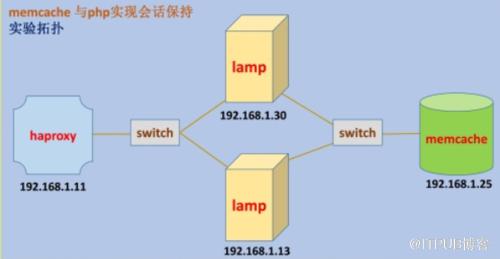
实验目标:
实现通过haproxy轮询调度(RR)反代至两台lamp时,用户会话ID保持不变。
版本:
haproxy-1.5.4-3.el6.x86_64,yum安装
memcached-1.4.15-9.el7_2.1.x86_64,yum安装
LAMP:httpd-2.4.9、mariadb-5.5.36-linux-x86_64、php-5.4.26,都是编译安装。
php的memcache扩展模块:memcache-2.2.7,编译安装
PHP安装:(其他安装略过)
编译成php-fpm
./configure --prefix=/usr/local/php-5.2.26--with-mysql=/usr/local/mysql--with-openssl--with-mysqli=/usr/local/mysql/bin/mysql_config--
enable-mbstring--with-freetype-dir--with-jpeg-dir--with-png-dir--with-zlib--with-libxml-dir=/usr--enable-xml--enable-sockets--enable-fpm
--with-mcrypt--with-config-file-path=/etc--with-config-file-scan-dir=/etc/php-5.2.26 --with-bz2
memcache 扩展模块安装
tar xf memcache-2.2.7.tgz
cd memcache-2.2.7
    /usr/local/php-5.2.26/bin/phpize
    Configuring for:
    PHP Api Version:         20100412
    Zend Module Api No:      20100525
    Zend Extension Api No:   220100525
Installing shared extensions:
/usr/local/php-5.2.26/lib/php/extensions/no-debug-non-zts-20100525/memcache.so
上述安装完后会有类似以下的提示:
extension=/usr/local/php/lib/php/extensions/no-debug-non-zts-20090626/memcache.so
编辑/etc/php.ini,在“Dynamic Extensions”相关的位置添加如下一行来载入memcache扩展:
| 1 |
extension=/usr/local/php/lib/php/extensions/no-debug-non-zts-20090626/memcache.so
|
httpd虚拟机配置:(只展示其中一台的配置)
cat /etc/httpd-2.4.9/extra/httpd-vhosts.conf:DocumentRoot "/www/test1.com" ErrorLog "logs/dummy-test1.com-error_log" CustomLog "logs/dummy-test1.com-access_log" common require all granted ProxyRequests Off ProxyPassMatch ^/(.*.php)$ fcgi://192.168.1.30:9000/www/test1.com/$1
httpd启用PHP及启动导入虚拟机配置:
启动以下两个模块:
LoadModule proxy_module modules/mod_proxy.so
LoadModule proxy_fcgi_module modules/mod_proxy_fcgi.so
修改:
DirectoryIndex index.php index.html
添加:
Include /etc/httpd-2.4.9/extra/httpd-vhosts.conf
AddType application/x-httpd-php-source .phps
AddType application/x-httpd-php .php
测试php与memcache的连接是否成功:
cat /www/test1/01.php:
connect("192.168.1.25", 11211)  or die("Could not connect");

    $version = $mem->getVersion();
    echo "Server's version: ".$version."
n";

    $mem->set('hellokey', 'Hello World', 0, 600) or die("Failed to save data at the memcached server");
    echo "Store data in the cache (data will expire in 600 seconds)
n";

    $get_result = $mem->get('hellokey');
    cho "$get_result is from memcached server.";
?>
访问此01.php,出现“Hello World is from memcached server”时,说明表memcache与php连接成功。
修改/etc/php.ini,把会话保存到memcache中。
session.save_handler = memcache
session.save_path="tcp://192.168.1.25:11211"
haproxy配置:
frontend  main *:80
    default_backend             app

backend app
    balance    roundrobin
    server app1 192.168.1.13:80 check
    server app2 192.168.1.30:80 check
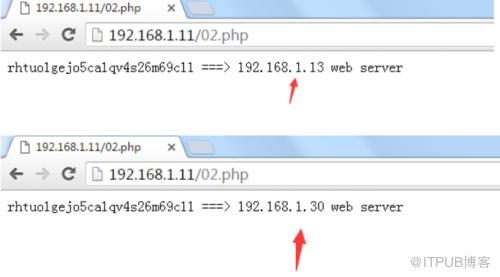
测试会话保存是否成功:
192.168.1.13(lamp)的测试脚本:/www/test1.com/02.php
 192.168.1.13 web server";
?>
192.168.1.30(lamp)的测试脚本:/www/test1.com/02.php
 192.168.1.30 web server"
?>
区别在于最后一行print 显示lamp本身的IP地址。
浏览器访问02.php
来自 “ ITPUB博客 ” ,链接:https://blog.itpub.net/2611/viewspace-2801782/ ,如需转载,请注明出处,否则将追究法律责任。

