Centos 7.4系统升级OpenSSH 8.4p1服务
OpenSSH是Linux系统远程登陆服务,默认端口是22,在升级服务时请先做好故障预估,在本服务器安装Telnet服务,并连接到服务器再升级,避免升级过程中出现故障导致服务器不能连接。
1.查看ssh服务当前版本,安装Telnet服务(避免SSH服务远程登陆不上)
[root@nginx02 ~]# ssh -V
OpenSSH_7.4p1, OpenSSL 1.0.2k-fips 26 Jan 2017
[root@nginx02 data]# yum install xinetd telnet-server -y
[root@nginx02 data]# vim /etc/xinetd.d/telnet
{
disable = yes
flags = REUSE
socket_type = stream
wait = no
user = root
server = /usr/sbin/in.telnetd
log_on_failure += USERID
}
[root@nginx02 data]# vim /etc/securetty
pts/0
pts/1
pts/2
pts/3
[root@nginx02 data]# systemctl enable xinetd
[root@nginx02 data]# systemctl enable telnet.socket
Created symlink from /etc/systemd/system/sockets.target.wants/telnet.socket to /usr/lib/systemd/system/telnet.sock
[root@nginx02 data]# systemctl start telnet.socket
[root@nginx02 data]# systemctl start xinetd
[root@nginx02 data]# netstat -lntp|grep 23
tcp 0 0 0.0.0.0:23 0.0.0.0:* LISTEN 1/systemd
[root@nginx02 data]#
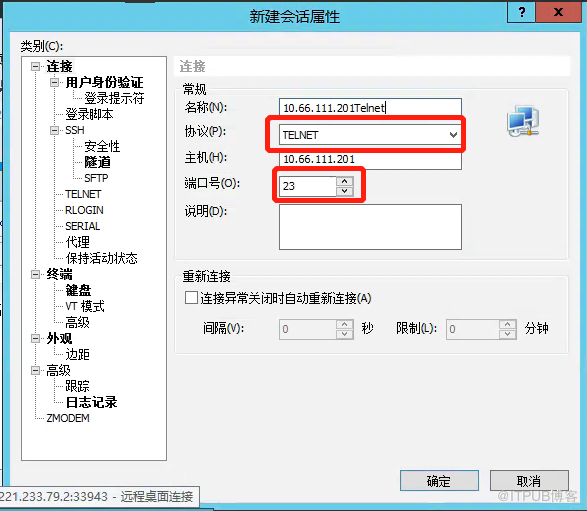
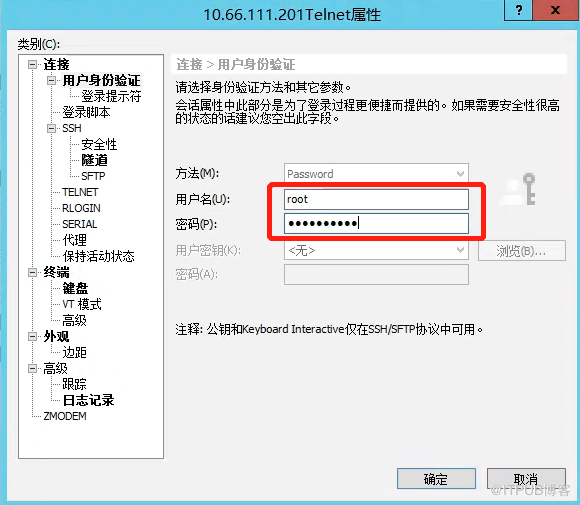
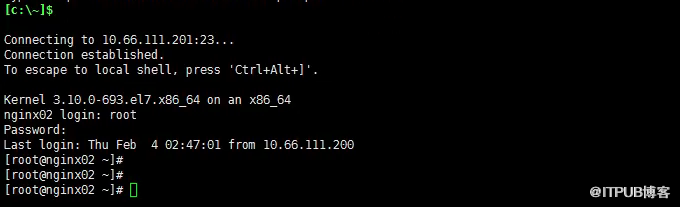
2.使用Xshell登陆服务器(23端口)
3.下载及安装OpenSSH 8.4服务
[root@nginx02 ~]# wget https://ftp.fsn.hu/pub/OpenBSD/OpenSSH/portable/openssh-8.4p1.tar.gz
[root@nginx02 ~]# tar xvf openssh-8.4p1.tar.gz
[root@nginx02 ~]# cd openssh-8.4p1
[root@nginx02 openssh-8.4p1]# ./configure --prefix=/usr/local/openssh --sysconfdir=/etc/ssh --with-ssl-dir=/usr/local/ssl --with-zlib=/usr/local/zlib
[root@nginx02 openssh-8.4p1]# chmod 600 /etc/ssh/ssh_host_*
[root@nginx02 openssh-8.4p1]# make -j 4 && make install
[root@nginx02 openssh-8.4p1]# mv /usr/sbin/sshd /usr/sbin/sshd.bak
[root@nginx02 openssh-8.4p1]# cp -rf /usr/local/openssh/sbin/sshd /usr/sbin/sshd
[root@nginx02 openssh-8.4p1]# mv /usr/bin/ssh /usr/bin/ssh.bak
[root@nginx02 openssh-8.4p1]# cp -rf /usr/local/openssh/bin/ssh /usr/bin/ssh
[root@nginx02 openssh-8.4p1]# mv /usr/bin/ssh-keygen /usr/bin/ssh-keygen.bak
[root@nginx02 openssh-8.4p1]# cp -rf /usr/local/openssh/bin/ssh-keygen /usr/bin/ssh-keygen
[root@nginx02 openssh-8.4p1]#
4.删除ssh老服务,使用新服务启动
[root@nginx02 openssh-8.4p1]# systemctl stop sshd.service
[root@nginx02 openssh-8.4p1]# rm -rf /lib/systemd/system/sshd.service
[root@nginx02 openssh-8.4p1]# systemctl daemon-reload
[root@nginx02 openssh-8.4p1]# cp -a contrib/redhat/sshd.init /etc/init.d/sshd
[root@nginx02 openssh-8.4p1]# /etc/init.d/sshd restart
Reloading systemd: [ OK ]
Restarting sshd (via systemctl): [ OK ]
[root@nginx02 openssh-8.4p1]# ssh -V
OpenSSH_8.4p1, OpenSSL 1.0.2k-fips 26 Jan 2017 --升级成功
[root@nginx02 openssh-8.4p1]#
5.如果xshell登陆出现警告(是因为新的openssh服务与xshell不兼容问题)
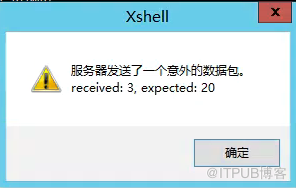
解决方法:
[root@nginx02 openssh-8.4p1]# vim /etc/ssh/sshd_config
KexAlgorithms curve25519-sha256@libssh.org,ecdh-sha2-nistp256,ecdh-sha2-nistp384,ecdh-sha2-nistp521,diffie-hellman-group14-sha1
[root@nginx02 openssh-8.4p1]# /etc/init.d/sshd restart
Restarting sshd (via systemctl): [ OK ]
[root@nginx02 openssh-8.4p1]#
来自 “ ITPUB博客 ” ,链接:https://blog.itpub.net/25854343/viewspace-2756138/ ,如需转载,请注明出处,否则将追究法律责任。

