Zabbix通过Orabbix监控Oracle
Orabbix简介
Orabbix 是设计用来为 zabbix 监控 Oracle 的数据库的插件,它提供多层次的监控,包括可用性和服务器性能的指标。
它提供了从众多Oracle实例采集的有效机制,进而提供此信息的监控和性能指标。然后,您可以利用的zabbix的报告功能为收集的所有数据,并提供分析。目前的发行版中包含了一组预先定义的模板,包括从初始部署报警和图形功能。然而,这些可以进行微调,以满足您额需求和数据/监控要求。
Orabbix监控的内容
1、数据库版本
2、归档日志与生产趋势
3、触发器,表/过程命中率
4、逻辑IO性能
5、物理IO性能
6、PGA
7、SGA
8、共享池
9、Session
10、数据库大小
Orabbix 是一个用来监控 Oracle 数据库实例的 Zabbix 插件。(插件安装在zabbix-server端)
下载地址: http://www.smartmarmot.com/product/orabbix/download/
zabbix-server上操作
Orabbix是通过JDBC去连接oracle数据库,然后过滤想要的数据,所以需要jdk环境
我测试过jdk1.7和1.8都可以,直接yum安装,或者下载rpm包,rpm -ivh安装,都可以
这里,我是直接rpm安装的,
[root@zabbix ~]# rpm -ivh jdk-8u102-linux-x64.rpm
Preparing... ########################################### [100%]
1:jdk1.8.0_102 ########################################### [100%]
在/opt目录下新建一个orabbix目录:
[root@oracle orabbix]#mkdir -p /opt/orabbix
(建议在此目录下,如果放置其他目录稍后需要更改orabbix的启动文件orabbix,启动文件默认写在opt/orabbix目录下 )
[root@zabbix opt]# cd orabbix/
上传orabbix-1.2.3.zip
[root@zabbix orabbix]# ls
orabbix-1.2.3.zip
解压
[root@zabbix orabbix]# unzip -q orabbix-1.2.3.zip
[root@zabbix orabbix]# ls
conf init.d lib orabbix-1.2.3.zip orabbixw.exe run.sh uninstall.cmd
doc install.cmd orabbix-1.2.3.jar orabbix.exe run.bat template
授权
[root@zabbix orabbix]# cd ..
[root@zabbix opt]# chmod -R a+x orabbix/
[root@zabbix ~]# cd /opt/orabbix/conf/
[root@zabbix conf]# ls
config.props log4j.properties query_a_1.props query_b.props query.props
config.props.sample log4j.properties.sample query_a.props query - Copy.props query.props.sample
[root@zabbix conf]# cp config.props.sample config.props
编辑配置文件:
[root@zabbix conf]# vim config.props
源配置文件
[root@zabbix conf]# egrep "^[a-Z,1-9]" config.props.sample
ZabbixServerList=ZabbixServer1,ZabbixServer2
ZabbixServer1.Address=IP_ADDRESS_OF_ZABBIX_SERVER
ZabbixServer1.Port=PORT_OF_ZABBIX_SERVER
ZabbixServer2.Address=IP_ADDRESS_OF_ZABBIX_SERVER
ZabbixServer2.Port=PORT_OF_ZABBIX_SERVER
OrabbixDaemon.PidFile=./logs/orabbix.pid
OrabbixDaemon.Sleep=300
OrabbixDaemon.MaxThreadNumber=100
DatabaseList=DB1,DB2,DB3
DatabaseList.MaxActive=10
DatabaseList.MaxWait=100
DatabaseList.MaxIdle=1
DB1.Url=jdbc:oracle:thin:@server.domain.example.com:<LISTENER_PORT>:DB1
DB1.User=zabbix
DB1.Password=zabbix_password
DB1.MaxActive=10
DB1.MaxWait=100
DB1.MaxIdle=1
DB1.QueryListFile=./conf/query.props
DB2.Url=jdbc:oracle:thin:@server2.domain.example.com:<LISTENER_PORT>:DB2
DB2.User=zabbix
DB2.Password=zabbix_password
DB2.QueryListFile=./conf/query.props
DB3.Url=jdbc:oracle:thin:@server3.domain.example.com:<LISTENER_PORT>:DB3
DB3.User=zabbix
DB3.Password=zabbix_password
DB3.QueryListFile=./conf/query.props
修改之后
[root@zabbix conf]# egrep "^[a-Z,1-9]" config.props
ZabbixServerList=ZabbixServer1 #(zabbixserver的名字,下行中address和port都引用到了这个名字,所以下面两行的前缀名字要与这里的名字保持一致)
ZabbixServer1.Address=127.0.0.1 #我这里就是在zabbix server上面操作的,所以这里是127.0.0.1
ZabbixServer1.Port=10051 #zabbix server的服务端口
OrabbixDaemon.PidFile=./logs/orabbix.pid
OrabbixDaemon.Sleep=300
OrabbixDaemon.MaxThreadNumber=100
DatabaseList=172.20.10.183-oracle,192.168.56.99-oracle #这里很重要,跟下面的对应上
DatabaseList.MaxActive=10
DatabaseList.MaxWait=100
DatabaseList.MaxIdle=1
172.20.10.183-oracle.Url=jdbc:oracle:thin:@172.20.10.183:1521:orcl #172.20.10.183 oracle数据库的地址,1521端口,orcl数据库实例名
172.20.10.183-oracle.User=zabbix #授权的账号
172.20.10.183-oracle.Password=zabbix #授权的密码
172.20.10.183-oracle.MaxActive=10
172.20.10.183-oracle.MaxWait=100
172.20.10.183-oracle.MaxIdle=1
172.20.10.183-oracle.QueryListFile=./conf/query.props #要查询的语句都在这定义的,不满意自己改
oracle主机上操作(这步可以省略,只要知道数据库实例,账号,密码)
下面是oracle 11g的(12c 语法不一样)授权语句如下,创用户,授权,这些操作,我都是在oracle数据库的sqlplus下执行的
登录数据库并授予用户相关权限即可。
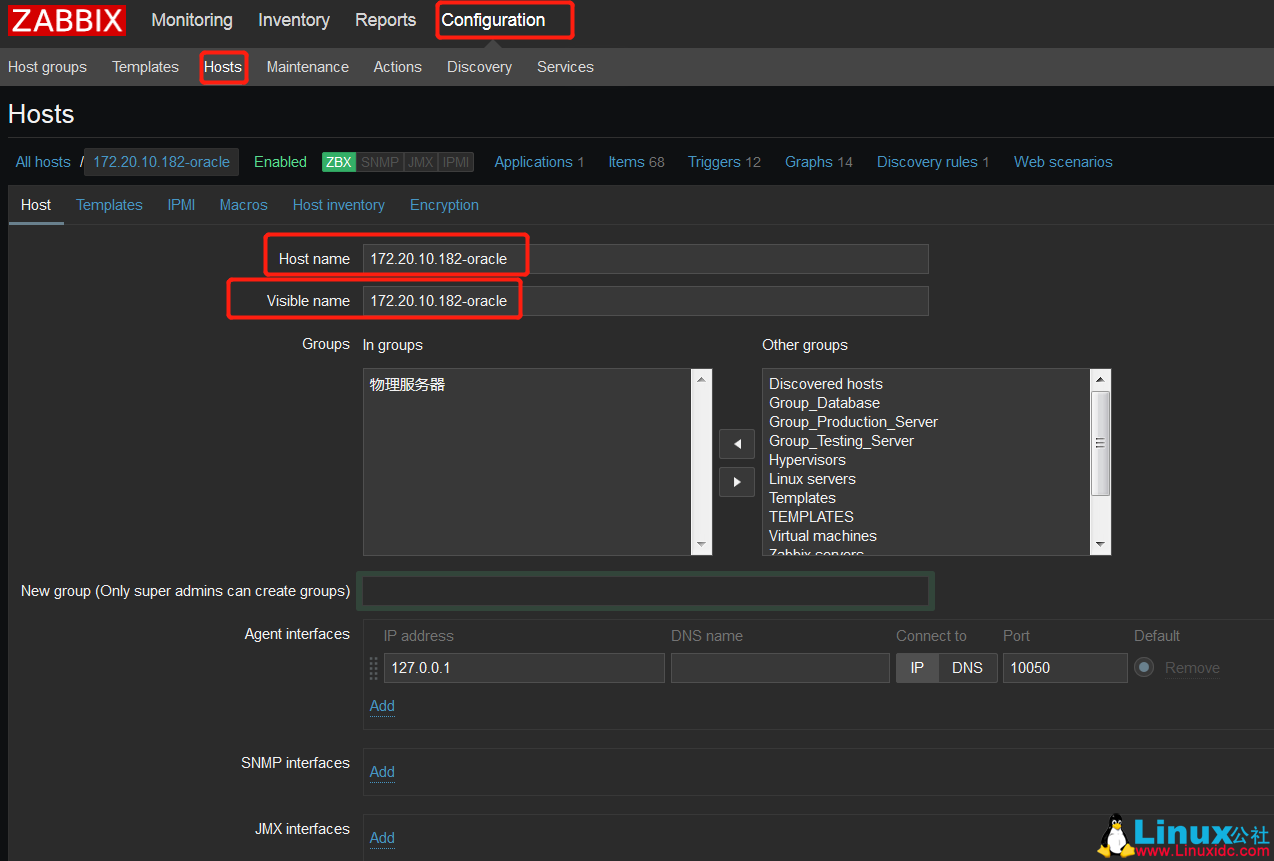
DatabaseList中放的是被监控的数据库主机名,该名称要和zabbix server界面中的机器名称保持一致
你会发现有一些监控项dbfilesize,dbsize没有值,这是因为/opt/orabbix/conf/query.props文件没有把这两个加入进查询的List下面,可以从query.props.sample把这两项复制进去
在QueryList最后面加上dbfilesize,dbsize
然后在文件末尾加入:
|
1
2
3
4
5
6
7
8
|
dbfilesize.Query=
select
to_char(
sum
(bytes
/1024/1024/10
),
'FM99999999999999990'
) retvalue from dba_data_files
dbsize.Query=SELECT to_char(
sum
( NVL(a.bytes
/1024/1024/10
- NVL(f.bytes
/1024/1024/10
, 0), 0)),
'FM99999999999999990'
) retvalue \
FROM sys.dba_tablespaces d, \
(
select
tablespace_name,
sum
(bytes) bytes from dba_data_files group by tablespace_name) a, \
(
select
tablespace_name,
sum
(bytes) bytes from dba_free_space group by tablespace_name) f \
WHERE d.tablespace_name = a.tablespace_name(+) AND d.tablespace_name = f.tablespace_name(+) \
AND NOT (d.extent_management like
'LOCAL'
AND d.contents like
'TEMPORARY'
)
|
在oracle数据库上创建zabbix用户,并授权
|
1
2
3
4
5
6
7
8
9
10
11
12
13
14
15
16
|
CREATE
USER
zabbix
IDENTIFIED
BY
zabbix
DEFAULT
TABLESPACE SYSTEM
TEMPORARY
TABLESPACE
TEMP
PROFILE
DEFAULT
ACCOUNT UNLOCK;
– 2 Roles
for
ZABBIX
GRANT
CONNECT
TO
ZABBIX;
GRANT
RESOURCE
TO
ZABBIX;
ALTER
USER
ZABBIX
DEFAULT
ROLE
ALL
;
– 5 System
Privileges
for
ZABBIX
GRANT
SELECT
ANY
TABLE
TO
ZABBIX;
GRANT
CREATE
SESSION
TO
ZABBIX;
GRANT
SELECT
ANY
DICTIONARY
TO
ZABBIX;
GRANT
UNLIMITED TABLESPACE
TO
ZABBIX;
GRANT
SELECT
ANY
DICTIONARY
TO
ZABBIX;
|
如果需要严格的权限控制,可以执行如下脚本
|
1
2
3
4
5
6
7
8
9
10
11
12
13
14
15
16
17
18
19
20
21
22
23
24
25
26
27
28
29
|
CREATE
USER
zabbix
IDENTIFIED
BY
zabbix
DEFAULT
TABLESPACE USERS
TEMPORARY
TABLESPACE
TEMP
PROFILE
DEFAULT
ACCOUNT UNLOCK;
|
启动orabbix
[root@zabbix orabbix]# cp init.d/orabbix /etc/init.d/
[root@zabbix orabbix]# ll /etc/init.d/orabbix
-rwxr-xr-x 1 root root 1693 Sep 14 21:40 /etc/init.d/orabbix
[root@zabbix orabbix]# /etc/init.d/orabbix start
linux7 启动orabbix
Starting Orabbix service:
报错的话,检查配置文件,数据库地址,端口,实例名,账号,密码是否正确,需要验证对于不懂oracle的怎么办,搜命令呗,我也是一路过来,各种坑~~~~~
然后里面看日志
[root@zabbix orabbix]# tailf /opt/orabbix/logs/orabbix.log
[main] INFO Orabbix - --------- on Database -> orcl
[pool-1-thread-1] WARN Orabbix - Error while executing ->dbversion- on database ->172.20.10.183-oracle- Exception received ORA-24247: network access denied by access control list (ACL)
ORA-06512: at "SYS.UTL_INADDR", line 4
ORA-06512: at "SYS.UTL_INADDR", line 35
ORA-06512: at line 1
出现这些日志,不影响后面的操作
如果是oracle11g用户还需要开放ACL访问控制
|
1
2
3
|
exec
dbms_network_acl_admin.create_acl(acl =>
'resolve.xml'
,description =>
'resolve acl'
, principal =>
'ZABBIX'
, is_grant =>
true
, privilege =>
'resolve'
);
exec
dbms_network_acl_admin.assign_acl(acl =>
'resolve.xml'
, host =>
'*'
);
commit
;
|
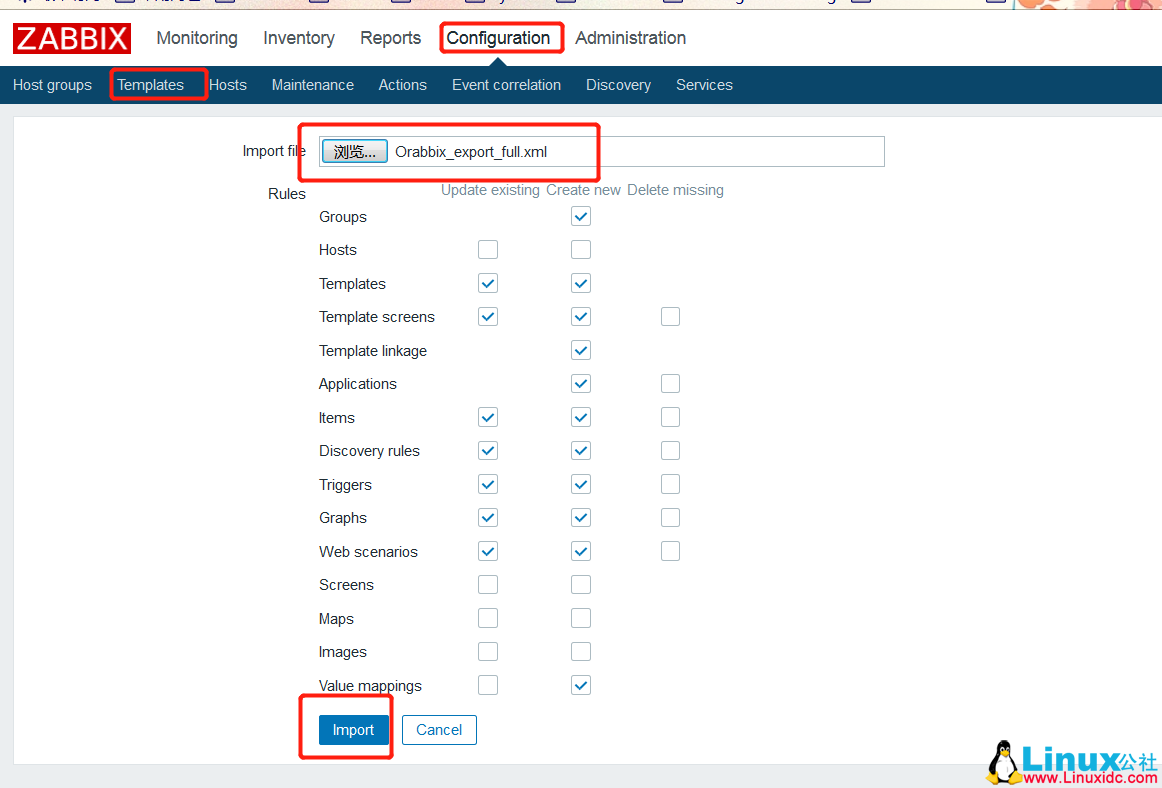
到此,安装配置完成,则通过web页面访问监控界面直接导入模板即可
模版放置在/opt/orabbix/template下
Orabbix_export_full.xml #只需要导入这个一个模板就好
添加主机
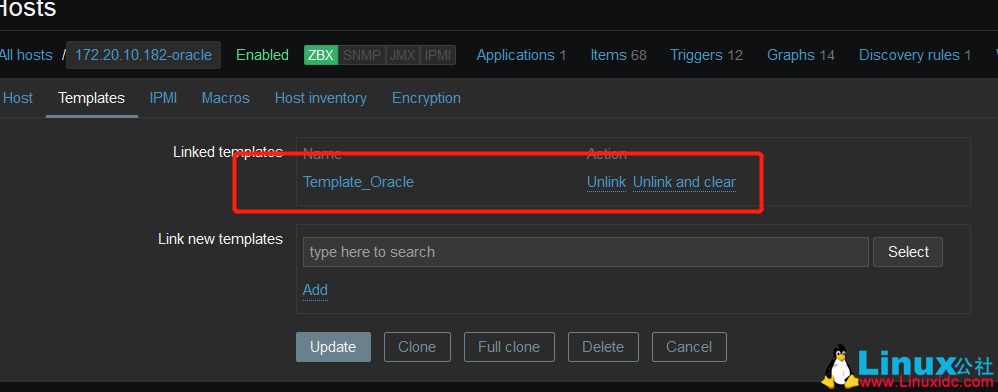
然后链接oracle的模板
添加完成之后的效果

查看最新数据
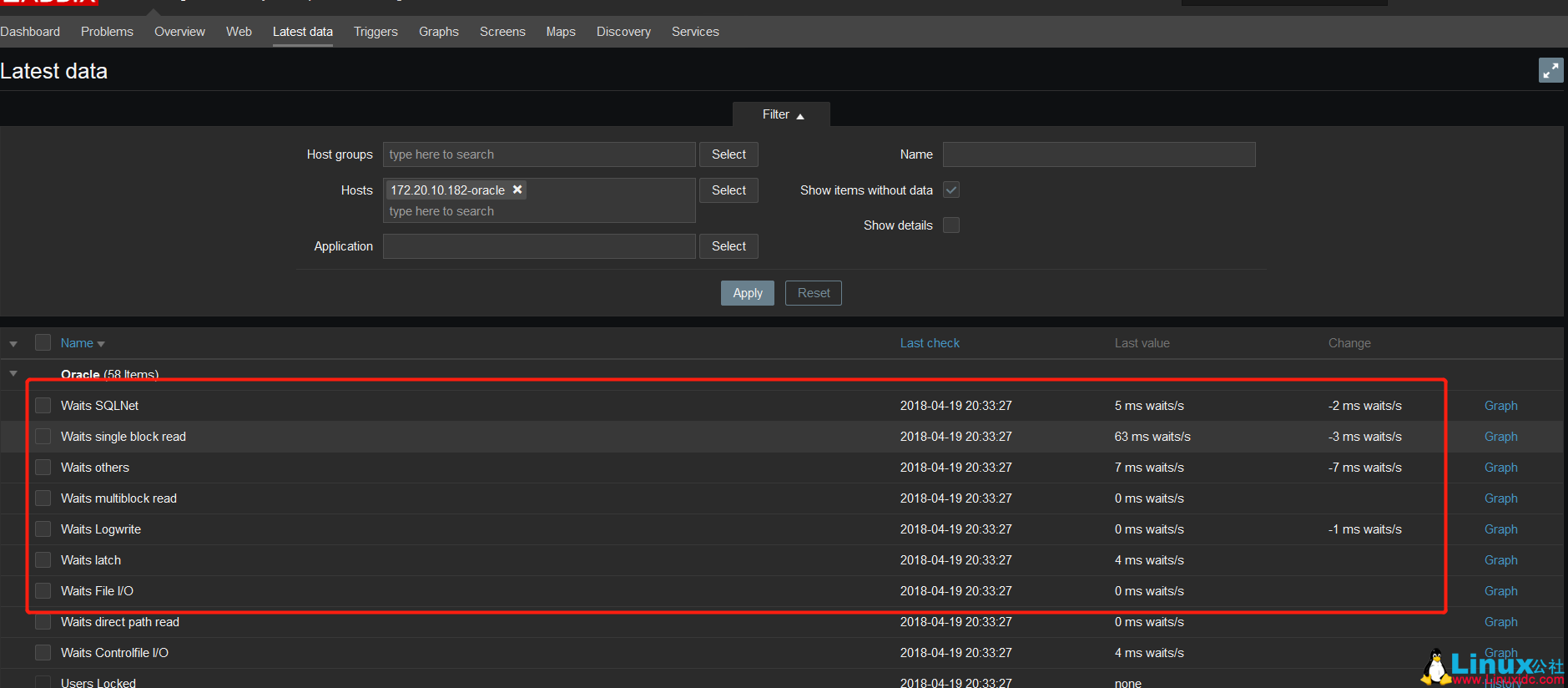
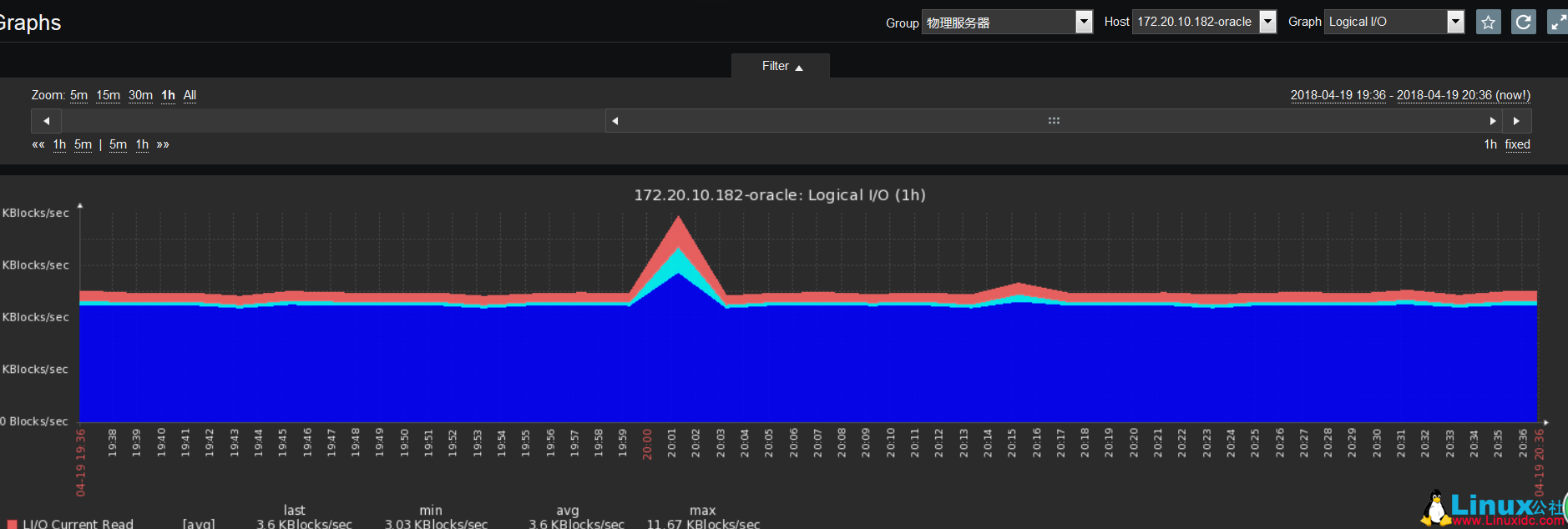
这时候图也有了
常见错误
[root@zabbix orabbix]# tailf /opt/orabbix/logs/orabbix.log
[main] ERROR Orabbix - Error on Configurator for database 172.20.10.183 oracle -->ORA-01017: invalid username/password; logon denied
config.props配置文件中,数据库账号密码不对,或者在oracle数据库没授权这个用户
来自 “ ITPUB博客 ” ,链接:https://blog.itpub.net/25469263/viewspace-2638043/ ,如需转载,请注明出处,否则将追究法律责任。

