SpringCloud之服务注册
类似于DUBBO 的zookeeper, SpringCloud本身提供一套服务注册中心--eureka
与zookeeper的区别在于
1:zookeeper本身就是一个应用,安装即可用;eureka其实是一个jar,需要新建一个maven项目,以及手动配置端口和pom文件。发布后即可使用
2:zookeeper本身不提供web端展示,需要重新安装配置dubbo客户端或者dubbokeeper实时监控服务;eureka发布成功后,即可有对应的spring 服务监控页面。
搭建SpringCloud的服务注册中心-eureka
1.新建maven项目eureka-server,eureka-server是作为一个子项目,目录结构如下
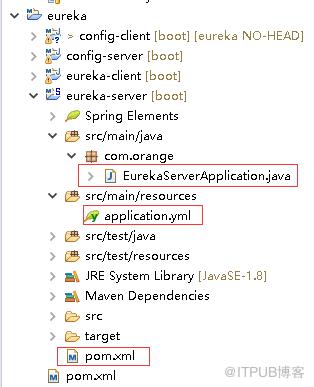
eureka-server还是比较简单的,主要需要修改这三个文件:EurekaServerApplication,application.yml,pom.xml
1.pom.xml

UTF-8 UTF-8 1.8 <!--eureka server --> org.springframework.cloud spring-cloud-starter-eureka <!-- spring boot test--> org.springframework.cloud spring-cloud-starter-eureka-server org.springframework.boot spring-boot-starter-test test org.springframework.cloud spring-cloud-dependencies Dalston.RC1 pom import

spring-cloud-starter-eureka-server:erueka注册中心核心依赖包
当然,作为一个springboot项目,需要依赖于:
         org.springframework.boot
         spring-boot-starter-parent
         1.5.3.RELEASE
          <!-- lookup parent from repository -->
所有的子项目都是springcoot项目,所以该依赖放在了父项目的pom中
2.application.yml
springboot启动时,会自动扫描该配置文件,当然,application.properties也是可以的

 server:
    port: 8761

 eureka:
    instance:
        hostname: localhost
    client:
        registerWithEureka: false
        fetchRegistry: false
        serviceUrl:
            defaultZone: http://${eureka.instance.hostname}:${server.port}/eureka/

其中:server.port:定义端口号
eureka.instance.hostname:定义eureka为本地ip,发布测试或者线上环境视情况配置
eureka.client.registerWithEureka:是否注册本身,这里不需要。所以为false
eureka.client.fetchRegister:是否从服务器获取注册信息,这里也不需要
eureka.client.serviceUrl.defaultZone:定义服务注册地址,后续的提供或者消费都需要通过该地址进行注册
3.EurekaServerApplication.java
springboot启动文件

@EnableEurekaServer
@SpringBootApplicationpublic class EurekaServerApplication {    public static void main(String[] args) {
        SpringApplication.run(EurekaServerApplication.class, args);
    }
}

@EnableEurekaServer:表明他是服务注册中心
@SpringBootApplication:表明他是springboot项目
最后:启动该项目,就可以了
浏览器打开:http://localhost:8761/
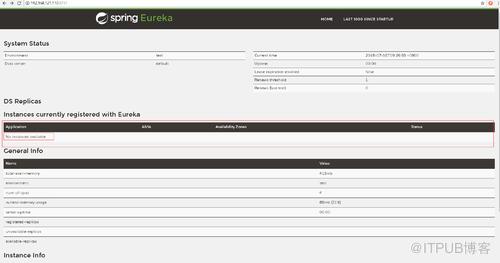
从中可以看出,eureka服务注册中心已经启动成功。只是目前的application中没有任何内容,当然,我们只是搞定了这个注册中心,还没有任何的服务呢
下面,我们来尝试写一个服务,同时注册到该注册中心
注册服务eureka-client
首先,还是来看下这个项目eureka-client的结构
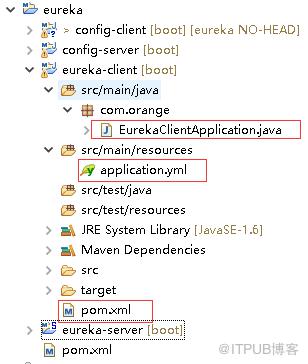
还是修改这三个文件:EurekaClientApplication,application.yml,pom.xml(所有的springboot项目,这三个文件也是最基本的,缺一不可)
1.pom.xml

             org.springframework.cloud
             spring-cloud-starter-eureka


             org.springframework.boot
             spring-boot-starter-web


             org.springframework.boot
             spring-boot-starter-test
             test


                 org.springframework.cloud
                 spring-cloud-dependencies
                 Dalston.RC1
                 pom
                 import

2.application.yml

eureka:
    client:
         serviceUrl:
             defaultZone: http://localhost:8761/eureka/server:
     port: 8762spring:
     application:
         name: eureka-client

eureka.client.serviceUrl.defaultZone:与eureka-server中的配置文件配置一样就行了
server.port:定义端口号
spring.application.name:定义项目名,方便在注册中心查看
3.EurekaClientApplication.java

@SpringBootApplication
@EnableEurekaClient
@RestControllerpublic class EurekaClientApplication {    public static void main(String[] args) {
        SpringApplication.run(EurekaClientApplication.class, args);
    }

    @Value("${server.port}")
    String port;

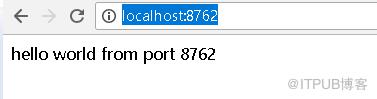
    @RequestMapping("/")    public String home() {        return "hello world from port " + port;
    }
}

@EnableEurekaClient:同意注册到注册中心
再启动eureka-client 后,会发现如图:
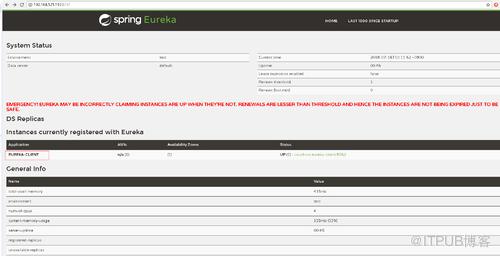
eureka-client已经注册成功
直接输入:http://localhost:8762/
至此,基础的服务注册中心搭建成功,有问题希望大家多提意见,谢谢!
原文出处
来自 “ ITPUB博客 ” ,链接:https://blog.itpub.net/2471/viewspace-2804601/ ,如需转载,请注明出处,否则将追究法律责任。

