前天有一网友问及有关设计模式的适配器模式(Adapter)时,说不太好理解。让Insus.NET能否举个简单的例子来说明一下。下面的动画是Insus.NET做出来的效果: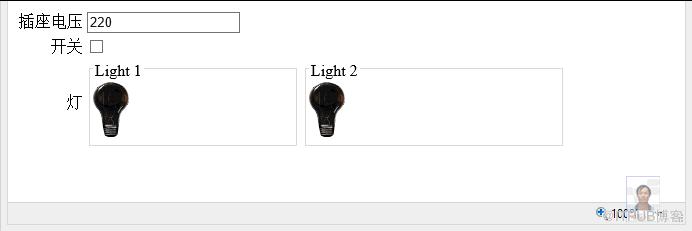
上面的演示,两个灯的规格一样,要求输入的电压为15伏。
Light1是直接使用,而Light2是使用Adapter(电源适配器)。因此Light1只能接收15伏的电压,小于15伏,会提示电压过低,如果超过了15伏,Light1肯定被烧坏。
Light2使用了电源适配器,它接收15伏至220的电压,在这电压范围之内,电源适配器会把电压转为15的电压。小于15伏,会提示电压过低,如果超过了220伏,适配器被烧坏。
好,我们程序开始,先创建一个灯Light的类:

 Light.cs
using System;using System.Collections.Generic;using System.Linq;using System.Web;////// Summary description for Light/// namespace Insus.NET{ public class Light { private int _InputVoltage = 15; public int InputVoltage { get { return _InputVoltage; } set { if (value 15) throw new Exception("危险!电压过大灯烧坏。"); else value = 15; _InputVoltage = value; } } public Light() { // // TODO: Add constructor logic here // } }}
再创建一个灯的电源适配器:
PowerAdapter.cs
using System;using System.Collections.Generic;using System.Linq;using System.Web;////// Summary description for PowerAdapter/// namespace Insus.NET{ public class PowerAdapter : Light { Light _Light; public PowerAdapter(Light light) { this._Light = light; } public int InputVoltage { get { return _Light.InputVoltage; } set { if (value 220) throw new Exception("危险!电压过大电源适配器烧坏。"); else value = 15; _Light.InputVoltage = value; } } }}
如何测试它们,我们得模拟一个环境,创建一个网页Default.aspx:
Default.aspx
html>
接下来,看看开关的事开与关的事件,有详细的注解:
Default.aspx.cs
using System;using System.Collections.Generic;using System.Linq;using System.Web;using System.Web.UI;using System.Web.UI.WebControls;using Insus.NET;public partial class _Default : System.Web.UI.Page{ string offLight = "~/Images/Light_C.gif"; string onLight = "~/Images/Light_O.gif"; protected void Page_Load(object sender, EventArgs e) { } protected void CheckBoxSwitch_CheckedChanged(object sender, EventArgs e) { var cb = (CheckBox)sender; //插座缺少电压为220伏 int input = Convert.ToInt32(string.IsNullOrEmpty(this.TextBox1.Text.Trim()) ? "220" : this.TextBox1.Text.Trim()); //开关打开 if (cb.Checked) { try { //实例一个电灯 Light light = new Light(); //插入插座,使用插座电压 light.InputVoltage = input; //电灯被打开 this.Image1.ImageUrl = onLight; //显示正常输出电压 this.Label1.Text = light.InputVoltage.ToString(); } catch (Exception ex) { //如果电压不正常,电灯打不开或是被烧坏。 this.Image1.ImageUrl = offLight; //显示异常信息。 this.Label1.Text = ex.Message; } try { Light light = new Light(); //使用电源适配器 PowerAdapter pa = new PowerAdapter(light); pa.InputVoltage = input; this.Image2.ImageUrl = onLight; this.Label2.Text = pa.InputVoltage.ToString(); } catch (Exception ex) { this.Image2.ImageUrl = offLight; this.Label2.Text = ex.Message; } this.TextBox1.Enabled = false; } //开关关闭 else { this.TextBox1.Text = string.Empty; this.TextBox1.Enabled = true; this.Image1.ImageUrl = offLight; this.Image2.ImageUrl = offLight; } }}
11:44分,补充下面内容,有网友问及演示完整代码(.NET Framework 4.0)
http://download.cnblogs.com/insus/ASPDOTNET/AdapterDemo.rar
来自 “ ITPUB博客 ” ,链接:https://blog.itpub.net/2349/viewspace-2812592/ ,如需转载,请注明出处,否则将追究法律责任。

