Hive 使用mysql 作为Metastore
Hive 使用mysql 作为Metastore
Hive 0.12.0,mysql 5.1.26
=====================================================
设置mysql
0. mysql -u root -p
1.mysql> CREATE USER 'hive'@'localhost' IDENTIFIED BY 'mysql';
2.mysql> GRANT ALL PRIVILEGES ON *.* TO 'hive'@'localhost' WITH GRANT OPTION;
3.mysql>flush privileges;
---
$mysql -u hive-p
1.Create a database with name metastore which will store the hive metastore
mysql>create database metastore;
2. Create the schema
mysql>SOURCE /home/hm/hive/scripts/metastore/upgrade/mysql/hive-schema-0.12.0.mysql.sql
================================
设置hive:
1. 下载 mysql 驱动,mysql-connector-java-5.1.26-bin,放在hive/lib
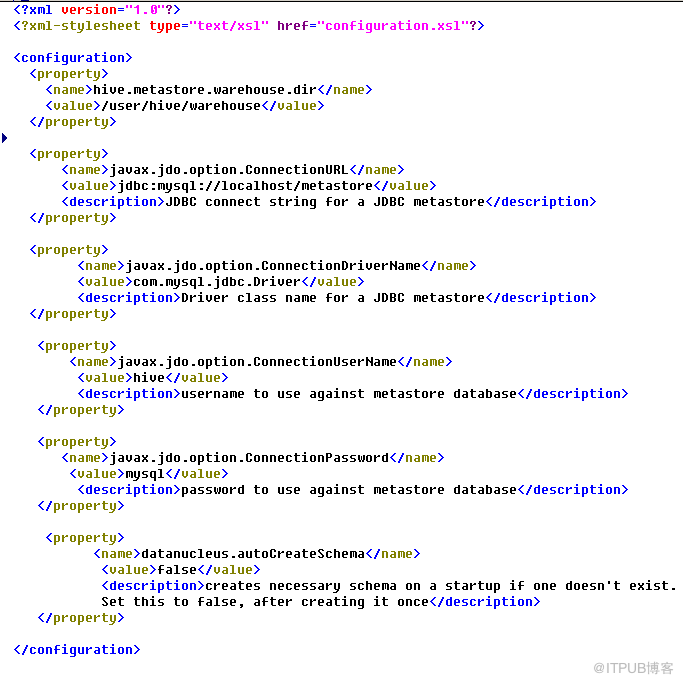
2,创建 hive/conf/hive-site.xml
//说明 hive.metastore.warehouse.dir, hive在hdfs中自动创建。
--------------------------------------
hive.metastore.warehouse.dir
/user/hive/warehouse
javax.jdo.option.ConnectionURL
jdbc:mysql://localhost/metastore
JDBC connect string for a JDBC metastore
javax.jdo.option.ConnectionDriverName
com.mysql.jdbc.Driver
Driver class name for a JDBC metastore
javax.jdo.option.ConnectionUserName
hive
username to use against metastore database
javax.jdo.option.ConnectionPassword
mysql
password to use against metastore database
datanucleus.autoCreateSchema
false
creates necessary schema on a startup if one doesn't exist. Set
this to false, after creating it once
-----------------------
=================
启动和测试hive (前提hadoop,mysql 已经运行正常)
$bin/hive
hive> create table sample(x string);
$mysql -u hive -p

--
hive> create database finance;
OK
Time taken: 0.101 seconds
hive> use finance;
OK
Time taken: 0.033 seconds
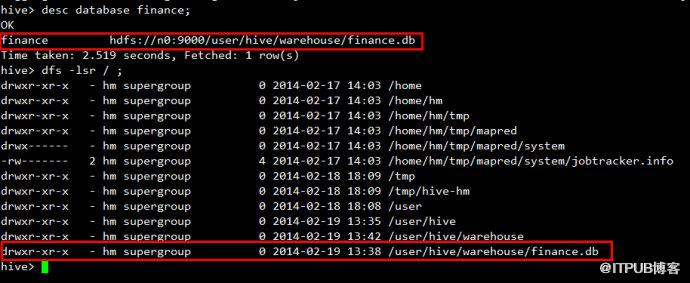
hive> desc database finance;
OK
finance
hdfs://n0:9000/user/hive/warehouse/finance.db
Time taken: 0.027 seconds, Fetched: 1 row(s)
--
all right~~
<!-- 正文结束 -->
Hive 0.12.0,mysql 5.1.26
=====================================================
设置mysql
0. mysql -u root -p
1.mysql> CREATE USER 'hive'@'localhost' IDENTIFIED BY 'mysql';
2.mysql> GRANT ALL PRIVILEGES ON *.* TO 'hive'@'localhost' WITH GRANT OPTION;
3.mysql>flush privileges;
---
$mysql -u hive-p
1.Create a database with name metastore which will store the hive metastore
mysql>create database metastore;
2.
mysql>SOURCE /home/hm/hive/scripts/metastore/upgrade/mysql/hive-schema-0.12.0.mysql.sql
================================
设置hive:
1. 下载 mysql 驱动,mysql-connector-java-5.1.26-bin,放在hive/lib
2,创建 hive/conf/hive-site.xml
//说明 hive.metastore.warehouse.dir, hive在hdfs中自动创建。
--------------------------------------
-----------------------
=================
启动和测试hive (前提hadoop,mysql 已经运行正常)
$bin/hive
hive> create table sample(x string);
$mysql -u hive -p
mysql> show
databases;
# you should see metastore
db. This db will contain the hive metastore
mysql>use metastore;
mysql> show tables;
#This above command will show
lot of tables
Now check whether the table information which you have created from the hive shell is present or not, by running the following command
mysql>select * from TBLS;
Now check whether the table information which you have created from the hive shell is present or not, by running the following command
mysql>select * from TBLS;
--
hive> create database finance;
OK
Time taken: 0.101 seconds
hive> use finance;
OK
Time taken: 0.033 seconds
hive> desc database finance;
OK
finance
Time taken: 0.027 seconds, Fetched: 1 row(s)
--
all right~~
来自 “ ITPUB博客 ” ,链接:https://blog.itpub.net/23299752/viewspace-1119719/ ,如需转载,请注明出处,否则将追究法律责任。
上一篇:
没有了~
下一篇:
没有了~

请登录后发表评论
登录
全部评论
