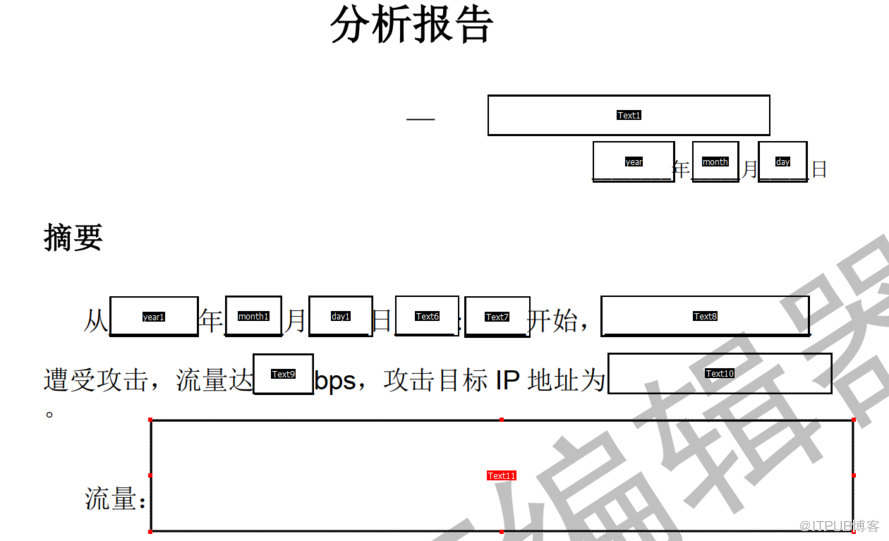
报告模板,可以用pdf编辑器生成。
public void modelPdf() throws Exception{
测试代码
public void modelPdf() throws Exception{

        Map<String,String> map = new HashMap<>();

        map.put("Text1","深圳");

        map.put("year","2019");

        map.put("month","9");

        map.put("day","19");

        map.put("year1","2019");

        map.put("month1","9");

        map.put("day1","10");

        map.put("Text6","10");

        map.put("Text7","36");

        map.put("Text8","深化公司");

        map.put("Text9","50G");

        map.put("Text10","36.25.24.2223.23422.54566756.7sdfsdfs.dfsf.dsfs.dfsdf.sddfs");


        Map<String,String> map2 = new HashMap<>();

        map2.put("Text11",".."+File.separator+".."+File.separator+"temp"+File.separator+"pdf"+File.separator+"26.jpg");


        Map<String,PdfPTable> map3 = new HashMap<>();


        PdfPTable t=new PdfPTable(5);

        float[] widths={1.5f,1f,1f,1.5f,1f};

        BaseFont bfChinese= BaseFont.createFont("STSong-Light", "UniGB-UCS2-H", BaseFont.NOT_EMBEDDED);


        Font keyfont=new Font(bfChinese,8,Font.BOLD);

        Font textfont=new Font(bfChinese,8,Font.NORMAL);

        t.setWidths(widths);

        t.getDefaultCell().setBorder(PdfPCell.NO_BORDER);

        PdfPCell c1 = new PdfPCell(new Paragraph("PO#",keyfont));

        t.addCell(c1);

        c1 = new PdfPCell(new Paragraph("Line",keyfont));

        t.addCell(c1);

        c1 = new PdfPCell(new Paragraph("Part#",keyfont));

        t.addCell(c1);

        c1 = new PdfPCell(new Paragraph("Description",keyfont));

        t.addCell(c1);

        c1 = new PdfPCell(new Paragraph("Origin",keyfont));

        t.addCell(c1);


        for(int i=0;i<6;i++){

            PdfPCell c2=new PdfPCell(new Paragraph("test"+i, textfont));

            t.addCell(c2);

            c2=new PdfPCell(new Paragraph("line"+i, textfont));

            t.addCell(c2);

            c2=new PdfPCell(new Paragraph("part"+i, textfont));

            t.addCell(c2);

            c2=new PdfPCell(new Paragraph("desc"+i, textfont));

            t.addCell(c2);

            c2=new PdfPCell(new Paragraph("origin"+i, textfont));

            t.addCell(c2);

        }

        map3.put("list1", t);

        Map<String,Object> o=new HashMap<>();

        o.put("datemap",map);

        o.put("imgmap",map2);

        o.put("list",map3);

        pdfout(o);

    }


    private static void pdfout(Map<String,Object> o) {

        // 模板路径

        String templatePath = "."+File.separator+"temp"+File.separator+"pdf"+File.separator+"alarmAnalysis_wrapper.pdf";

        File f = new File(templatePath);

        if(!f.exists()){

            return;

        }

        // 生成的新文件路径

        String newPDFPath = "."+File.separator+"temp"+File.separator+"pdf"+File.separator+"testout1.pdf";

        PdfReader reader = null;

        FileOutputStream out = null;

        ByteArrayOutputStream bos = null;

        PdfStamper stamper = null;

        try {

            BaseFont bf=BaseFont.createFont("STSong-Light", "UniGB-UCS2-H", BaseFont.NOT_EMBEDDED);

            Font FontChinese = new Font(bf, 9, Font.NORMAL);

            out = new FileOutputStream(newPDFPath);// 输出流

            byte[] buf = FileUtils.readFileToByteArray(new File(templatePath));

            reader = new PdfReader(buf);// 读取pdf模板

            bos = new ByteArrayOutputStream();

            stamper = new PdfStamper(reader, bos);

            AcroFields form = stamper.getAcroFields();

            //文字类的内容处理

            Map<String,String> datemap = (Map<String,String>)o.get("datemap");

            form.addSubstitutionFont(bf);

            for(String key : datemap.keySet()){

                String value = datemap.get(key);

                com.itextpdf.text.Phrase phr_Content = new com.itextpdf.text.Phrase(value,FontChinese);

                int pageNo = form.getFieldPositions(key).get(0).page;

                PdfContentByte under = stamper.getOverContent(pageNo);

                Rectangle signRect = form.getFieldPositions(key).get(0).position;

                float x = signRect.getLeft();

                float y = signRect.getTop();

                Paragraph paragraph = new Paragraph(value,FontChinese);

                paragraph.setFirstLineIndent(20f);

                ColumnText ct = new ColumnText(under);

                ct.setSimpleColumn(signRect);

                ct.addElement(paragraph);

                ct.go();

//                ColumnText.showTextAligned(under, Element.ALIGN_LEFT, phr_Content, x+2, y-15, 0);

//                form.setField(key,value);

            }

            Map<String,PdfPTable> listmap = (Map<String,PdfPTable>)o.get("list");

            for(String key : listmap.keySet()){

                PdfPTable value = listmap.get(key);

                int pageNo = form.getFieldPositions(key).get(0).page;

                Rectangle signRect = form.getFieldPositions(key).get(0).position;

                float tatalWidth = signRect.getRight() - signRect.getLeft() - 1;

                float x = signRect.getLeft();

                float y = signRect.getTop();

                int size = value.getNumberOfColumns();

                float width[] = new float[size];

                for(int i=0;i<size;i++){

                    if(i==0){

                        width[i]=60f;

                    }else{

                        width[i]=(tatalWidth-60)/(size-1);

                    }

                }

                value.setTotalWidth(width);

                //获取图片页面

                PdfContentByte under = stamper.getOverContent(pageNo);

                value.writeSelectedRows(0, -1, x, y, under);

            }

            //图片类的内容处理

            Map<String,String> imgmap = (Map<String,String>)o.get("imgmap");

            for(String key : imgmap.keySet()) {

                String value = imgmap.get(key);

                String imgpath = value;

                int pageNo = form.getFieldPositions(key).get(0).page;

                Rectangle signRect = form.getFieldPositions(key).get(0).position;

                float x = signRect.getLeft();

                float y = signRect.getBottom();

                //根据路径读取图片

                Image image = Image.getInstance(imgpath);

                //获取图片页面

                PdfContentByte under = stamper.getOverContent(pageNo);

                //图片大小自适应

                image.scaleToFit(signRect.getWidth(), signRect.getHeight());

                //添加图片

                image.setAbsolutePosition(x, y);

                under.addImage(image);

            }

            stamper.setFormFlattening(true);// 如果为false,生成的PDF文件可以编辑,如果为true,生成的PDF文件不可以编辑

            stamper.close();

            Document doc = new Document();

            Font font = new Font(bf, 32);

            PdfCopy copy = new PdfCopy(doc, out);

            doc.open();

            PdfImportedPage importPage = copy.getImportedPage(new PdfReader(bos.toByteArray()), 1);

            copy.addPage(importPage);

            doc.close();

        } catch (Exception e) {

            e.printStackTrace();

        }

    }
来自 “ ITPUB博客 ” ,链接:https://blog.itpub.net/2318/viewspace-3169580/ ,如需转载,请注明出处,否则将追究法律责任。
上一篇:
C++在C的基础上改进了哪些细节
下一篇:
Go语言现在有哪些优势?

请登录后发表评论
登录
全部评论
