Control Access with Oracle Grant Security
For a complete discussion of Oracle grant security, see my book "Oracle Privacy Security Auditing".
Oracle offers many ways to control data access rules, including:
- Grant security (e.g., system, object, and role privileges)
- Grant execute security (e.g., definer and invoker rights)
- Virtual private databases (VPD)
- N-tier authentication (e.g., RADIUS and authentication servers)
Let's start with the basics by looking at grant security to examine its benefits and pitfalls. The original relational model provides a method for granting privileges to users to allow for access control. This grant model was originally described by E.F. Codd and Chris Date in the original relational model and the model is standard across most commercial relational databases.
Oracle grant security takes several forms: object grants, system privilege grants, and role-based grants. The idea is that every user in the database is granted access to specific data objects to control data access.
Oracle Object privileges
Object privileges assign the right to perform. a particular operation on a specific object. Here are some examples of object privilege assignment:
grant select, insert on customer to fred, mary, joe;
grant insert on order_table to update_role;
grant all on customer to fred;
grant select on customer_view to mary;
As you can see, the direct assignment of object privileges requires specific grants for every object to every user in the Oracle database. If you have a schema with 100 tables and 1,000 users, it would require 100,000 individual grant statements to assign security.
Oracle System privileges
System privileges cover many areas of access in a broad brush, with grants such as select any table. Examples of system privilege grants include:
grant create any cluster to customer_role;
grant select any table to fred;
grant create any table to public;
grant create tablespace to dba_role;
Obviously, system privileges should be used only in cases where security isn't important, because a single grant statement could remove all security from the table.
Oracle Role-based security
Role security allows you to gather related grants into a collection. Since the role is a predefined collection of privileges that are grouped together, privileges are easier to assign to users, as in this example:
create role all_customer;
grant select, update on customer to all_customer;
grant select on item_table to all_customer;
grant all_customer to fred, mary, joe;
The benefits of role-based security are obvious, because role-based security allows you to define sets of access rules and then assign them to the appropriate classes of users.
However, unlike VPD security, it isn't possible to implement sophisticated rules for data access. With grants, users either have access to the table, or they do not.
Design for Oracle grant security
If you choose to implement grant security for your Oracle database, you must do some careful up-front planning to ensure that each role is carefully designed to cover access for a specific class of users without overlapping other roles. The steps for implementing grant security are:
- Define roles for all known classes of users.
- Define access rules for each role.
- Define all row-level and column-level restrictions.
- Create views for all data access.
- Assign the views to the roles.
- Assign the roles to the users.
To alleviate the issue of overlapping roles, many Oracle designers create a hierarchy of roles, using roles within roles to exactly match the data access requirements to user groups.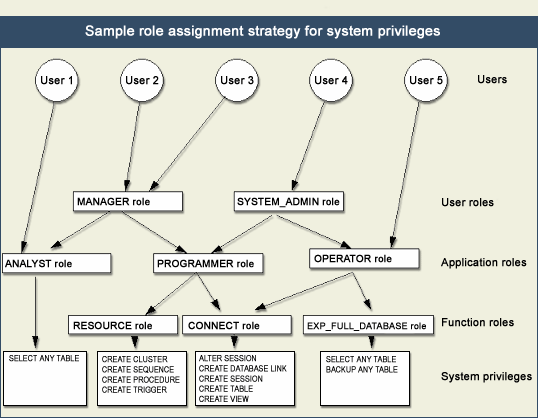
User group access
Note the careful overlap of access privileges between the programmer and analyst roles. It's not uncommon for roles to legitimately overlap when it comes to access, and the Oracle designer must pay careful attention to the access outline.
In the real world, the design of the roles can get quite complex. To illustrate, let's look at a simple example.
Design for row-level and column-level access
In the real world, it isn't enough simply to grant access to whole tables; often you may need to restrict access to specific rows within a table. Without VPDs, the only way to do this with grants is to create separate views for each row-level restriction and then assign the views to the roles and the roles to the users. For example, assume that you must design roles based on the following business rules:
- Only managers may view the salary column of the employee table (column restriction).
- Other employees may view only employee names and phone number for publisher P001 (row restriction).
To implement this design within Oracle using role-based security, perform. the following steps:
- Create the base roles for managers and employees.
- Create the appropriate views.
- Grant the views to the roles.
- Grant the roles to the users.
In Oracle, the views in Listing A implement this design scheme.
SQL> create role emp_role;
Role created.
SQL> create role mgr_role;
Role created.
SQL> create view
2 emp_view
3 as
4 select
5 emp_first_name, emp_last_name
6 from
7 emp
8 where
9 pub_key = 'P001';
View created.
SQL> create view
2 mgr_view
3 as
4 select
5 emp_first_name, emp_last_name, emp_salary
6 from
7 emp;
View created.
SQL>
SQL> -- Grant the privileges to the role
SQL> grant create session, connect, resource to emp_role, mgr_role;
Grant succeeded.
SQL> grant select on emp_view to emp_role;
Grant succeeded.
SQL> grant select on mgr_view to mgr_role;
Grant succeeded.
SQL> create user fred_emp identified by fred;
User created.
SQL> grant emp_role to fred_emp;
Grant succeeded.
SQL> create user mary_mgr identified by mary;
User created.
SQL> grant mgr_role to mary_mgr;
Grant succeeded.
Now that you've assigned the appropriate grant statements, test your views and see if they work (Listing B):
SQL> connect fred_emp/fred;
Connected.
SQL> select * from pubs.emp_view;
EMP_FIRST_NAME EMP_LAST_NAME
-------------------- ------------------------------
sam king
mary korn
SQL> connect mary_mgr/mary;
Connected.
SQL> select * from pubs.mgr_view;
EMP_FIRST_NAME EMP_LAST_NAME EMP_SALARY
-------------------- ---------------------- ----------
sam king 95000
bill jackson 35000
mary korn 28000
fred linus 45000
janet tokheim 63000
john lavender 14000
Loopholes in grant security
There are several issues with grant security that can create loopholes in your design. These include:
- Assigning grants to PUBLIC.
- Assigning roles using the WITH ADMIN option.
- Overlapping unplanned access roles.
- Assigning system privileges (select any table) to roles.
- Creating public synonyms.
For example, within Oracle you can explicitly grant to PUBLIC all tables that you wish to have general read-only access. This system privilege supercedes the role-based security and creates a giant loophole, as in this example:
Create public synonym customer for pubs.customer;
Grant select on customer to public;
Another important loophole is public synonyms for tables. Remember, the default in Oracle is that nobody except the object owner is allowed to perform. any operation on the table. Also, the full table name must be specified in the SQL or Oracle will imply that the table does not exist:
connect pubs/pubs
Connected.
create table
test_table
as
select object_name, object_type from dba_objects;
Table created.
select count(*) from test_table;
COUNT(*)
----------
31350
1 row selected.
Now, when you connect as the user, SCOTT, he is unable to see the table rows, as in the example:
connect scott/tiger
Connected.
select count(*) from test_table
*
ERROR at line 1:
ORA-00942: table or view does not exist
In this case, you know that the table exists, but Oracle considers only the fully-qualified table name:
Connect pubs/pubs
create public synonym test1_table for pubs.test1_table;
Synonym created.
Connect scott/tiger
select count(*) from test_table;
COUNT(*)
----------
31350
1 row selected.
Complexity of Oracle Security
Designing Oracle databases for grant security can become phenomenally complex. The issues raised in this article have led to the creation of new methods of Oracle security, most notably the grant execute model and the VPD. In my book "Oracle Privacy Security Auditing", I'll examine database design for these new methods.
来自 “ ITPUB博客 ” ,链接:https://blog.itpub.net/230160/viewspace-671045/ ,如需转载,请注明出处,否则将追究法律责任。

最新文章
- How to Add/Drop/Resize Redo Log with Physical Standby in place. [ID 473442.1]
- How to Change Interconnect/Public Interface IP Subnet in a 10g Cluster
- oracle rac vip oracle10g RAC更改主机public地址及vip
- Modifying the VIP of a Cluster Node
- How to Recreate OCR / Voting Disk Accidentally Deleted [ID 399482.1]
- Configuring raw devices multipath for Oracle Clusterware10g R2 (10.2.0) on RHEL5
- Oracle RAC 重建 OCR 和 Voting disk
- How to Recreate OCR / Voting Disk Accidentally Deleted [ID 399482.1]
- shrink space
- 连载4:子例程的引用
