From:
http://www.oracle-base.com/articles/10g/ASMUsingASMLibAndRawDevices.php
The article assumes the operating system installation is complete, along with an Oracle software installation. The ASM instance shares the Oracle home with the database instance. If you plan on running multiple database instances on the server the ASM instance should be installed in a separate Oracle home.
Note: When running Oracle 10g Release 2 on RHEL 4 you should consider reading this article: Using Block Devices for Oracle 10g Release 2 in RHEL 4
Determine your kernel version using the following command as the root user.
Edit the /etc/sysconfig/rawdevices file, adding the following lines.
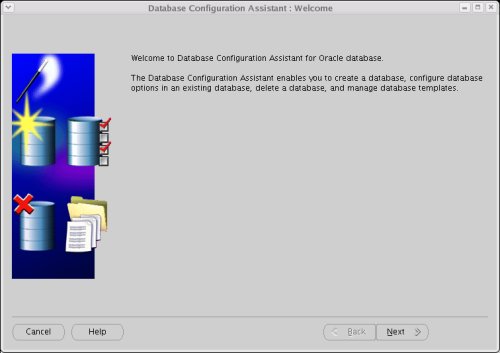
To configure an ASM instance, start the Database Configuration Assistant by issuing the "dbca" command as the oracle user. On the "Welcome" screen, click the "Next" button.
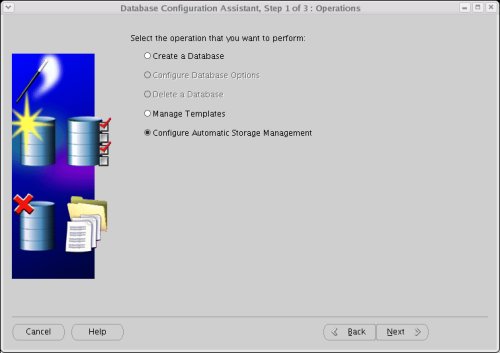
Select the "Configure Automatic Storage Management" option, then click the "Next" Button.
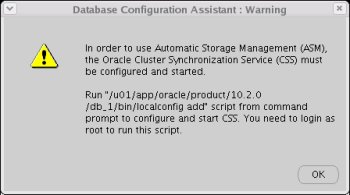
If the Oracle Cluster Syncronization Service (CSS) is not currently running, a warning screen will be displayed. Follow the instructions and click the "OK" button. Once you've returned to the previous screen, click the "Next" button again.
The script. gives the following output.
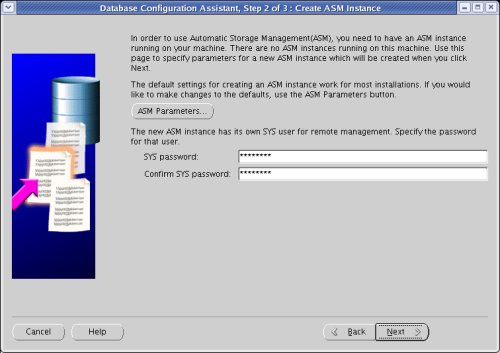
On the confirmation screen, click the "OK" button.
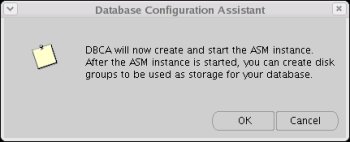
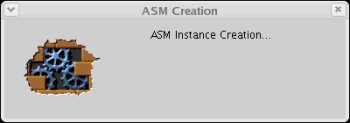
Wait while the ASM instance is created.
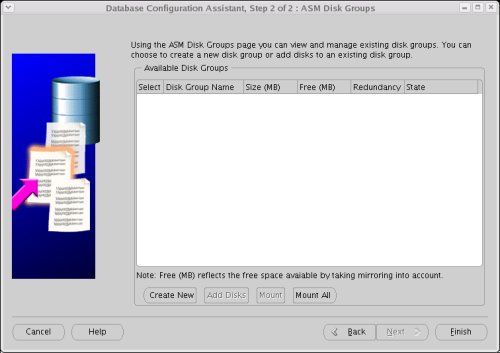
Once the ASM instance is created, you are presented with the "ASM Disk Groups" screen. Click the "Create New" button.
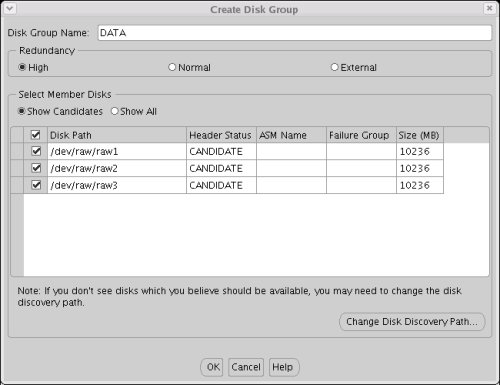
On the "Create Disk Group" screen, enter Disk Group Name of "DATA" and select the required level of redundancy:
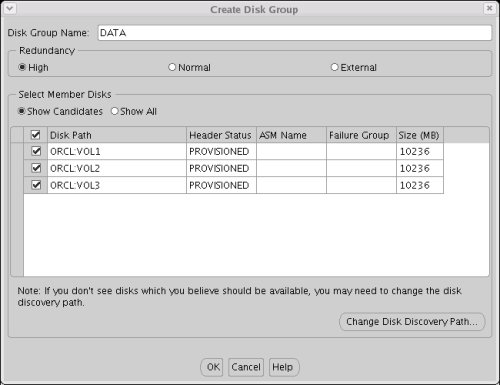
When using raw devices, the candidate discs are listed using the devide names.
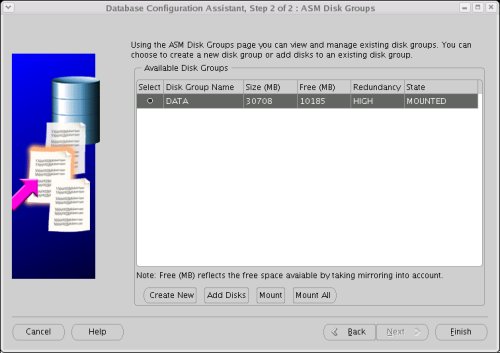
On the "ASM Disk Groups" screen. Click the "Finish" button.
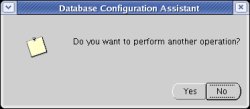
Click the "Yes" button to perform. another operation.
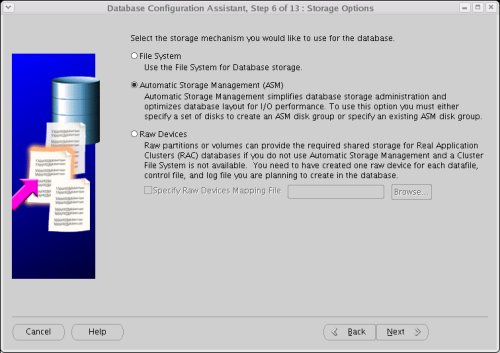
You are now ready to create a database instance using ASM.
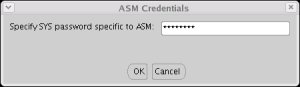
Enter the ASM password if prompted, then click the "OK" button.
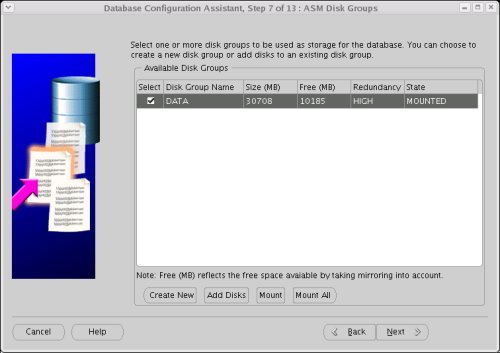
Select the "DATA" disk group, then clicking the "Next" button.
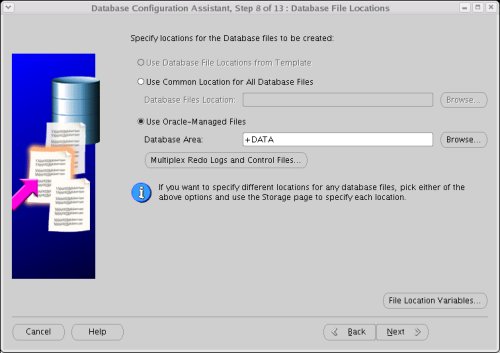
Accept the default "Oracle-Managed Files" database location by clicking the "Next" button.
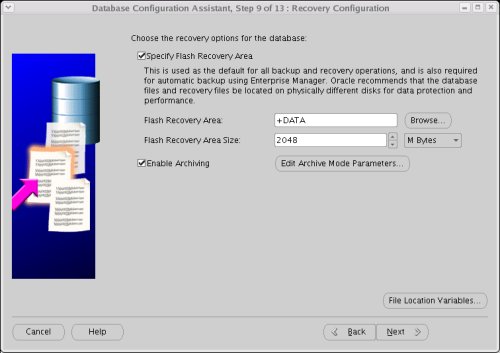
Enable the "Flash Recovery Area" and Archiving, using the "+DATA" disk group for both.
Continue with the rest of the DBCA, selecting the required options along the way.
Alter the ASM disk discovery string to exclude the raw devices used previously, then shutdown the ASM instance.
My first thought was to perform. a simple insert/update/delete test, so I created the following user and schema for the test in a database using and ASM instance using ASMLib.
Once the tests on ASMLib were complete, I switched to using raw devices and repeated the tests. The average results for 1000 of each operation are listed below:
For more information see:
Hope this helps. Regards Tim...
ASM using ASMLib and Raw Devices
- Introduction
- Partition the Disks
- ASMLib Installation
- Raw Device Setup
- ASM Creation
- Database Creation
- Switching from Raw Devices to ASMLib
- Switching from ASMLib to Raw Devices
- Performance Comparison
Introduction
Automatic Storage Management (ASM) simplifies administration of Oracle related files by allowing the administrator to reference disk groups rather than individual disks and files, which ASM manages internally. On Linux, ASM is capable of referencing disks as raw devices or by using the ASMLib software. This article presents the setup details for using either raw devices or ASMLib, as well as the procedures for converting between both methods.The article assumes the operating system installation is complete, along with an Oracle software installation. The ASM instance shares the Oracle home with the database instance. If you plan on running multiple database instances on the server the ASM instance should be installed in a separate Oracle home.
Note: When running Oracle 10g Release 2 on RHEL 4 you should consider reading this article: Using Block Devices for Oracle 10g Release 2 in RHEL 4
Partition the Disks
Both ASMLib and raw devices require the candidate disks to be partitioned before they can be accessed. In this example, three 10Gig VMware virtual disks are to be used for the ASM storage. The following text shows the "/dev/sdb" disk being partitioned.The remaining disks ("/dev/sdc" and "/dev/sdd") must be partitioned in the same way.# ls sd* sda sda1 sda2 sdb sdc sdd # fdisk /dev/sdb Device contains neither a valid DOS partition table, nor Sun, SGI or OSF disklabel Building a new DOS disklabel. Changes will remain in memory only, until you decide to write them. After that, of course, the previous content won't be recoverable. The number of cylinders for this disk is set to 1305. There is nothing wrong with that, but this is larger than 1024, and could in certain setups cause problems with: 1) software that runs at boot time (e.g., old versions of LILO) 2) booting and partitioning software from other OSs (e.g., DOS FDISK, OS/2 FDISK) Warning: invalid flag 0x0000 of partition table 4 will be corrected by w(rite) Command (m for help): n Command action e extended p primary partition (1-4) p Partition number (1-4): 1 First cylinder (1-1305, default 1): Using default value 1 Last cylinder or +size or +sizeM or +sizeK (1-1305, default 1305): Using default value 1305 Command (m for help): w The partition table has been altered! Calling ioctl() to re-read partition table. Syncing disks. #
ASMLib Installation
This step is only necessary if you want to use ASMLib to access the ASM disks.Determine your kernel version using the following command as the root user.
Download the ASMLib software from the OTN website, making sure you pick the version that matches your distribution, kernel and architecture. For this example I used CentOS 4.3, so the following packages were required:# uname -r 2.6.9-34.ELsmp #
- oracleasm-support-2.0.1-1.i386.rpm
- oracleasmlib-2.0.1-1.i386.rpm
- oracleasm-2.6.9-34.ELsmp-2.0.1-1.i686.rpm
# rpm -Uvh oracleasm-support-2.0.1-1.i386.rpm \
           oracleasmlib-2.0.1-1.i386.rpm \
           oracleasm-2.6.9-34.ELsmp-2.0.1-1.i686.rpm
Preparing...                ########################################### [100%]
   1:oracleasm-support      ########################################### [ 33%]
   2:oracleasm-2.6.9-34.ELsm########################################### [ 67%]
   3:oracleasmlib           ########################################### [100%]
## /etc/init.d/oracleasm configure
Configuring the Oracle ASM library driver.
This will configure the on-boot properties of the Oracle ASM library
driver. The following questions will determine whether the driver is
loaded on boot and what permissions it will have. The current values
will be shown in brackets ('[]'). Hitting without typing an
answer will keep that current value. Ctrl-C will abort.
Default user to own the driver interface []: oracle
Default group to own the driver interface []: oinstall
Start Oracle ASM library driver on boot (y/n) [n]: y
Fix permissions of Oracle ASM disks on boot (y/n) [y]:
Writing Oracle ASM library driver configuration: [ OK ]
Creating /dev/oracleasm mount point: [ OK ]
Loading module "oracleasm": [ OK ]
Mounting ASMlib driver filesystem: [ OK ]
Scanning system for ASM disks: [ OK ]
# If this were a RAC installation, the disks would only be stamped by one node. The other nodes would just scan for the disks.# /etc/init.d/oracleasm createdisk VOL1 /dev/sdb1 Marking disk "/dev/sdb1" as an ASM disk: [ OK ] # /etc/init.d/oracleasm createdisk VOL2 /dev/sdc1 Marking disk "/dev/sdc1" as an ASM disk: [ OK ] # /etc/init.d/oracleasm createdisk VOL3 /dev/sdd1 Marking disk "/dev/sdd1" as an ASM disk: [ OK ] #
The stamped disks are listed as follows.# /etc/init.d/oracleasm scandisks Scanning system for ASM disks: [ OK ] #
The disks are now ready to be used by ASM.# /etc/init.d/oracleasm listdisks VOL1 VOL2 VOL3 #
Raw Device Setup
This step is only necessary if you want ASM to access the disks as raw devices.Edit the /etc/sysconfig/rawdevices file, adding the following lines.
Restart the rawdevices service using the following command./dev/raw/raw1 /dev/sdb1 /dev/raw/raw2 /dev/sdc1 /dev/raw/raw3 /dev/sdd1
Run the following commands and add them the /etc/rc.local file.service rawdevices restart
The ASM raw device disks are now configured.chown oracle:oinstall /dev/raw/raw1 chown oracle:oinstall /dev/raw/raw2 chown oracle:oinstall /dev/raw/raw3 chmod 600 /dev/raw/raw1 chmod 600 /dev/raw/raw2 chmod 600 /dev/raw/raw3
ASM Creation
Creation of the ASM instance is the same, regardless of the use of ASMLib or raw devices. When using ASMLib, the candidate disks are listed using the stamp associated with them, while the raw devices are listed using their device name.To configure an ASM instance, start the Database Configuration Assistant by issuing the "dbca" command as the oracle user. On the "Welcome" screen, click the "Next" button.
Select the "Configure Automatic Storage Management" option, then click the "Next" Button.
If the Oracle Cluster Syncronization Service (CSS) is not currently running, a warning screen will be displayed. Follow the instructions and click the "OK" button. Once you've returned to the previous screen, click the "Next" button again.
The script. gives the following output.
# /u01/app/oracle/product/10.2.0/db_1/bin/localconfig add
/etc/oracle does not exist. Creating it now.
Successfully accumulated necessary OCR keys.
Creating OCR keys for user 'root', privgrp 'root'..
Operation successful.
Configuration for local CSS has been initialized

Adding to inittab
Startup will be queued to init within 90 seconds.
Checking the status of new Oracle init process...
Expecting the CRS daemons to be up within 600 seconds.
CSS is active on these nodes.
        centos2
CSS is active on all nodes.
Oracle CSS service is installed and running under init(1M)
#On the confirmation screen, click the "OK" button.
Wait while the ASM instance is created.
Once the ASM instance is created, you are presented with the "ASM Disk Groups" screen. Click the "Create New" button.
On the "Create Disk Group" screen, enter Disk Group Name of "DATA" and select the required level of redundancy:
- External - ASM does not mirror the files. This option should only be used if your disks are already protected by some form. of redundancy, like RAID.
- Normal - ASM performs two-way mirroring of all files.
- High - ASM performs three-way mirroring of all files.
When using raw devices, the candidate discs are listed using the devide names.
On the "ASM Disk Groups" screen. Click the "Finish" button.
Click the "Yes" button to perform. another operation.
You are now ready to create a database instance using ASM.
Database Creation
Before continuing with the database creation, check the listener is up and the ASM instance has registered with it. Start the listener using the following command.The ASM instance is not registered, so we can force the registration by doing the following.$ lsnrctl start LSNRCTL for Linux: Version 10.2.0.1.0 - Production on 29-APR-2006 14:35:46 Copyright (c) 1991, 2005, Oracle. All rights reserved. Starting /u01/app/oracle/product/10.2.0/db_1/bin/tnslsnr: please wait... TNSLSNR for Linux: Version 10.2.0.1.0 - Production Log messages written to /u01/app/oracle/product/10.2.0/db_1/network/log/listener .log Listening on: (DESCRIPTION=(ADDRESS=(PROTOCOL=tcp)(HOST=centos2.localdomain)(POR T=1521))) Connecting to (ADDRESS=(PROTOCOL=tcp)(HOST=)(PORT=1521)) STATUS of the LISTENER ------------------------ Alias LISTENER Version TNSLSNR for Linux: Version 10.2.0.1.0 - Production Start Date 29-APR-2006 14:35:47 Uptime 0 days 0 hr. 0 min. 0 sec Trace Level off Security ON: Local OS Authentication SNMP OFF Listener Log File /u01/app/oracle/product/10.2.0/db_1/network/log/listen er.log Listening Endpoints Summary... (DESCRIPTION=(ADDRESS=(PROTOCOL=tcp)(HOST=centos2.localdomain)(PORT=1521))) The listener supports no services The command completed successfully $
Checking the status of the listener shows that the ASM instance is now registered.$ export ORACLE_SID=+ASM $ sqlplus / as sysdba SQL*Plus: Release 10.2.0.1.0 - Production on Sat Apr 29 14:37:06 2006 Copyright (c) 1982, 2005, Oracle. All rights reserved. Connected to: Oracle Database 10g Enterprise Edition Release 10.2.0.1.0 - Production With the Partitioning, OLAP and Data Mining options SQL> alter system register; System altered. SQL> exit Disconnected from Oracle Database 10g Enterprise Edition Release 10.2.0.1.0 - Pr oduction With the Partitioning, OLAP and Data Mining options $
Go back to the DBCA and create a custom database in the normal way, selecting the "Automatic Storage Management (ASM)" storage option.$ lsnrctl status LSNRCTL for Linux: Version 10.2.0.1.0 - Production on 29-APR-2006 14:37:32 Copyright (c) 1991, 2005, Oracle. All rights reserved. Connecting to (ADDRESS=(PROTOCOL=tcp)(HOST=)(PORT=1521)) STATUS of the LISTENER ------------------------ Alias LISTENER Version TNSLSNR for Linux: Version 10.2.0.1.0 - Production Start Date 29-APR-2006 14:35:47 Uptime 0 days 0 hr. 1 min. 46 sec Trace Level off Security ON: Local OS Authentication SNMP OFF Listener Log File /u01/app/oracle/product/10.2.0/db_1/network/log/listen er.log Listening Endpoints Summary... (DESCRIPTION=(ADDRESS=(PROTOCOL=tcp)(HOST=centos2.localdomain)(PORT=1521))) Services Summary... Service "+ASM" has 1 instance(s). Instance "+ASM", status BLOCKED, has 1 handler(s) for this service... Service "+ASM_XPT" has 1 instance(s). Instance "+ASM", status BLOCKED, has 1 handler(s) for this service... The command completed successfully $
Enter the ASM password if prompted, then click the "OK" button.
Select the "DATA" disk group, then clicking the "Next" button.
Accept the default "Oracle-Managed Files" database location by clicking the "Next" button.
Enable the "Flash Recovery Area" and Archiving, using the "+DATA" disk group for both.
Continue with the rest of the DBCA, selecting the required options along the way.
Switching from Raw Devices to ASMLib
Shutdown any databases using the ASM instance, but leave the ASM instance itself running. Connect to the running ASM instance.Perform. the ASMLib Installation, but stop prior to stamping the ASM disk. If you attempt to stamp the disks using the createdisk command it will fail.$ export ORACLE_SID=+ASM $ sqlplus / as sysdba
Alter the ASM disk discovery string to exclude the raw devices used previously, then shutdown the ASM instance.
If you are planning to remove the raw device mappings (Raw Device Setup), you could simply reset the ASM_DISKGROUP parameter.SQL> ALTER SYSTEM SET asm_diskstring = 'ORCL:VOL*' SCOPE=SPFILE; System altered. SQL> SHUTDOWN IMMEDIATE; ASM diskgroups dismounted ASM instance shutdown SQL>
At this point the disks will not be used by ASM because they are not stamped. As mentioned previously, the createdisk command used to stamp new disks would fail, so we must issue the renamedisk command as the root user for each disk.SQL> ALTER SYSTEM RESET asm_diskstring SCOPE=SPFILE SID='*'; System altered. SQL>
Notice, the stamp matches the discovery string set earlier. The ASM instance can now be started.# /etc/init.d/oracleasm renamedisk /dev/sdb1 VOL1 Renaming disk "/dev/sdb1" to "VOL1": [ OK ] # /etc/init.d/oracleasm renamedisk /dev/sdc1 VOL2 Renaming disk "/dev/sdc1" to "VOL2": [ OK ] # /etc/init.d/oracleasm renamedisk /dev/sdd1 VOL3 Renaming disk "/dev/sdd1" to "VOL3": [ OK ] #
The ASM instance is now using ASMLib, rather than raw devices. All dependent databases can now be started.SQL> STARTUP ASM instance started Total System Global Area 83886080 bytes Fixed Size 1217836 bytes Variable Size 57502420 bytes ASM Cache 25165824 bytes ASM diskgroups mounted SQL>
Switching from ASMLib to Raw Devices
Shutdown any databases using the ASM instance, but leave the ASM instance itself running. Connect to the running ASM instance.Alter the ASM disk discovery string to match the raw devices you plan to set up, then shutdown the ASM instance.$ export ORACLE_SID=+ASM $ sqlplus / as sysdba
Perform. all the steps listed in the Raw Device Setup, then start the ASM instance.SQL> ALTER SYSTEM SET asm_diskstring = '/dev/raw/raw*' SCOPE=SPFILE; System altered. SQL> SHUTDOWN IMMEDIATE; ASM diskgroups dismounted ASM instance shutdown SQL>
The ASM instance is now using the disks as raw devices, rather than as ASMLib disks. All dependent databases can now be started.SQL> STARTUP ASM instance started Total System Global Area 83886080 bytes Fixed Size 1217836 bytes Variable Size 57502420 bytes ASM Cache 25165824 bytes ASM diskgroups mounted SQL>
Performance Comparison
Some documents suggests using ASMLib with Oracle 10g Release 2 gives superior disk performance, while others say it only reduces the time searching for candidate disks, and hence ASM startup time. I decided to compare the performance of the two methods myself to see if I could tell the difference.My first thought was to perform. a simple insert/update/delete test, so I created the following user and schema for the test in a database using and ASM instance using ASMLib.
Then, as the test user, I ran the following code several times and calculated an average time for each operation.export ORACLE_SID=DB10G sqlplus / as sysdba CREATE TABLESPACE test_ts; CREATE USER test_user IDENTIFIED BY test_user DEFAULT TABLESPACE test_ts QUOTA UNLIMITED ON test_ts; GRANT CONNECT, CREATE TABLE TO test_user; CONN test_user/test_user CREATE TABLE test_tab ( id NUMBER, data VARCHAR2(4000), CONSTRAINT test_tab_pk PRIMARY KEY (id) );
SET SERVEROUTPUT ON
DECLARE
  l_loops NUMBER := 1000;
  l_data  VARCHAR2(32767) := RPAD('X', 4000, 'X');
  l_start NUMBER;
BEGIN
  l_start := DBMS_UTILITY.get_time;

  FOR i IN 1 .. l_loops LOOP
    INSERT INTO test_tab (id, data) VALUES (i, l_data);
    COMMIT;
  END LOOP;

  DBMS_OUTPUT.put_line('Inserts (' || l_loops || '): ' || (DBMS_UTILITY.get_time - l_start) || ' hsecs');

  l_start := DBMS_UTILITY.get_time;

  FOR i IN 1 .. l_loops LOOP
    UPDATE test_tab
    SET    data = l_data
    WHERE  id   = i;
    COMMIT;
  END LOOP;

  DBMS_OUTPUT.put_line('Updates (' || l_loops || '): ' || (DBMS_UTILITY.get_time - l_start) || ' hsecs');

  l_start := DBMS_UTILITY.get_time;

  FOR i IN 1 .. l_loops LOOP
    DELETE FROM test_tab
    WHERE  id = i;
    COMMIT;
  END LOOP;

  DBMS_OUTPUT.put_line('Deletes (' || l_loops || '): ' || (DBMS_UTILITY.get_time - l_start) || ' hsecs');

  EXECUTE IMMEDIATE 'TRUNCATE TABLE test_tab';
END;
/Once the tests on ASMLib were complete, I switched to using raw devices and repeated the tests. The average results for 1000 of each operation are listed below:
You can instantly see that the ASMLib results are better than those of the raw devices, but the testing is suspect for the following reasons:Operation ASMLib (hsecs) Raw Devices (hsecs) ============== ============== =================== Inserts (1000) 468 852 Updates (1000) 956 1287 Deletes (1000) 1281 1995
- For each single run of the script, only 1000 operations of each type were performed. That equates to about 4M of data in the table when it is full. When you consider the use of the buffer cache, this is a pitiful amount of data. I originally intended to perform. many more operations, but my disk was grinding so badly I thought better of it.
- The tests were performed using VMware virtual disks, so really all this work was being done on a single SATA disk. I can't be sure if these results aren't just an artifact of the setup.
- Although the average results look convincing, the raw data was so eratic I'm not convinced these results mean anything.
For more information see:
Hope this helps. Regards Tim...
来自 “ ITPUB博客 ” ,链接:https://blog.itpub.net/230160/viewspace-604847/ ,如需转载,请注明出处,否则将追究法律责任。

请登录后发表评论
登录
全部评论
最新文章
- How to Add/Drop/Resize Redo Log with Physical Standby in place. [ID 473442.1]
- How to Change Interconnect/Public Interface IP Subnet in a 10g Cluster
- oracle rac vip oracle10g RAC更改主机public地址及vip
- Modifying the VIP of a Cluster Node
- How to Recreate OCR / Voting Disk Accidentally Deleted [ID 399482.1]
- Configuring raw devices multipath for Oracle Clusterware10g R2 (10.2.0) on RHEL5
- Oracle RAC 重建 OCR 和 Voting disk
- How to Recreate OCR / Voting Disk Accidentally Deleted [ID 399482.1]
- shrink space
- 连载4:子例程的引用
