1、在Eclipse根目录下找dropinsmypluginplugins,没有则新建目录,将hadoop-eclipse-plugin-1.0.0_V5.0.jar插件放在plugins文件夹下,重启eclipse


4、在控制台那块选择Map/Reduce Locations 然后右键添加Location
host和port和安装的hadoop保持一致
dfs.permissions
false
public static class
TokenizerMapper
extends Mapper
private final static
IntWritable one = new IntWritable(1);
private Text word = new
Text();
public void map(Object
key, Text value, Context context
) throws IOException, InterruptedException
{
StringTokenizer itr = new StringTokenizer(value.toString());
while
(itr.hasMoreTokens()) {
word.set(itr.nextToken());
context.write(word, one);
}
}
}
public static class
IntSumReducer
extends Reducer {
private IntWritable
result = new IntWritable();
public void reduce(Text
key, Iterable values,
Context
context
) throws
IOException, InterruptedException {
int
sum = 0;
for
(IntWritable val : values) {
sum += val.get();
}
result.set(sum);
context.write(key, result);
}
}
public static void main(String[] args)
throws Exception {
Configuration conf = new
Configuration();
conf.set("mapred.job.tracker", "192.168.12.15:9001");
String[] ars=new
String[]{"/usr/hadoop/input/english1.txt","/usr/hadoop/output1"};
String[] otherArgs = new
GenericOptionsParser(conf, ars).getRemainingArgs();
if (otherArgs.length !=
2) {
System.err.println("Usage: wordcount ");
System.exit(2);
}
Job job = new Job(conf,
"word count");
job.setJarByClass(WordCount.class);
job.setMapperClass(TokenizerMapper.class);
job.setCombinerClass(IntSumReducer.class);
job.setReducerClass(IntSumReducer.class);
job.setOutputKeyClass(Text.class);
job.setOutputValueClass(IntWritable.class);
FileInputFormat.addInputPath(job, new Path(otherArgs[0]));
FileOutputFormat.setOutputPath(job, new Path(otherArgs[1]));
System.exit(job.waitForCompletion(true) ? 0 : 1);
}
<!-- 正文结束 -->
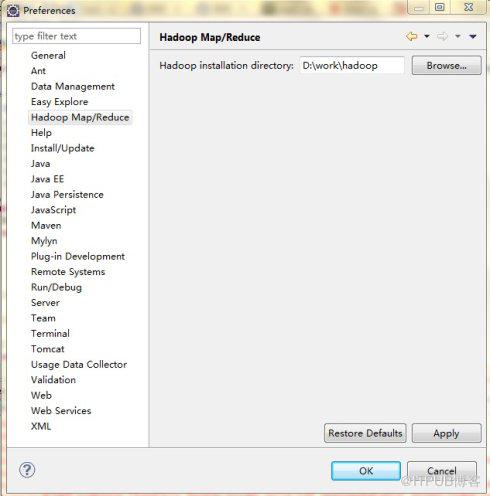
2、安装成功后,在window->preference里边即可看到Hadoop
Map/Reduce,同时指定hadoop安装路径
3、配置hadoop
(1)Window->Open
Perspective->Other->Map/Reduce
(2)Window->Show views->Other->Map
Reduce Tools->Map/Reduce locations
此时可以在eclipse里边看到如下图标
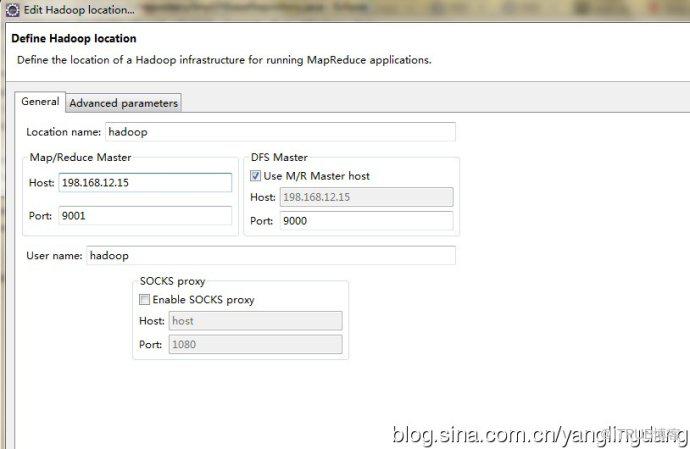
4、在控制台那块选择Map/Reduce Locations 然后右键添加Location
host和port和安装的hadoop保持一致
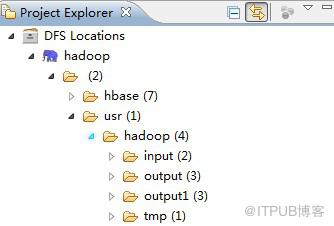
5、保存之后,Explore里边刷新会又有一些文件夹,并且没有错误信息即表示配置成功
一般这步会出现
org.apache.hadoop.security.AccessControlException: Permission denied: user=hadoop, access=WRITE
解决方法:在hdfs-site.xml里加入下面的
至此,插件安装配置完成
6、wordCount测试
public class WordCount {
}
前提是在/usr/hadoop/下创建input文件夹,并在该文件夹下上传english1.txt文件,output1不需要新建,否则会出错,右键run
as/run on hadoop,然后选择刚配置的location即可
控制台出现如下信息则表示正确
13/12/26 16:42:28 INFO input.FileInputFormat: Total input
paths to process : 1
13/12/26 16:42:28 INFO mapred.JobClient: Running job:
job_201312261116_0022
13/12/26 16:42:29 INFO mapred.JobClient: map
0% reduce 0%
13/12/26 16:42:37 INFO mapred.JobClient: map
100% reduce 0%
13/12/26 16:42:45 INFO mapred.JobClient: map
100% reduce 33%
13/12/26 16:42:47 INFO mapred.JobClient: map
100% reduce 100%
13/12/26 16:42:48 INFO mapred.JobClient: Job complete:
job_201312261116_0022
。。。
7、此时刷新DFS
location,在/usr/hadoop下出现output1文件夹,打开output1文件夹下边的part-r-00000文件,即可看到mapreduce结果
" 10
"...two 1
"A 2
"A" 1
"About 3
"Absolutely," 1
"All 5
"Amy, 1
"And 4
"Another 2
"Are 5
"Aren't 1
"At 1
"Awful," 1
"Because 3
"Bedell's 1
"Big 1
"Both 1
。。。
来自 “ ITPUB博客 ” ,链接:https://blog.itpub.net/22922318/viewspace-1119404/ ,如需转载,请注明出处,否则将追究法律责任。
上一篇:
没有了~
下一篇:
没有了~

请登录后发表评论
登录
全部评论
