Hive安装 mysql使用主机(win7)上的mysql数据库,
Hive安装
mysql使用主机(win7)上的mysql数据库,启动后,要关闭360和win7自带的防火墙,确保在虚拟机里能拼通主机**************************************************
D:servermysql-5.0.16-win32in
grant all on
*.* to hive@'localhost' identified
by 'hive' with
grant option;
create
database hive character set
'UTF8';
下载地址: http://archive.apache.org/dist/hive/hive-0.8.1/
拷贝:cp
/mnt/hgfs/share_files/hive-0.8.1.tar.gz ~
解压:tar -zxvf
hive-0.8.1.tar.gz
安装配置hive
(1)修改/home/grid/hive-0.8.1/bin/hive-config.sh
在末尾添加:
[grid@h1
bin]$ vi hive-config.sh
export
JAVA_HOME=/usr/java/jdk1.6.0_29/
export
HIVE_HOME=/home/grid/hive-0.8.1
export
HADOOP_HOME=/home/grid/hadoop-0.20.2
(2)
根据hive-default.xml.template复制hive-site.xml
[grid@h1
conf]$ cp hive-default.xml.template
hive-site.xml
(3)
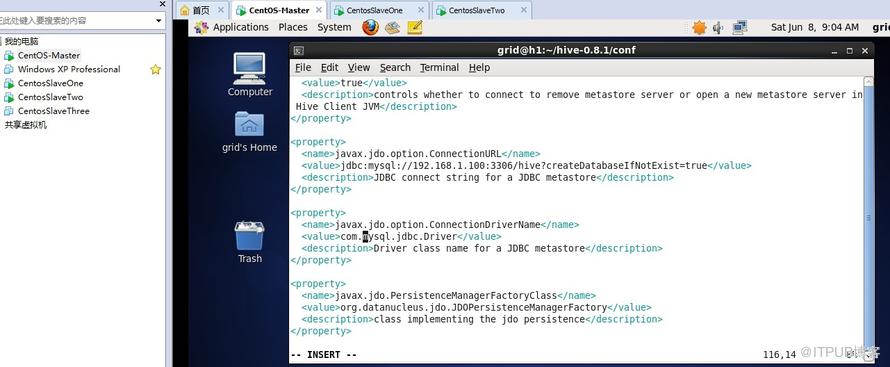
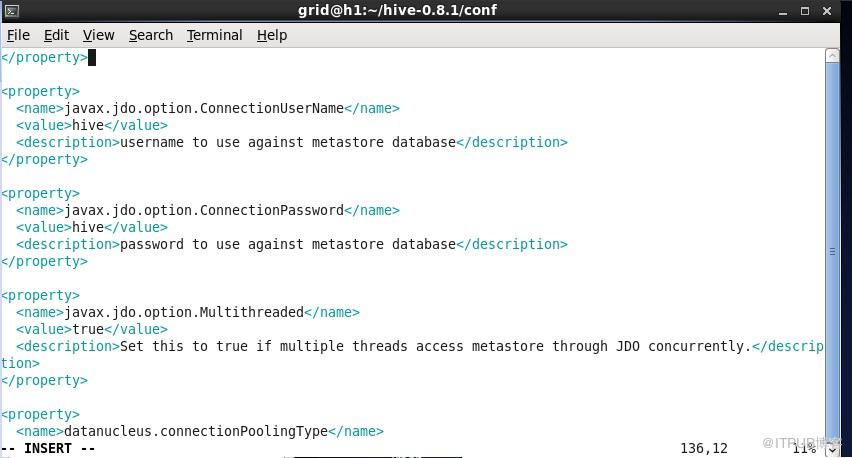
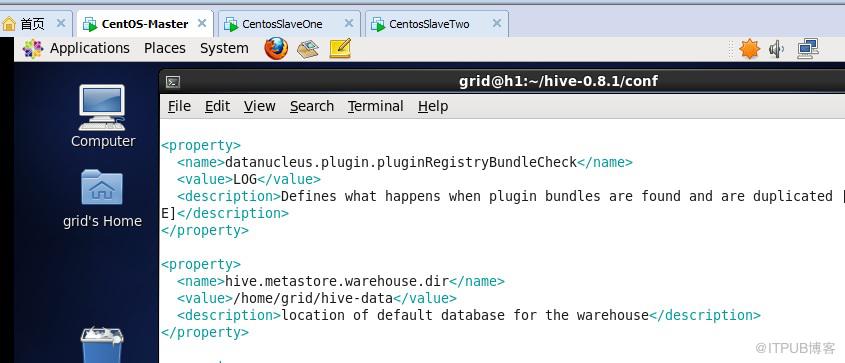
修改配置文件hive-site.xml:
临时文件目录,默认值是/tmp/hive-${user.name}
数据目录,默认值是/user/hive/warehouse
hive.exec.scratchdir
/home/grid/hive-tmp
hive.metastore.warehouse.dir
/home/grid/hive-data
javax.jdo.option.ConnectionURL
jdbc:mysql://192.168.1.100:3306/hive?createDatabaseIfNotExist=true
javax.jdo.option.ConnectionDriverName
com.mysql.jdbc.Driver
javax.jdo.option.ConnectionUserName
hive
javax.jdo.option.ConnectionPassword
hive
(4)配置log4j
[grid@h1
conf]$ cp hive-log4j.properties.template
hive-log4j.properties
(5)创建临时文件目录、数据目录
[grid@h1 ~]$
mkdir hive-tmp
[grid@h1 ~]$
mkdir hive-data
(6)把MySQL的JDBC驱动mysql-connector-java-5.0.8.jar
复制到Hive的lib目录下。(注:发现无法直接拷贝到/home/grid/hive-0.8.1/lib目录下,奇怪)
[grid@h1 ~]$
cp /mnt/hgfs/share_files/mysql-connector-java-5.0.8.jar
~
[grid@h1 ~]$
cp mysql-connector-java-5.0.8.jar
/home/grid/hive-0.8.1/lib
[grid@h1 ~]$
rm mysql*.jar
(7)启动
[grid@h1 ~]$
hive-0.8.1/bin/hive
出现问题1:
Hive
requires Hadoop 0.20.x (x >= 1).
'hadoop
version' returned:
Hadoop
0.20-append-r1056497 Subversion https://svn.apache.org/repos/asf/hadoop/common/branches/branch-0.20-append -r
1056491 Compiled by stack on Fri Jan 7 20:43:30 UTC
2011
问题解决1:出现这个问题是因为安装hbase的时候,我们用hbase的jar包覆盖hadoop的jar包(老师的课程里说的是用hadoop的包覆盖hbase的包,但这样运行时会报错)
[grid@h1 ~]$
hadoop-0.20.2/bin/stop-all.sh
[grid@h1 ~]$
cd hadoop-0.20.2
[grid@h1
hadoop-0.20.2]$ rm hadoop-0.20.2-core.jar
//用原来备份的文件还原(如果想运行hbase,又要用hbase的jar来覆盖这个jar)
[grid@h1
hadoop-0.20.2]$ cp hadoop-0.20.2-core.sav
hadoop-0.20.2-core.jar
//要同步到其他机器
[root@h1
hadoop-0.20.2]# scp
hadoop-0.20.2-core.jar grid@h2:/home/grid/hadoop-0.20.2/hadoop-0.20.2-core.jar
[root@h1
hadoop-0.20.2]# scp
hadoop-0.20.2-core.jar grid@h3:/home/grid/hadoop-0.20.2/hadoop-0.20.2-core.jar
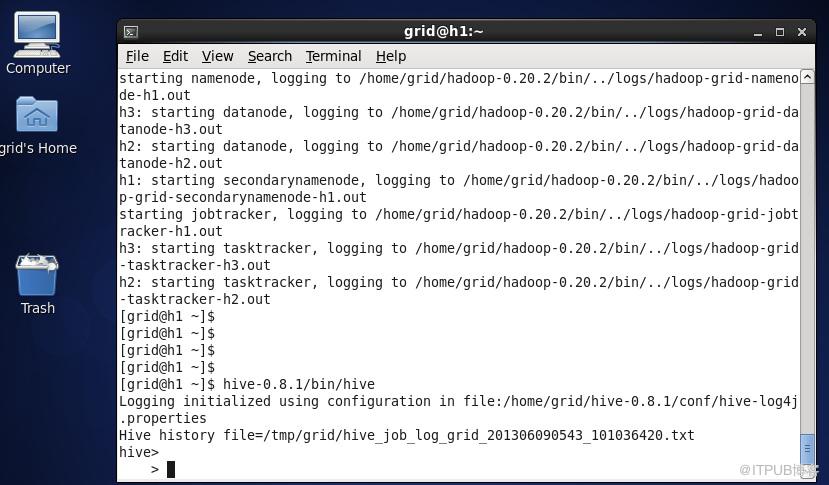
再次启动:
[grid@h1 ~]$
hadoop-0.20.2/bin/start-all.sh
[grid@h1 ~]$
hive-0.8.1/bin/hive
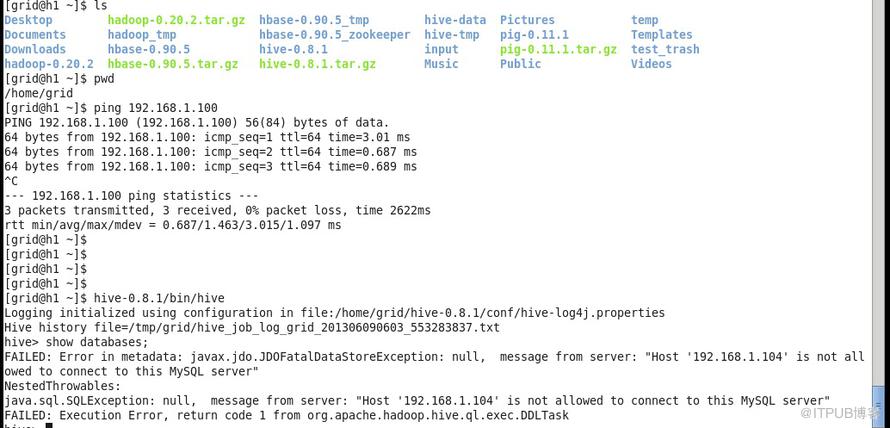
hive> show
databases;
又报错2:
FAILED:
Error in metadata: javax.jdo.JDOFatalDataStoreException:
null, message from server: "Host
'192.168.1.104' is not allowed to connect to this MySQL
server"
NestedThrowables:
java.sql.SQLException:
null, message from server: "Host
'192.168.1.104' is not allowed to connect to this MySQL
server"
FAILED:
Execution Error, return code 1 from
org.apache.hadoop.hive.ql.exec.DDLTask
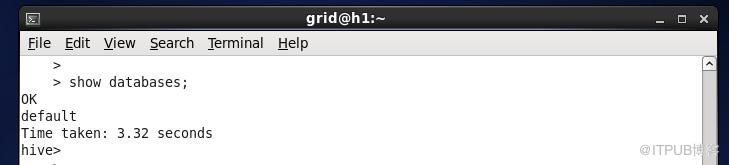
问题解决2:
在mysql里运行:grant all on *.*
to hive@'192.168.1.104' identified
by 'hive' with grant option;
192.168.1.104是安装hive的机器ip
这个是因win7自带防火墙问题,连不上mysql
问题3
hive> show
tables;
FAILED: Error
in metadata: MetaException(message:Got exception:
javax.jdo.JDODataStoreException An exception was thrown while
adding/validating class(es) : Can't create table
'.hivesd_params.frm' (errno: 139)
java.sql.SQLException:
Can't create table '.hivesd_params.frm' (errno:
139)
at
com.mysql.jdbc.SQLError.createSQLException(SQLError.java:946)
at
com.mysql.jdbc.MysqlIO.checkErrorPacket(MysqlIO.java:2985)
at
com.mysql.jdbc.MysqlIO.sendCommand(MysqlIO.java:1631)
at
com.mysql.jdbc.MysqlIO.sqlQueryDirect(MysqlIO.java:1723)
问题解决3:(是数据库编码引起的)
drop
database hive;
create
database hive character set
'latin1';
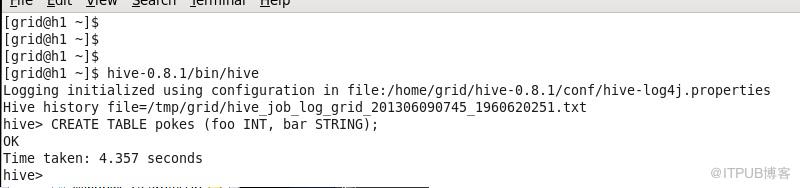
建表
hive>
CREATE TABLE pokes (foo INT, bar
STRING);
OK
Time taken:
4.357 seconds
其他操作见:Hive常用的SQL命令操作.txt
其他问题:Hive和Hbase如何共存,他们两有jar冲突
其实这个安装早就弄了,这个人惰性的厉害,非周日晚上做作业不可
<!-- 正文结束 -->
其他问题:Hive和Hbase如何共存,他们两有jar冲突
其实这个安装早就弄了,这个人惰性的厉害,非周日晚上做作业不可
来自 “ ITPUB博客 ” ,链接:https://blog.itpub.net/22705188/viewspace-1117952/ ,如需转载,请注明出处,否则将追究法律责任。
上一篇:
没有了~
下一篇:
没有了~

请登录后发表评论
登录
全部评论
