前言
页面太多图片?那么请你花20分钟去优化一下页面的性能
讲道理,当你为图片的src赋值时,DOM节点渲染完毕时就会主动去请求src指向的资源,即使该图片不在用户的可视范围。那么,如果图片太多,加载页面的速度会就会变慢。
效果图

让我们看打开chrome的debug看看network面板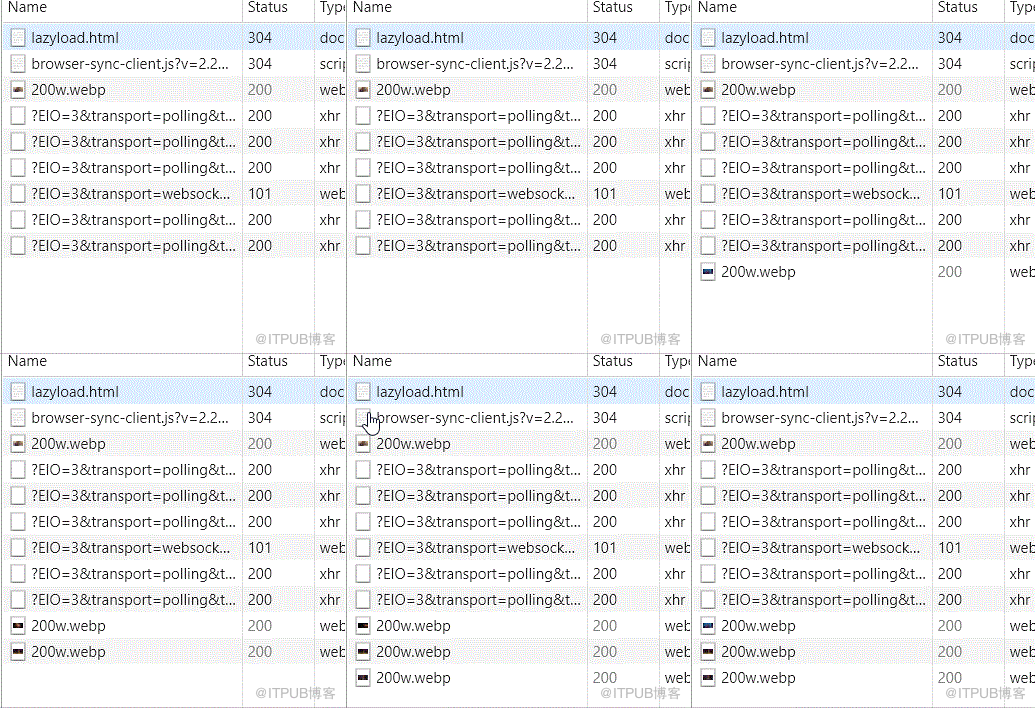
原理
- 将资源路径赋值到img标签的data-xx属性中,而不是src属性
- 获取img节点距离浏览器顶部的距离,如果小于或等于浏览器窗口的可视高度,那么就将data-xx的值赋值到src里去
用到的Web API
代码
html
// img-warpper * 5, 每张gif链接都不一样


css
body {
  text-align: center;
 }

img {
  width: 100%;
  max-width: 300px;
  height: 200px;
  margin-bottom: 100px; // 为了方便看效果,将图片尽可能的撑开
 }
javascript
// 图片懒加载类
class LazyLoad {
  constructor(el) {
    this.imglist = Array.from(document.querySelectorAll(el)); // 需使用懒加载的图片集合
    this.init(); // 初始化
  }
  // 判断是否该图片是否可以加载
  canILoad() {
    let imglist = this.imglist;
    for (let i = imglist.length; i--;) {
      // 缩写,相当于if true
      this.getBound(imglist[i]) && this.loadImage(imglist[i], i);
    }
  }
  // 获取图片与窗口的信息
  getBound(el) {
    let bound = el.getBoundingClientRect();
    let clientHeight = window.innerHeight;
    // 图片距离顶部的距离  {
      this.imglist.length && this.canILoad();
    });
  }
  // 初始化
  init() {
    this.canILoad();
    this.bindEvent();
  }
 }
// 实例化对象,参数则是需要使用懒加载的图片类名
const lazy = new LazyLoad('.lazyload')
异步加载的图片怎么使用
- 基本操作,异步获取图片链接
- 动态插入节点
- 获取这些新添加的节点
3.1 给新添加的节点做一些标记,如类名或者属性 - lazy.imglist.push(Array.from(document.querySelectorAll(‘这些新的节点’)));
来自 “ ITPUB博客 ” ,链接:https://blog.itpub.net/2249/viewspace-2805151/ ,如需转载,请注明出处,否则将追究法律责任。

请登录后发表评论
登录
全部评论
