转载: http://tech.it168.com/a2011/0728/1224/000001224704_all.shtml
【IT168 技术】exe在Vista或Win7下不以管理员权限运行,会被UAC(用户帐户控制)阻止访问系统某些功能,如修改注册表操作等;如何让exe以管理员权限运行呢,方法有两种,一个是直接修改exe属性;另一个是在程序中加入MANIFEST资源,下面分别介绍。
1、直接修改exe属性
1) 右击“exe”,在弹出的菜单中选择“属性”,出现的界面如下图:
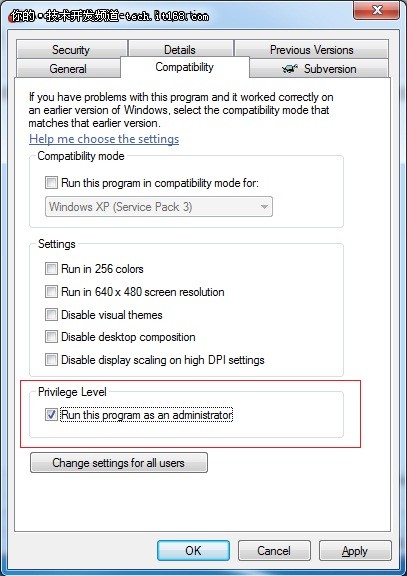
2) 选择"Compatibility"项,并勾选"Run this program as administrator"项即可。
2、 在程序中加入MANIFEST资源
1) 打开Vs2005或vs2008工程,看在Properties下是否有app.manifest这个文件;如没有,右击工程在菜单中选择“属性”,出现界面如下图:
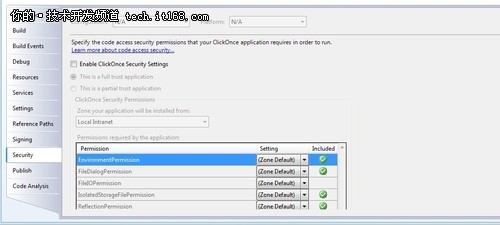
选中"Security",在界面中勾选"Enable ClickOnce Security Settings"后,在Properties下就有自动生成app.manifest文件。
打开app.manifest文件,将
改为
修改后的app.manifest为:
<asmv1:assembly manifestVersion="1.0" xmlns="urn:schemas-microsoft-com:asm.v1" xmlns:asmv1="urn:schemas-microsoft-com:asm.v1" xmlns:asmv2="urn:schemas-microsoft-com:asm.v2" xmlns:xsi="http://www.w3.org/2001/XMLSchema-instance">
<assemblyIdentity version="1.0.0.0" name="MyApplication.app" />
<trustInfo xmlns="urn:schemas-microsoft-com:asm.v2">
<security>
<requestedPrivileges xmlns="urn:schemas-microsoft-com:asm.v3">
<!-- UAC Manifest Options
If you want to change the Windows User Account Control level replace the
requestedExecutionLevel node with one of the following.
If you want to utilize File and Registry Virtualization for backward
compatibility then delete the requestedExecutionLevel node.
-->
<requestedExecutionLevel level="requireAdministrator" uiAccess="false" />
requestedPrivileges>
<applicationRequestMinimum>
<defaultAssemblyRequest permissionSetReference="Custom" />
<PermissionSet class="System.Security.PermissionSet" version="1" Unrestricted="true" ID="Custom" SameSite="site" />
applicationRequestMinimum>
security>
trustInfo>
asmv1:assembly>
然后在"Security"中再勾去"Enable ClickOnce Security Settings"后,重新编译即可。
来自 “ ITPUB博客 ” ,链接:https://blog.itpub.net/22275400/viewspace-752763/ ,如需转载,请注明出处,否则将追究法律责任。

