饿了么vue,项目创建流程代码篇(路由基本,将父组件和子组件联系起来)
创建的过程( 二):路由功能实现页面切换 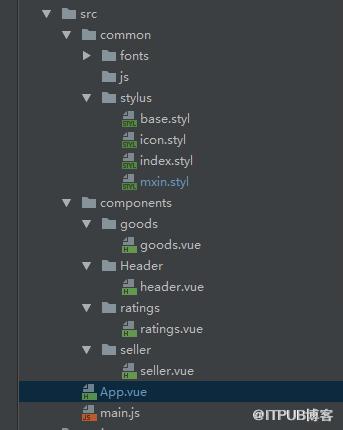
目录结构
定义三个子组件,分别是goods,seller,ratings
安装vue-router插件 npm install --save-dev vue-router
// 入口main.js下

import VueRouter from 'vue-router';
import App from './App';
// goods组件
import Goods from './components/goods/goods';
import Seller from './components/seller/seller';
import Ratings from './components/ratings/ratings';
// 全局引用样式
import './common/stylus/index.styl';
/**
 * 入口js  上方引入的是父组件和一个依赖组件
 */
/* eslint-disable no-new */

Vue.use(VueRouter);  // 使用路由插件

/* eslint-disable no-unused-vars */
// 需要一个根组件
let app = Vue.extend(App);
// 实例一个路由,可以拉入自己的配置项
let router = new VueRouter({
  linkActiveClass: 'active'
});

// 配置路由
router.map({
  '/goods': {
    component: Goods
  },
  '/seller': {
    component: Seller
  },
  '/ratings': {
    component: Ratings
  }
});
// 启动路由,配置一个挂载点
router.start(app, '#app');

// 进入页面默认载入板块
router.go('/goods');
子组件goods等可以加内容方便显示
内容
App.vue中使对引入的组件进行样式的设置,注意导入组件之后,进行注册
<!--模板-->
<!--js脚本--><!--样式-->来自 “ ITPUB博客 ” ,链接:https://blog.itpub.net/212/viewspace-2799166/ ,如需转载,请注明出处,否则将追究法律责任。
下一篇:
DOM盒子模型实战,获取外链样式

请登录后发表评论
登录
全部评论
