Tengine RPM
Tengine是亚洲最大的电子商务网站淘宝网推出的高性能的HTTP和反向代理web服务器。
它基于 Nginx HTTP 服务器,拥有许多高级功能。事实证明,Tengine 在淘宝网、天猫、优酷、阿里速卖通和阿里云等世界前100强网站上非常稳定、高效。
简言之,Tengine是一个具有一些高级功能的 Nginx 发行版。
Tengine官方没有提供RPM包,这里提供非官方的经过优化编译并集成LuaJIT、ModSecurity、geoip2等多种常用模块的Tengine RPM包,方便用户在目标服务器上快速安装配置web服务器。
这是基于官方包https://tengine.taobao.org/download/tengine-3.1.0.tar.gz 制作的rpm包,您可免费下载并安装使用。
目前仅先推出基于almalinux 9.5的rpm包,同样可用于Red Hat Enterprise Linux (RHEL) 及其衍生产品,如CentOS Linux、Rocky Linux。
如何下载?
https://github.com/eagleos/tengine-rpm/releases
https://tengine-rpm.sourceforge.io
如何安装?
- 手工安装
rpm -Uvh tengine-3.1.0-1.el9.x86_64.rpm
如:
[root@EagleOS ~]# rpm -ivh tengine-3.1.0-1.el9.x86_64.rpm

错误:依赖检测失败:

geolite2-city < 20250331 被 tengine-3.1.0-1.el9.x86_64 取代

geolite2-country < 20250331 被 tengine-3.1.0-1.el9.x86_64 取代

[root@EagleOS ~]# rpm -Uvh tengine-3.1.0-1.el9.x86_64.rpm

Verifying...                          ################################# [100%]

准备中...                          ################################# [100%]

正在升级/安装...

1:tengine-3.1.0-1.el9              ################################# [ 33%]

正在清理/删除...

2:geolite2-country-20191217-6.el9  ################################# [ 67%]

3:geolite2-city-20191217-6.el9     ################################# [100%]
如下图所示:

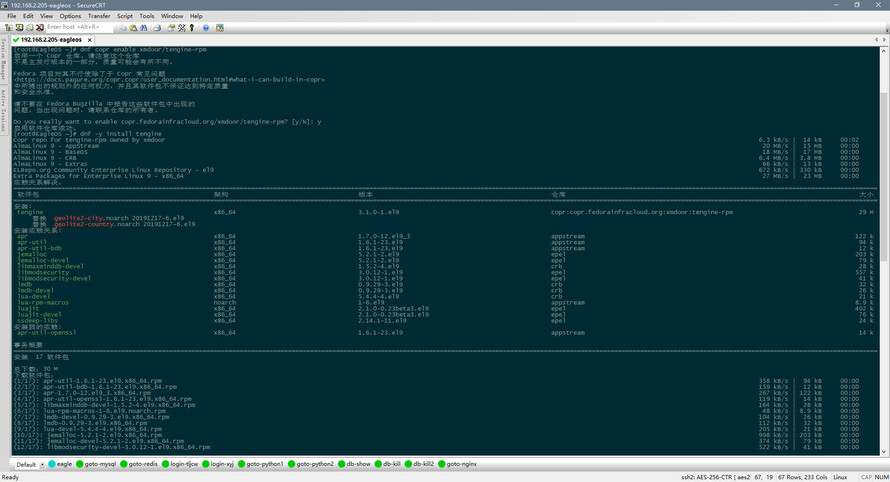
- 在线安装
dnf copr enable xmdoor/tengine-rpm
dnf -y install tengine
如下图所示:
配置说明
- nginx配置文件位于:/app/nginx/conf
- 安装后会自动启动nginx服务,手工重启服务命令:systemctl restart nginx,重载配置命令:systemctl reload nginx
- 安装rpm包过程中,会自动检测目标服务器cpu核数,对nginx配置进行自动优化配置处理
- 对于目标服务器默认站点,在nginx.conf中对境外服务器默认禁止访问,以节省服务器相关访问资源。
您如果需要开放此访问,可更改此文件,删除如下配置语句即可:
  if ($ip_deny) {
  return 503;
  }
- 支持lua语法,相关测试语句请查看nginx.conf中配置,可修改相关配置进行测试
- vhost.conf为站点配置示例,默认未加载,可仿之修改并启动
- 本rpm包编译参数如下:
[root@EagleOS ~]# nginx -V
Tengine version: Microsoft-IIS/3.1.0
nginx version: Microsoft-IIS/8.5/1.24.0
built by gcc 11.5.0 20240719 (Red Hat 11.5.0-5) (GCC)
built with OpenSSL 3.2.2 4 Jun 2024
TLS SNI support enabled
configure arguments: --prefix=/app/nginx --sbin-path=/usr/sbin/nginx --with-http_ssl_module --with-ld-opt=-lpcre --with-http_stub_status_module --with-http_gzip_static_module --with-http_realip_module --with-ld-opt=-ljemalloc --with-jemalloc --with-stream --with-stream_ssl_module --with-stream_realip_module --with-stream_ssl_preread_module --with-debug --with-compat --with-file-aio --with-mail --with-mail_ssl_module --with-pcre --with-pcre-jit --with-threads --with-http_auth_request_module --with-http_dav_module --with-http_degradation_module --with-http_flv_module --with-http_gunzip_module --with-http_image_filter_module --with-http_mp4_module --with-http_random_index_module --with-http_secure_link_module --with-http_sub_module --with-http_v2_module --with-http_addition_module --with-luajit-inc=/usr/include/luajit-2.1 --with-luajit-lib=/usr/lib64 --without-http_upstream_keepalive_module --add-module=modules/ngx_backtrace_module --add-module=modules/ngx_debug_pool --add-module=modules/ngx_debug_timer --add-module=modules/ngx_http_concat_module --add-module=modules/ngx_http_footer_filter_module --add-module=modules/ngx_http_reqstat_module --add-module=modules/ngx_http_slice_module --add-module=modules/ngx_http_trim_filter_module --add-module=modules/ngx_http_upstream_check_module --add-module=modules/ngx_http_upstream_dynamic_module --add-module=modules/ngx_http_upstream_dyups_module --add-module=modules/ngx_http_upstream_keepalive_module --add-module=modules/ngx_http_upstream_session_sticky_module --add-module=modules/ngx_http_upstream_vnswrr_module --add-module=modules/ngx_http_user_agent_module --add-module=modules/ngx_multi_upstream_module --add-module=modules/ngx_slab_stat --add-module=../ngx_cache_purge-2.5.3 --add-module=../ngx_brotli --add-module=../nginx-module-vts-0.2.4 --add-module=../ngx_http_geoip2_module --add-module=../lua-nginx-module-0.10.28 --add-module=../ModSecurity-nginx-master --with-cc-opt='-O2 -flto=auto -ffat-lto-objects -fexceptions -g -grecord-gcc-switches -pipe -Wall -Werror=format-security -Wp,-D_FORTIFY_SOURCE=2 -Wp,-D_GLIBCXX_ASSERTIONS -specs=/usr/lib/rpm/redhat/redhat-hardened-cc1 -fstack-protector-strong -specs=/usr/lib/rpm/redhat/redhat-annobin-cc1 -m64 -march=x86-64-v2 -mtune=generic -fasynchronous-unwind-tables -fstack-clash-protection -fcf-protection' --with-ld-opt='-Wl,-z,relro -Wl,--as-needed -Wl,-z,now -specs=/usr/lib/rpm/redhat/redhat-hardened-ld -specs=/usr/lib/rpm/redhat/redhat-annobin-cc1 -Wl,-E'
FAQ
- 1.为何使用`rpm -Uvh`而不是`rpm -ivh`?
答:如果目标服务器已经安装了系统默认的geolite2-city和geolite2-country,则其中的IP数据库文件是2019年过旧的数据库,
本rpm包中包含同样路径及名称的IP数据库文件(2025.03.31官方maxmind.com最新数据库),会覆盖安装,所以需要使用`rpm -Uvh`进行升级安装。
来自 “ ITPUB博客 ” ,链接:https://blog.itpub.net/21096949/viewspace-3080084/ ,如需转载,请注明出处,否则将追究法律责任。

