
修改Jupyter工作目录的方法:
1、使用jupyter notebook --generate-config指令获取当前Jupyter路径
(yankerp) Administrator@MZNOQLGC1WJQ0RT C:UsersAdministrator
# jupyter notebook --generate-config
Writing default config to: C:UsersAdministrator.jupyterjupyter_notebook_config.py
目前的路径在C:UsersAdministrator.jupyterjupyter_notebook_config.py
2、打开jupyter_notebook_config文件
打开文件找到c.NotebookAppxxxx定义 Jupyter notebook工作路径如下:
c.NotebookApp.notebook_dir = 'C:\Jupyter-yankerpjupyter'
在上面的C:Jupyter-yankerpjupyter目录需要提前创建
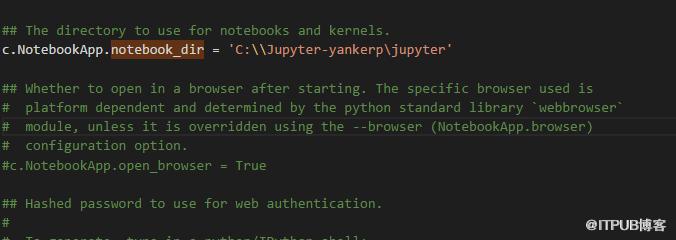
修改c.NotebookApp.notebook_dir中的路径即可。
相关文章教程推荐:jupyter教程
来自 “ ITPUB博客 ” ,链接:https://blog.itpub.net/201/viewspace-2834610/ ,如需转载,请注明出处,否则将追究法律责任。
上一篇:
centos6 vim修改完怎么保存?
下一篇:
怎么在Jupyter里打开ipynb文件

请登录后发表评论
登录
全部评论
