概述
window是android中非常常见的一个概念。Activity、Dialog、Toast这些常用的知识点都是和window密不可分的。
因此,笔者整理了下window相关的知识,期望能对需要的读者有所帮助。
window官方描述
Window源码中对window的描述如下:
/**
 * Abstract base class for a top-level window look and behavior policy.  An
 * instance of this class should be used as the top-level view added to the
 * window manager. It provides standard UI policies such as a background, title
 * area, default key processing, etc.
 *  * The only existing implementation of this abstract class is
 * android.view.PhoneWindow, which you should instantiate when needing a
 * Window.
 */
笔者翻译后的大致意思如下:
- window是一个抽象类,主要用来处理窗口的展示与行为策略(比如触摸,点击等)。
- window类的实例应该是一个被添加到windowManager的顶级视图。
- window提供了标准的UI策略,如背景,标题区域,默认密钥处理等。
- widnow唯一的实现类是android.view.PhoneWindow,如果要使用window就必须通过android.view.PhoneWindow。
window与decorview
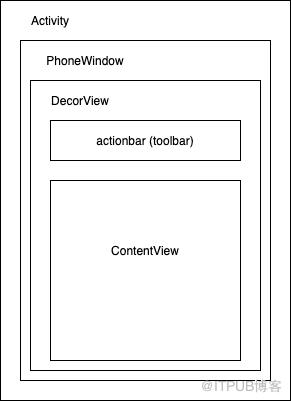
window与decorview的逻辑关系如下:
- 一个Activity对应一个PhoneWindow,PhoneWidnow会处理这个activity中的ui展示和用户的行为(如触摸,点击等)。
- PhoneWidnow不是一个View对象,通过将PhoneWindow添加到windowManager中,PhoneWindow能够将要处理的行为事件传递给DecorView。
- DecorView继承自FrameLayout,是除了Window之外最顶级的视图。
- ContentView就是我们通常使用activity.setContentView()中设置的View。它所对应的id是R.id.content。
源码解析
接下来就通过源码解析看下具体的window相关的层级之间的关系。
Activity.setContentView()
逻辑如下:
- 调用window.setContentView() 来初始化Layout
- 调用initWindowDecorActionBar来初始化 actionBar
由于是关注window相关层级之间的关系,因此接下来直接看window.setContentView的源码。
  public void setContentView(@LayoutRes int layoutResID) {
        getWindow().setContentView(layoutResID);
        initWindowDecorActionBar();
    }
PhoneWindow.setContentView()
根据上文解析的Window的注释,已知window的实例是PhoneWindow,因此直接跳转到PhoneWindow的源码。
主要逻辑如下:
- 首先判断contentView是否已经创建,如果没有创建就需要调用installDecor()来初始化DecorView。
- 然后会调用inflate()方法,将layout添加到contentView中。(FEATURE_CONTENT_TRANSITIONS是转场动画相关逻辑,暂且不看。)
- 最后调用window的callBack的onContentChanged()方法,通知window内容的更改。
 // This is the view in which the window contents are placed. It is either
    // mDecor itself, or a child of mDecor where the contents go.
    ViewGroup mContentParent;

    public void setContentView(int layoutResID) {
        if (mContentParent == null) {
            installDecor();
        } else if (!hasFeature(FEATURE_CONTENT_TRANSITIONS)) {
            mContentParent.removeAllViews();
        }

        if (hasFeature(FEATURE_CONTENT_TRANSITIONS)) {
            final Scene newScene = Scene.getSceneForLayout(mContentParent, layoutResID,
                    getContext());
            transitionTo(newScene);
        } else {
            mLayoutInflater.inflate(layoutResID, mContentParent);
        }
        mContentParent.requestApplyInsets();
        final Callback cb = getCallback();
        if (cb != null && !isDestroyed()) {
            cb.onContentChanged();
        }
        mContentParentExplicitlySet = true;
    }
PhoneWindow.installDecor()
installDecor()是初始化DecorView的相关逻辑,主要逻辑如下:
- 判断DecorView是否为空,如果为空就调用generateDecor()来创建。如果已经初始化过了,那么就再调用setWindow绑定一下此时的window。
- 判断contentView是否为空,如果为空,就调用generateLayout()来创建。
- decorContentParent就是toolbar的View,也是通过判断是否为空来执行初始化逻辑。
- 而后的FEATURE_ACTIVITY_TRANSITIONS就是转场动画相关的逻辑,暂且不看。
private void installDecor() {
mForceDecorInstall = false;
if (mDecor == null) {
mDecor = generateDecor(-1);
mDecor.setDescendantFocusability(ViewGroup.FOCUS_AFTER_DESCENDANTS);
mDecor.setIsRootNamespace(true);
if (!mInvalidatePanelMenuPosted && mInvalidatePanelMenuFeatures != 0) {
mDecor.postOnAnimation(mInvalidatePanelMenuRunnable);
}
} else {
mDecor.setWindow(this);
}
if (mContentParent == null) {
mContentParent = generateLayout(mDecor);
    // Set up decor part of UI to ignore fitsSystemWindows if appropriate.
    mDecor.makeOptionalFitsSystemWindows();

    final DecorContentParent decorContentParent = (DecorContentParent) mDecor.findViewById(
            R.id.decor_content_parent);

    if (decorContentParent != null) {
        mDecorContentParent = decorContentParent;
        mDecorContentParent.setWindowCallback(getCallback());
        if (mDecorContentParent.getTitle() == null) {
            mDecorContentParent.setWindowTitle(mTitle);
        }

        final int localFeatures = getLocalFeatures();
        for (int i = 0; i
}
PhoneWindow.generateDecor()
generateDecor()是创建DecorView的相关逻辑,主要逻辑如下:
- 先判断此时的context是否是DecorContext,如果不是,就通过application和此时的content来new 一个DecorContext。
- 直接new一个DecorView返回,需要传入参数DecorContext 和此时的window。
  protected DecorView generateDecor(int featureId) {
        // System process doesn't have application context and in that case we need to directly use
        // the context we have. Otherwise we want the application context, so we don't cling to the
        // activity.
        Context context;
        if (mUseDecorContext) {
            Context applicationContext = getContext().getApplicationContext();
            if (applicationContext == null) {
                context = getContext();
            } else {
                context = new DecorContext(applicationContext, getContext());
                if (mTheme != -1) {
                    context.setTheme(mTheme);
                }
            }
        } else {
            context = getContext();
        }
        return new DecorView(context, featureId, this, getAttributes());
    }
PhoneWindow.generateLayout()
generateLayout()是创建contentView的方法,主要逻辑如下:
- 通过getWindowStyle()获取到window的TypeArray,然后通过这个TypeArray来获取window相关的状态,从而来设置window的属性。(常见的状态如:是否有title,是否有actionbar等)
- 此处还有window.getContainer()的逻辑。举个例子,一个dialog会有自己的Window,Dialog的Window的Container就是它的Activity的Window。
- 最终会通过id=ID_ANDROID_CONTENT获取到contentParent返回。ID_ANDROID_CONTENT =com.android.internal.R.id.content。(使用Fragement的时候经常会使用R.id.content,其实就是对应contentView)
  protected ViewGroup generateLayout(DecorView decor) {
        // Apply data from current theme.

        TypedArray a = getWindowStyle();

        if (false) {
            System.out.println("From style:");
            String s = "Attrs:";
            for (int i = 0; i = android.os.Build.VERSION_CODES.HONEYCOMB)) {
            setFlags(FLAG_SPLIT_TOUCH, FLAG_SPLIT_TOUCH&(~getForcedWindowFlags()));
        }

        a.getValue(R.styleable.Window_windowMinWidthMajor, mMinWidthMajor);
        a.getValue(R.styleable.Window_windowMinWidthMinor, mMinWidthMinor);
        if (DEBUG) Log.d(TAG, "Min width minor: " + mMinWidthMinor.coerceToString()
                + ", major: " + mMinWidthMajor.coerceToString());
        if (a.hasValue(R.styleable.Window_windowFixedWidthMajor)) {
            if (mFixedWidthMajor == null) mFixedWidthMajor = new TypedValue();
            a.getValue(R.styleable.Window_windowFixedWidthMajor,
                    mFixedWidthMajor);
        }
        if (a.hasValue(R.styleable.Window_windowFixedWidthMinor)) {
            if (mFixedWidthMinor == null) mFixedWidthMinor = new TypedValue();
            a.getValue(R.styleable.Window_windowFixedWidthMinor,
                    mFixedWidthMinor);
        }
        if (a.hasValue(R.styleable.Window_windowFixedHeightMajor)) {
            if (mFixedHeightMajor == null) mFixedHeightMajor = new TypedValue();
            a.getValue(R.styleable.Window_windowFixedHeightMajor,
                    mFixedHeightMajor);
        }
        if (a.hasValue(R.styleable.Window_windowFixedHeightMinor)) {
            if (mFixedHeightMinor == null) mFixedHeightMinor = new TypedValue();
            a.getValue(R.styleable.Window_windowFixedHeightMinor,
                    mFixedHeightMinor);
        }
        if (a.getBoolean(R.styleable.Window_windowContentTransitions, false)) {
            requestFeature(FEATURE_CONTENT_TRANSITIONS);
        }
        if (a.getBoolean(R.styleable.Window_windowActivityTransitions, false)) {
            requestFeature(FEATURE_ACTIVITY_TRANSITIONS);
        }

        mIsTranslucent = a.getBoolean(R.styleable.Window_windowIsTranslucent, false);

        final Context context = getContext();
        final int targetSdk = context.getApplicationInfo().targetSdkVersion;
        final boolean targetPreHoneycomb = targetSdk  LAYOUT_IN_DISPLAY_CUTOUT_MODE_NEVER) {
                throw new UnsupportedOperationException("Unknown windowLayoutInDisplayCutoutMode: "
                        + a.getString(R.styleable.Window_windowLayoutInDisplayCutoutMode));
            }
            params.layoutInDisplayCutoutMode = mode;
        }

        if (mAlwaysReadCloseOnTouchAttr || getContext().getApplicationInfo().targetSdkVersion
                >= android.os.Build.VERSION_CODES.HONEYCOMB) {
            if (a.getBoolean(
                    R.styleable.Window_windowCloseOnTouchOutside,
                    false)) {
                setCloseOnTouchOutsideIfNotSet(true);
            }
        }

        if (!hasSoftInputMode()) {
            params.softInputMode = a.getInt(
                    R.styleable.Window_windowSoftInputMode,
                    params.softInputMode);
        }

        if (a.getBoolean(R.styleable.Window_backgroundDimEnabled,
                mIsFloating)) {
            /* All dialogs should have the window dimmed */
            if ((getForcedWindowFlags()&WindowManager.LayoutParams.FLAG_DIM_BEHIND) == 0) {
                params.flags |= WindowManager.LayoutParams.FLAG_DIM_BEHIND;
            }
            if (!haveDimAmount()) {
                params.dimAmount = a.getFloat(
                        android.R.styleable.Window_backgroundDimAmount, 0.5f);
            }
        }

        if (params.windowAnimations == 0) {
            params.windowAnimations = a.getResourceId(
                    R.styleable.Window_windowAnimationStyle, 0);
        }

        // The rest are only done if this window is not embedded; otherwise,
        // the values are inherited from our container.
        if (getContainer() == null) {
            if (mBackgroundDrawable == null) {
                if (mBackgroundResource == 0) {
                    mBackgroundResource = a.getResourceId(
                            R.styleable.Window_windowBackground, 0);
                }
                if (mFrameResource == 0) {
                    mFrameResource = a.getResourceId(R.styleable.Window_windowFrame, 0);
                }
                mBackgroundFallbackResource = a.getResourceId(
                        R.styleable.Window_windowBackgroundFallback, 0);
                if (false) {
                    System.out.println("Background: "
                            + Integer.toHexString(mBackgroundResource) + " Frame: "
                            + Integer.toHexString(mFrameResource));
                }
            }
            if (mLoadElevation) {
                mElevation = a.getDimension(R.styleable.Window_windowElevation, 0);
            }
            mClipToOutline = a.getBoolean(R.styleable.Window_windowClipToOutline, false);
            mTextColor = a.getColor(R.styleable.Window_textColor, Color.TRANSPARENT);
        }

        // Inflate the window decor.

        int layoutResource;
        int features = getLocalFeatures();
        // System.out.println("Features: 0x" + Integer.toHexString(features));
        if ((features & (1
activity中window的初始化
window是在activity启动的时候被初始化的,widnow初始化的任务栈调用是:
- ActivityThread.performLaunchActivity()
- Activity.attach()
Activity.attach()主要逻辑如下:
- 创建PhoneWindow
- 为PhoneWindow设置windowManager,通过context.getSystemService()获取到windowManager。
- 当activity的mParent存在时,为window的container设置成mParent.getWindow()。(mParent和TabActivity有关,有兴趣的可以自行看下TabActivity源码)
 final void attach(Context context, ActivityThread aThread,
            Instrumentation instr, IBinder token, int ident,
            Application application, Intent intent, ActivityInfo info,
            CharSequence title, Activity parent, String id,
            NonConfigurationInstances lastNonConfigurationInstances,
            Configuration config, String referrer, IVoiceInteractor voiceInteractor,
            Window window, ActivityConfigCallback activityConfigCallback, IBinder assistToken) {
        attachBaseContext(context);

        mFragments.attachHost(null /*parent*/);

        mWindow = new PhoneWindow(this, window, activityConfigCallback);
        mWindow.setWindowControllerCallback(this);
        mWindow.setCallback(this);
        mWindow.setOnWindowDismissedCallback(this);
        mWindow.getLayoutInflater().setPrivateFactory(this);
        if (info.softInputMode != WindowManager.LayoutParams.SOFT_INPUT_STATE_UNSPECIFIED) {
            mWindow.setSoftInputMode(info.softInputMode);
        }
        if (info.uiOptions != 0) {
            mWindow.setUiOptions(info.uiOptions);
        }
        mUiThread = Thread.currentThread();

        mMainThread = aThread;
        mInstrumentation = instr;
        mToken = token;
        mAssistToken = assistToken;
        mIdent = ident;
        mApplication = application;
        mIntent = intent;
        mReferrer = referrer;
        mComponent = intent.getComponent();
        mActivityInfo = info;
        mTitle = title;
        mParent = parent;
        mEmbeddedID = id;
        mLastNonConfigurationInstances = lastNonConfigurationInstances;
        if (voiceInteractor != null) {
            if (lastNonConfigurationInstances != null) {
                mVoiceInteractor = lastNonConfigurationInstances.voiceInteractor;
            } else {
                mVoiceInteractor = new VoiceInteractor(voiceInteractor, this, this,
                        Looper.myLooper());
            }
        }

        mWindow.setWindowManager(
                (WindowManager)context.getSystemService(Context.WINDOW_SERVICE),
                mToken, mComponent.flattenToString(),
                (info.flags & ActivityInfo.FLAG_HARDWARE_ACCELERATED) != 0);
        if (mParent != null) {
            mWindow.setContainer(mParent.getWindow());
        }
        mWindowManager = mWindow.getWindowManager();
        mCurrentConfig = config;

        mWindow.setColorMode(info.colorMode);

        setAutofillOptions(application.getAutofillOptions());
        setContentCaptureOptions(application.getContentCaptureOptions());
    }
————————————————
版权声明:本文为CSDN博主「许佳佳233」的原创文章,遵循CC 4.0 BY-SA版权协议,转载请附上原文出处链接及本声明。
原文链接:https://blog.csdn.net/Double2hao/article/details/116115775
来自 “ ITPUB博客 ” ,链接:https://blog.itpub.net/1873/viewspace-2797799/ ,如需转载,请注明出处,否则将追究法律责任。

