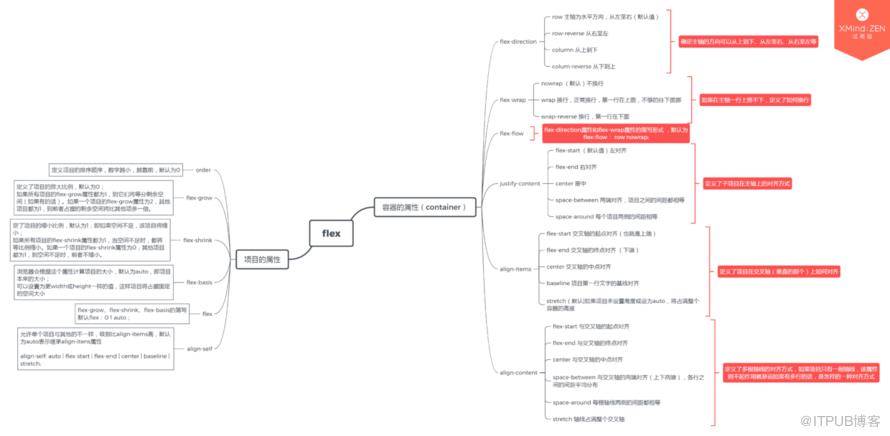
1、flex布局
2、box-shadow阴影
box-shadow: h-shadow(必选) v-shadow(必选) blur spread color inset;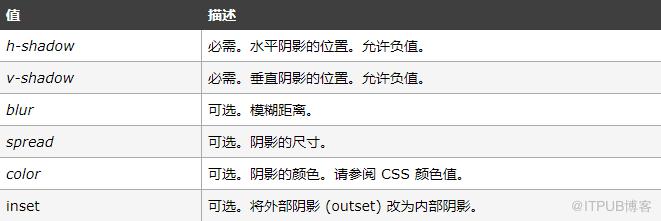
Example:
box-shadow:0 0 20rpx #aaaaaa;3、line-gradient渐变
background: linear-gradient(to right, blue, white);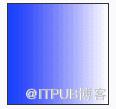
4、绝对定位使元素居中
可以用left:50%加上margin-left:-(宽度/2),来实现绝对定位的水平居中,这里的宽度指的是设置为绝对定位的元素的宽度
/* 可以用left:50%加上margin-left:-(宽度/2),来实现绝对定位的水平居中,这里的宽度指的是设置为绝对定位的元素的宽度 */
.popup {
    width:100px;
    height: 100px;
    background: red;
    position: absolute;
    top: 50%;
    left: 50%;
    margin-left: -50px;
    margin-top: -50px;
}
5、vertical-align属性图片与文字对齐
全部订单
6、关于图片、文字的居中
(1)图片居中要在图片本身上设置margin: 0 auto;
(2)文字居中要在其父元素上设置text-align: center;
<!-- html -->
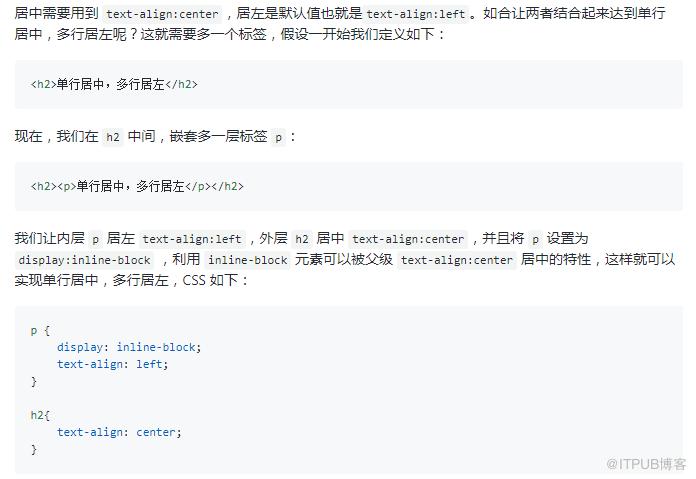
113131313 7、单行居中,多行居左
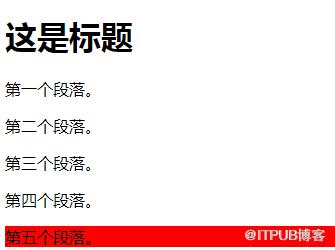
8、css选择器-获取最后一个元素
:last-child 选择属于其父元素最后一个子元素每个
元素。
p:last-child {
  background: red;
}


  这是标题
    第一个段落。
    第二个段落。
    第三个段落。
    第四个段落。
    第五个段落。
9、文字溢出并显示省略号?
white-space:nowrap;
overflow: hidden;
text-overflow: ellipsis;
10、文字超过两行才溢出并显示省略号?
扩展:http://www.css88.com/archives/5206
{
    width: 561rpx;
    overflow: hidden;
    text-overflow: ellipsis;
    text-overflow: -o-ellipsis-lastline;
    display: -webkit-box;
    -webkit-line-clamp: 2;
    -webkit-box-orient: vertical;
}
###11、box-sizing
(1)问题场景
    在CSS中,设置的`width`和`height`只会应用到这个元素的内容区;如果这个元素有`border`或`padding`,那么绘制到屏幕上时的盒子宽度和高度会加上设置的`borde`和`padding`。
这意味着当你调整一个元素的宽度和高度时需要时刻注意到这个元素的边框和内边距,在响应式布局时,这个特点很烦人。

(2)解决
// 默认值
box-sizing: content-box;
box-sizing: border-box;
border-box告诉浏览器去理解你设置的边框和内边距的值是包含在width内的。也就是说,如果你将一个元素的width设为100px,那么这100px会包含其它的border和padding,内容区的实际宽度会是width减去border + padding的计算值。大多数情况下这使得我们更容易的去设定一个元素的宽高。

###12、设置input中placeholder的文字样式
// .inputClassName是标签的类名,包括(input,textArea);
.inputClassName::-webkit-input-placeholder {
color: #b6b6b6;
}
.inputClassName:-moz-placeholder {
color: #b6b6b6;
}
.inputClassName::-moz-placeholder {
color: #b6b6b6;
}
.inputClassName:-ms-input-placeholder {
color: #b6b6b6;
}

###13、获取元素位置

###14、css3自旋转动画@keyframes mymove {
0% {
transform: rotate(0deg);
-ms-transform: rotate(0deg);
-webkit-transform: rotate(0deg);
}
100% {
transform: rotate(-360deg);
-ms-transform: rotate(-360deg);
-webkit-transform: rotate(-360deg);
}
}
// @-moz-keyframes
// @-webkit-keyframes
// @-o-keyframes
.icon {
-webkit-animation: mymove 4.5s infinite linear;
-webkit-transform-origin: center center;
-ms-transform-origin: center center;
transform-origin: center center;
}
###15、持续更新。。(如果你遇到了坑或者有好的解决方案欢迎留言)

【原创首发于慕课网】
来自 “ ITPUB博客 ” ,链接:https://blog.itpub.net/1868/viewspace-2805240/ ,如需转载,请注明出处,否则将追究法律责任。

