
我们在传递一些文件的时候,选择邮箱可以附带很多大内存的文本。在学习了一些框架的使用后,我们可以进行一些有趣的操作,比如通过Yii框架来实现邮箱文件的发送。一直在学习理论知识难免枯燥,下面就让我们用刚学的Yii知识,来给自己的朋友发一些文件吧,具体操作方法往下看。
1.在qq邮箱的设置中开启POP3/SMTP服务
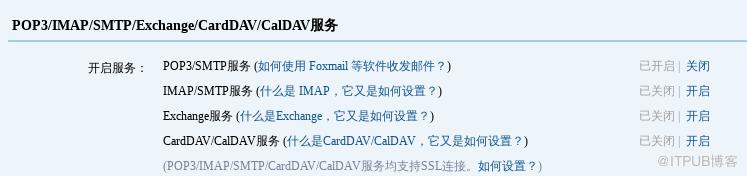
2.保存下授权码
在Yii2配置文件中(common/config/main.php中components)添加邮箱组件
'mailer' => [

            'class' => 'yiiswiftmailerMailer',

            'viewPath' => '@common/mail',

            // send all mails to a file by default. You have to set

            // 'useFileTransport' to false and configure a transport

            // for the mailer to send real emails.

            'useFileTransport' => false,

            'transport' => [

                //这里如果你是qq的邮箱,可以参考qq客户端设置后再进行配置 http://service.mail.qq.com/cgi-bin/help?subtype=1&&id=28&&no=1001256

                'class' => 'Swift_SmtpTransport',

                'host' => 'smtp.qq.com',

                // qq邮箱

                'username' => '114***6@qq.com',

                //授权码, 什么是授权码, http://service.mail.qq.com/cgi-bin/help?subtype=1&&id=28&&no=1001256

                'password' => '***',

                'port' => '465',

                'encryption' => 'ssl',

             ],

            'messageConfig'=>[

                'charset'=>'UTF-8',

                'from'=>['114***@qq.com'=>'developer']

            ],

        ],
3.调用邮箱接口发送邮件
public function actionSendmail()

    {

        $mail = YII::$app->mailer->compose();

        $mail->setTo("***@qq.com");

        $mail->setSubject("邮件测试");

        $mail->setTextBody("textbody 25 ok?");//发布纯文字文本

        //$mail->setHtmlBody("htmlbody");//发布可以带html标签的文本

        if($mail->send()){

            echo "success";

        }else{

            echo "failure";

        }

}
以上就是Yii设置邮箱发文件的方法,想必大家已经成功发送邮件了。还没有下载Yii框架的小伙伴还不快行动起来,同时不要忘记Yii配置的方法啦。更多php学习指路:php框架
来自 “ ITPUB博客 ” ,链接:https://blog.itpub.net/1805/viewspace-2831022/ ,如需转载,请注明出处,否则将追究法律责任。
上一篇:
python上下文管理器的用法详解
下一篇:
java枚举中的values遍历

请登录后发表评论
登录
全部评论
