摘要
可以通过设置一个XMLHttpRequest对象的responseType属性来改变一个从服务器上返回的响应的数据类型。可用的属性值为空字符串 (默认), "arraybuffer", "blob", "document", 和 "text". response属性的值会根据responseType属性的值的不同而不同, 可能会是一个 ArrayBuffer, Blob, Document, string,或者为NULL(如果请求未完成或失败)。
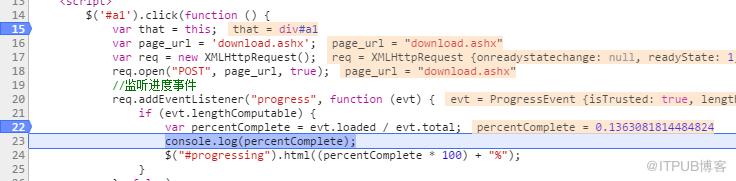
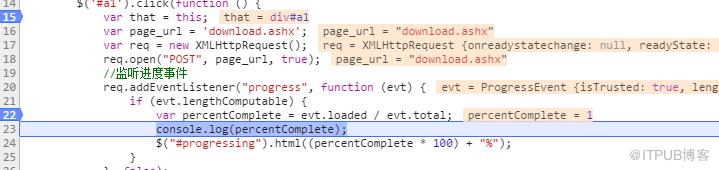
新版本的XMLHttpRequest对象,传送数据的时候,有一个progress事件,用来返回进度信息。
它分成上传和下载两种情况。下载的progress事件属于XMLHttpRequest对象,上传的progress事件属于XMLHttpRequest.upload对象。
一个例子
服务端以一个一般处理程序来处理下载的请求。
/// download 的摘要说明 ///
public class download : IHttpHandler
{ public void ProcessRequest(HttpContext context)
{ string fileName = "1.docx";//客户端保存的文件名
string filePath = context.Server.MapPath("~/file/" + fileName);//路径 //以字符流的形式下载文件
FileStream fs = new FileStream(filePath, FileMode.Open); byte[] bytes = new byte[(int)fs.Length];
fs.Read(bytes, 0, bytes.Length);
fs.Close();
context.Response.ContentType = "application/octet-stream"; //通知浏览器下载文件而不是打开
context.Response.AddHeader("Content-Length", bytes.Length.ToString());
context.Response.AddHeader("Content-Transfer-Encoding", "Binary");
context.Response.AddHeader("Content-Disposition", "attachment; filename=" +
HttpUtility.UrlEncode(fileName, System.Text.Encoding.UTF8));
context.Response.BinaryWrite(bytes);
context.Response.Flush();
context.Response.End();
} public bool IsReusable
{ get
{ return false;
}
}
}
js
下载
测试
XMLHttpRequest Level 2 使用指南
来自 “ ITPUB博客 ” ,链接:https://blog.itpub.net/1567/viewspace-2800487/ ,如需转载,请注明出处,否则将追究法律责任。
上一篇:
less,变量,嵌套,函数方法
下一篇:
理工大学python 温度转换程序

请登录后发表评论
登录
全部评论
