声明:同是新手,哪里不对可以指正,谢谢。
首先我用的maven的web项目。其中引入的jar包junit junit 4.12 test org.springframework spring-webmvc 4.3.7.RELEASE mysql mysql-connector-java 5.1.39 org.springframework spring-jdbc 4.3.7.RELEASE org.springframework spring-test 4.3.7.RELEASE org.springframework spring-context-support 4.3.7.RELEASE org.slf4j slf4j-log4j12 1.7.21 org.freemarker freemarker 2.3.23 commons-collections commons-collections 3.2.2 此处需要注意的是:
-
暂时不要引入mybatis的jar包,因为该实例没有配置datasource,引入后会直接导致tomcat无法启动。
- 不要少了spring-context-support.jar不然在配置freemarderConfig时会有“No setter
found for property 'templateLoaderPath' ”错误。
 <!--   错误   No setter found for                        property 'templateLoaderPath' in class
'org.springframework.web.servlet.view.freemarker.FreeMarkerConfigurer'    -->
在这里需要加入spring的核心监听器
org.springframework.web.context.ContextLoaderListener,以及springMVC的请求分发器
org.springframework.web.servlet.DispatcherServletweb.xml代码如下:
FreeMarkerT contextConfigLocation classpath:spring/applicationContext.xml org.springframework.web.context.ContextLoaderListener springDispatcherServlet org.springframework.web.servlet.DispatcherServlet contextConfigLocation classpath:spring/beans/spring-*.xml 1 springDispatcherServlet / 在这里需要注意的就是要让FreeMarker的解析器优先级高一些,这样就会优先解析ftl文件。
这个比较简单,这个也不用多说了,大家看一下,有注释。
!!!要注意!!! :定义模版所在的位置(freeMarkerConfigurer的templateLoaderPath属性)后,此处定义后就不能在freeMarkerviewResolver中定义prifix属性,不然会提示 找不到模版!!!
3600 zh_CN yyyy-MM-dd HH:mm:ss yyyy-MM-dd #.## /*
* freeMarker需要返回一个ModelAndView对象,其中可以添加多种数据类型
*/
@RequestMapping(value="haha",method=RequestMethod.GET)
public ModelAndView index(){
System.out.println("进入Index");
ModelAndView mv = new ModelAndView("index");
mv.addObject("message", "Spring MVC And Freemarker");
mv.addObject("name", " Hello world , test my first spring mvc ! ");
String[] s = {"数组1","数组2"};
List list = Arrays.asList(s);
mv.addObject("list", list);
return mv;
}
/*
* SpringMVC的测试方法
*/
@RequestMapping(value="home",method=RequestMethod.GET)
public String home(){
System.out.println("这里是Home");
return "home";
}
注意事项:
- 该文件需要放在上面指定的目录下,我上面写的是:(“/WEB-INF/view/”)目录。
- 名称与Controller中MovdelAndView相同。我定义的为(”index“),所以模版的名称为:index.ftl
-
取集合时,ModelAndView中定义的集合名称和s模版中的保持一致
- ${r"代码内容"},这种形式可将代码原样输出到html页面上。
具体内如下 :
freemarker测试
FreeMarker
${message},${name}
这里是集合的遍历方法
- list是集合名称
- a是每个元素的名称
- 通过${r'${a}'}形式取出即可显示
${a}
#list>
war和原项目都有,有什么问题及时交流,谢谢。
分享码:pt95
下载地址:FreeMarkerT1
大家看一下结果: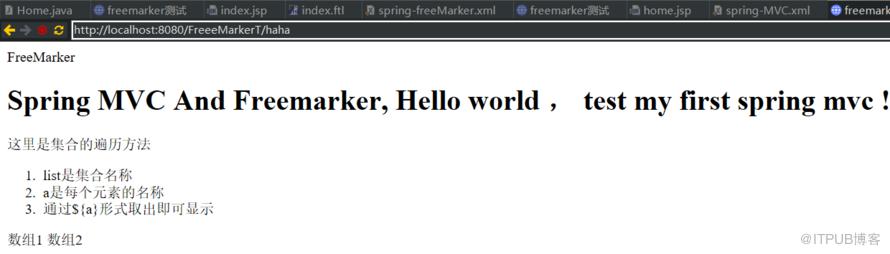
来自 “ ITPUB博客 ” ,链接:https://blog.itpub.net/1551/viewspace-2807684/ ,如需转载,请注明出处,否则将追究法律责任。
上一篇:
话说 内存屏障,有序性保证

请登录后发表评论
登录
全部评论
