To import data from excel to DB
Here,I introduce some methods to import data from excel to DB,
1 By OPENDATASOURCE
SELECT * FROM OPENDATASOURCE(
'Microsoft.Jet.OLEDB.4.0',
'Excel 8.0;DataBase=D:\TEST.xls')...[sheet1$]
Note: Sometimes, error message will occor when executing above script. like this:
Msg 15281, Level 16, State 1, Line 1
SQL Server blocked access to STATEMENT 'OpenRowset/OpenDatasource' of component 'Ad Hoc Distributed Queries' because this component is turned off as part of the security configuration for this server. A system administrator can enable the use of 'Ad Hoc Distributed Queries' by using sp_configure. For more information about enabling 'Ad Hoc Distributed Queries', see "Surface Area Configuration" in SQL Server Books Online.
The solution issetting Ad Hoc Distributed Queries to 1,you can refer to my post: http://www.cnblogs.com/Burgess/archive/2008/09/24/1298195.html
2 By Linked server
EXEC sp_addlinkedserver --add linked server
@server = N'MyExcel',
@srvproduct = N'Jet 4.0',
@provider = N'Microsoft.Jet.OLEDB.4.0',
@datasrc = N'd:\TEST.xls',
@provstr = N'Excel 8.0'
GO
Note:You can also add linked server by below method:
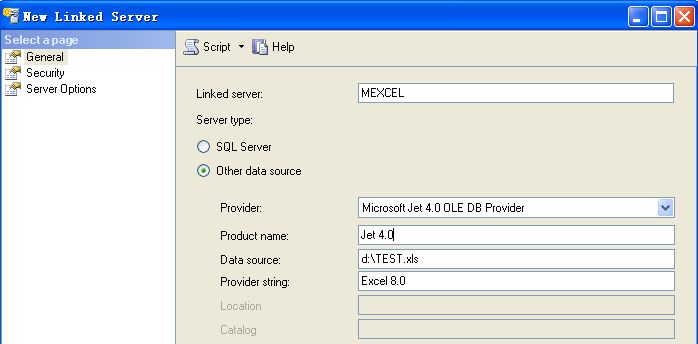
exec sp_addlinkedsrvlogin 'MyExcel','false' --login without account (Optional)
go
select * from MyExcel...sheet1$ --query data
go
3 By VBA

 Code
Code<!--
Code highlighting produced by Actipro CodeHighlighter (freeware)
http://www.CodeHighlighter.com/
--> 1
Private Sub cmdInsert_Click()Sub cmdInsert_Click()2

3
Dim LinCnt As Integer4
LinCnt = 65
If InputBox("Please input password1", "口令输入框", , 8700, 4700) = "password" Then6
Rows("6:6").Select7
Rows("6:65536").Select8
Range("A6").Select9
10
Connection.Open " Provider=SQLOLEDB.1;Persist Security Info=True;User ID=User_id;Password=PWD; Initial Catalog=DB_name;Data Source=Server_ip;Connect Timeout=60 "11
Connection.CursorLocation = adUseClient12
CMD.ActiveConnection = Connection13
14
Do While Cells(LinCnt, "C") <> ""15
If txtSoldto.Text = "" And txtQcimat.Text = "" And Cells(LinCnt, "G") = "" Then16
MsgBox "Please maintain  "
"17
Exit Sub18
Else19
SQLstmt = " insert into table_name values('" & VBA.Trim(txt1.Text) & "','" & VBA.Trim(txt2.Text) & "','" & Cells(LinCnt, "C") & "','" & Cells(LinCnt, "D") & "','" & Cells(LinCnt, "E") & "','" & Cells(LinCnt, "F") & "','" & Cells(LinCnt, "G") & "','" & Cells(LinCnt, "H") & "','" & Cells(LinCnt, "I") & "','" & Cells(LinCnt, "J") & "') "20
CMD.CommandText = SQLstmt21
CMD.Execute22
LinCnt = LinCnt + 123
End If24
Loop25
Connection.Close26
Exit Sub27
Else28
MsgBox "You have no right to insert!"29
Exit Sub30
End If31
 End Sub
4 By SQL Server Import and Export Wizard
Detailed oprating steps is abbreviated here.
5 Other methods:
Please refer to http://support.microsoft.com/default.aspx/kb/321686
来自 “ ITPUB博客 ” ,链接:https://blog.itpub.net/15053694/viewspace-464331/ ,如需转载,请注明出处,否则将追究法律责任。

最新文章
- To create user and maintain authorization
- To create new Datatable
- Select all and Unselect all for ListView
- Useful Functions(2)
- To get text when ListView or GridView index changed
- To add header and data for ListView
- check all items
- To create ItemTemplate
- ASPNET's useful function(2)
- ASPNET's useful function(1)
