nmon从这里下载:
http://www.ibm.com/developerworks/wikis/display/Wikiptype/nmonanalyser
1、准备:
1)用root用户登录到系统中
2)建目录:#mkdir /nmon/script
3)确定版本:#oslevel,以便确定用哪个脚本,我是用530
# oslevel -s
5300-09-01-0847
4)把nmon12e_aix530用ftp上传到/nmon/script
5)执行授权命令:#chmod +x nmon12e_aix530
2、使用:
1)直接使用:
./nmon/nmon12e_aix536 -f -N -m /nmon/log -s 30 -c 2880
表示:
-f 按标准格式输出文件:
-N include NFS sections
-m 切换到路径去保存日志文件
-s 每隔n秒抽样一次,这里为30
-c 取出多少个抽样数量,这里为2880,即监控=2880*(30/60/60)=24小时
根据小时计算这个数字的公式为:c=h*3600/s,比如要监控10小时,每隔30秒采样一次,则c=10*3600/30=1200
2)用crontab定期使用:
A、执行命令:#crontab -e
B、在最后一行添加如下命令:
0 8 * * 1,2,3,4,5 /nmon/script/nmon12e_aix530 -f -N -m /nmon/log -s 30 -c 1200
表示:
周一到周五,从早上08点开始,监控10个小时(到18:00整为止),输出到/nmon/log
3、分析
1)会在/tmp/nmon生成*.nmon的文件把它下载到你的电脑上
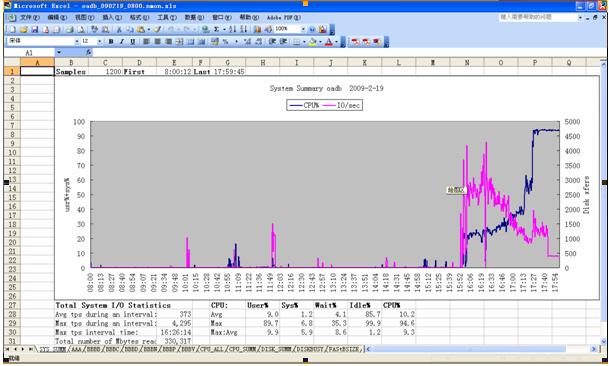
2)打开nmon analyser v339.xls,把宏的安全性设成最低,打开下载好的*.nmon文件。
并且保存为一个文件,生成的是视图模式的,非常直观!
参考:
附录一:crontab参数:
参考:http://tech.ddvip.com/2008-11/122629526990895.html
f1 f2 f3 f4 f5 program
minute hour day_of_month month weekday command这些字段接收以下值:
minute 0 到 59
hour 0 到 23
day_of_month 1 到 31
month 1 到 12
weekday 0 到 6(星期天到星期六)
其中f1 是表示分钟,f2 表示小时,f3 表示一个月份中的第几日,f4 表示月份,f5 表示一个星期中的第几天。program 表示要执行的程序。
当 f1 为 * 时表示每分钟都要执行 program,f2 为 * 时表示每小时都要执行程序,其馀类推
当 f1 为 a-b 时表示从第 a 分钟到第 b 分钟这段时间内要执行,f2 为 a-b 时表示从第 a 到第 b 小时都要执行,其馀类推
当 f1 为 */n 时表示每 n 分钟个时间间隔执行一次,f2 为 */n 表示每 n 小时个时间间隔执行一次,其馀类推
当 f1 为 a, b, c,... 时表示第 a, b, c,... 分钟要执行,f2 为 a, b, c,... 时表示第 a, b, c...个小时要执行,其馀类推
附录二:nmon参数:
参考http://www.ibm.com/developerworks/wikis/display/Wikiptype/nmonanalyser
nmon:
-f spreadsheet output format [note: default -s300 -c288]
Output file is
-F
-c
-d requests disk service and wait times (DISKSERV and DISKWAIT)
-i
-g
-l
-m
-r
-s
-x capacity planning (15 mins for 1 day = -fdt -s900 -c96)
-t include top processes in the output
-T as –t plus saves command line arguments in UARG section
-A include data for async I/O (PROCAIO) sections
-D prevents DISK sections being produced (useful when Disk Groups are being used because there are too many hdisks to process)
-E stops ESS sections being produced (necessary when Disk
Groups are being used because there are too many vpaths to process)
-J prevents JFS sections being produced (prevents Excel errors when you have more than 255 filesystems)
-L includes LARGEPAGE section
-N include NFS sections
-S include WLM sections with subclasses
-W include WLM sections without subclasses
-Y include SUMMARY section (very efficient alternative to –t if PID level data is not required)
来自 “ ITPUB博客 ” ,链接:https://blog.itpub.net/14019112/viewspace-664256/ ,如需转载,请注明出处,否则将追究法律责任。

