*{
    padding: 0;
    margin: 0;
}
/*网页头部*/
.header{
    width: 100%;
    height: 100px;
    background-color: #07cbc9;
    position: fixed;
    z-index: 9;
}
.header .logo img{
    float: left;
    height: 48px;
    width: 260px;
    margin-top: 26px;
    margin-left: 100px;
}
.header .h-nav{
    float: right;
    height: 100px;
}
.header .h-nav ul{
    margin-right: 50px;
}
.header .h-nav ul li{
    width: 105px;
    float: left;
    list-style: none;
    font-size: 20px;
    color: #fff;
    text-align: center;
    line-height: 100px;
    font-family: "微软雅黑";
}
.header .h-nav ul li:hover{
    cursor: pointer;
    background-color: #000;
}
/*banner图*/
.banner .pic img{
    width: 100%;
    height: 700px;
    position: relative;
    padding-top: 100px;
}
.banner .shade{
    position: absolute;
    opacity: 0.5;
    width: 100%;
    height: 700px;
    background-color: #000;
    z-index: 1;
    top: 100px;
}
/*表单*/
.banner .form-menu{
    width: 700px;
    height: 300px;
    z-index: 2;
    text-align: center;
    position: absolute;
    top: 250px;
    left: 50%;
    margin-left: -350px;
}
.banner .form-menu input,button{
    background-color: transparent;
    color: #999999;
    border: thin solid;
    width: 400px;
    height: 30px;
    margin-top: 20px;
}
.banner .form-menu textarea{
    width: 400px;
    background-color: transparent;
    margin-top: 20px;
    color: #999999;
}
.banner .form-menu button{
    width: 150px;
}
.banner .form-menu input:hover{
    border-color: #07cbc9;
}
.banner .form-menu textarea:hover{
    border-color: #07cbc9;
}
.banner .form-menu button:hover{
    background-color: #07cbc9;
    color: #fff;
    border-style: none;
}
/*网页主体*/
.main{
    width: 100%;
    height: auto;
    font-family: "微软雅黑";
}
.main .about{
    width: 90px;
    height: 30px;
    font-weight: bolder;
    font-size: 25px;
    padding-top: 20px;
    padding-bottom: 10px;
    line-height: 30px;
    margin: 0 auto;
}
.main hr{
    width: 20px;
    border-color: #07cbc9;
    margin: 0 auto;
    text-align: center;
}
.main .m-word{
    width: 400px;
    height: 20px;
    text-align: center;
    margin: 0 auto;
    padding-top: 10px;
    color: #999999;
    font-weight: bold;
}
.main .m-pic{
    width: 100%;
    height: 250px;
    text-align: center;
    margin-top: 20px;
}
.main .m-pic img{
    width: 420px;
    height: 250px;
}
/*网页底部*/
/*清除浮动*/
.clear{
    clear: both;
}

<body>
    <!--网页头部-->
    <div class="header">
        <div class="logo">
            <img src="img/logo.png" alt="logo" />
        </div>
        <div class="h-nav">
            <ul>
                <li>HOME</li>
                <li>ABOUT</li>
                <li>GALLERY</li>
                <li>FACULTY</li>
                <li>EYENUTS</li>
                <li>CONTACT</li>
            </ul>
        </div>
        <div class="clear"></div>
    </div>
    <!-- banner图 -->
    <div class="banner">
        <div class="pic">
            <img src="img/banner3.jpg" />
        </div>
        <!-- 遮罩 -->
        <div class="shade"></div>
        <!-- 表单 -->
        <div class="form-menu">
            <div class="menu-word">
                <input type="text" name="name" value="  your Name">
            </div>
            <div class="menu-word">
                <input type="text" name="password" value="  your password" size="16">
            </div>
            <div class="menu-word">
                <input type="text" name="email" value="  your Email">
            </div>
            <div class="menu-word">
                <textarea type="text" name="recommend" placeholder=" To introduce myself" rows="10"></textarea>
            </div>
            <button>Sure to submit</button>
        </div>
    </div>
    <!--网页主体-->
    <div class="main">
        <div class="about">ABOUT</div>
        <hr/>
        <div class="m-word">
            He edited the report that was to be presented to the committee at the hearing. They referred their plan to the management.
        </div>
        <div class="m-pic">
            <img src="img/bb3.jpg" align="child" />
        </div>
    </div>
    <!--网页底部-->
    <div class="footer"></div>
</body>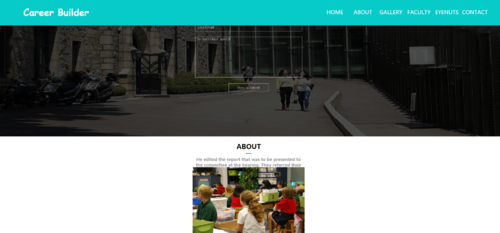
来自 “ ITPUB博客 ” ,链接:https://blog.itpub.net/1371/viewspace-3160551/ ,如需转载,请注明出处,否则将追究法律责任。
上一篇:
下拉框值重复,怎么去重
下一篇:
JS怎么打开file表单选择文件上传?

请登录后发表评论
登录
全部评论
