
首先,在已经下载好的python文件目录下,找到config-highlight.def文件,我的是在H:pythonpython3**Libidlelib**文件夹下。
打开文件后,你会看到一些默认的颜色配置,比如经典的颜色配置就是白色背景,一般这个文件中会有两种配置可供选择:
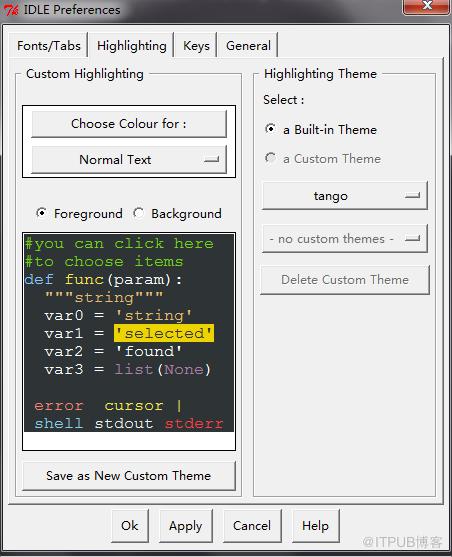
[IDLE Classic]和 [IDLE New],表现在IDLE界面上就是在python shell下,选择options—configure IDLE—-highlighting选项中,右侧的highlighting theme主题选择,有两种可选方案。
如果直接在源文件上修改颜色有些麻烦,除非你特别熟悉颜色。网上有经典的背景配置:
[Obsidian]
definition-foreground = #678CB1
error-foreground = #FF0000
string-background = #293134
keyword-foreground = #93C763
normal-foreground = #E0E2E4
comment-background = #293134
hit-foreground = #E0E2E4
builtin-background = #293134
stdout-foreground = #678CB1
cursor-foreground = #E0E2E4
break-background = #293134
comment-foreground = #66747B
hilite-background = #2F393C
hilite-foreground = #E0E2E4
definition-background = #293134
stderr-background = #293134
hit-background = #000000
console-foreground = #E0E2E4
normal-background = #293134
builtin-foreground = #E0E2E4
stdout-background = #293134
console-background = #293134
stderr-foreground = #FB0000
keyword-background = #293134
string-foreground = #EC7600
break-foreground = #E0E2E4
error-background = #293134

[tango]
definition-foreground = #fce94f
error-foreground = #fa8072
string-background = #2e3436
keyword-foreground = #8cc4ff
normal-foreground = #ffffff
comment-background = #2e3436
hit-foreground = #ffffff
break-foreground = #000000
builtin-background = #2e3436
stdout-foreground = #eeeeec
cursor-foreground = #fce94f
hit-background = #2e3436
comment-foreground = #73d216
hilite-background = #edd400
definition-background = #2e3436
stderr-background = #2e3436
break-background = #2e3436
console-foreground = #87ceeb
normal-background = #2e3436
builtin-foreground = #ad7fa8
stdout-background = #2e3436
console-background = #2e3436
stderr-foreground = #ff3e40
keyword-background = #2e3436
string-foreground = #e9b96e
hilite-foreground = #2e3436
error-background = #2e3436
直接把上面的代码copy到刚才打开的config-highlight.def文件中,然后重启shell就可以。
重启后,shell会默认选择原来的。你就在highlighting theme主题中查看,此时已经多了两种主题,就是你刚才添加的。
更多Python知识请关注Python视频教程栏目。
来自 “ ITPUB博客 ” ,链接:https://blog.itpub.net/1331/viewspace-2833941/ ,如需转载,请注明出处,否则将追究法律责任。
下一篇:
anaconda不能安装包解决方法

请登录后发表评论
登录
全部评论
