HttpModule实现系统IP访问控制
最近项目中的一个政务系统要求可配置的IP访问控制,既然有这个需求我们自然要满足啦。
对于之前一篇中使用IHttpHandlerFactory验证用户经验,这次使用HttpModule来更早的检测用户。
如何来更好的判断IP是否在允许的列表或者禁止的列表,基于目前IPV4,就干脆IP的4位字段分别判断,这样也可简单的批量IP网段设置。
系统中将配置保存到数据库中,数据库设计如下:

接下来就可编写Httpmodule了,如下:
public class IPHttpModule : IHttpModule { #region IHttpModule 成员 public void Dispose() { } public void Init(HttpApplication context) { context.BeginRequest += new EventHandler(context_BeginRequest); } #endregion ////// 提示信息 /// const string ErrorHtml = @"系统提示 .ipforbidden { border: #c0c0c0 1px dashed; font-size: 9pt; line-height: 20pt; padding-left: 10px; padding-top: 5px; padding-right: 10px; padding-bottom: 10px; margin-top: 15px; margin-bottom: 15px; } ; void context_BeginRequest(object sender, EventArgs e) { HttpApplication app = (HttpApplication)sender; HttpContext context = app.Context; //判断是否IP限制 if (!CheckPermisssion(context.Request.UserHostAddress)) { context.Response.Write(ErrorHtml); context.Response.End(); } } }您的访问受到限制,请与系统管理员联系。"
下面是判断的代码:
////// 检测ip是否有访问系统的权限 /// /// ///public static bool CheckPermisssion(string ip) { bool isallow = true; string[] tempipsection = ip.Split('.'); int[] ipsection = new int[] { int.Parse(tempipsection[0]), int.Parse(tempipsection[1]), int.Parse(tempipsection[2]), int.Parse(tempipsection[3]) }; List<Base_ip> ipList = GetList(null); //IP允许列表 List<Base_ip> ipallowList = ipList.FindAll(delegate(Base_ip ipModel) { return ipModel.Iptype == 1; }); foreach (Base_ip ipModel in ipallowList) { if (CheckPermisssion(ipsection, ipModel)) { isallow = true; break; } else { isallow = false; } } if (!isallow) return isallow; //IP禁止列表 List<Base_ip> ipnotallowList = ipList.FindAll(delegate(Base_ip ipModel) { return ipModel.Iptype == 2; }); foreach (Base_ip ipModel in ipnotallowList) { if (CheckPermisssion(ipsection, ipModel)) { isallow = false; break; } } return isallow; } /// /// 判断是否包含在内 /// /// /// ///private static bool CheckPermisssion(int[] ipsection, Base_ip ipModel) { if (ipsection[0] < ipModel.Onefrom || ipsection[0] > ipModel.Oneend) return false; if (ipsection[1] < ipModel.Twofrom || ipsection[1] > ipModel.Twoend) return false; if (ipsection[2] < ipModel.Threefrom || ipsection[2] > ipModel.Threeend) return false; if (ipsection[3] < ipModel.Fourfrom || ipsection[3] > ipModel.Fourend) return false; return true; }
代码其实也很简单,就不再具体讲述。
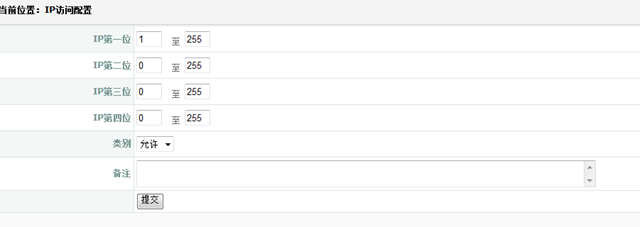
下面也截几张系统图。
添加IP配置:
配置列表:

当访问受到限制时,系统返回如下:

然后配置web.config中httpModules节点,
<add name="ipconfig" type="HttpModule.IPHttpModule,HttpModule"/>
由于用户每次访问系统都要检查,导致每次都会查询数据库中的配置。系统中数据访问是通过Hxj.Data来实现的,即可通过配置Hxj.Data的缓存配置来减轻数据库的压力。
来自 “ ITPUB博客 ” ,链接:https://blog.itpub.net/12639172/viewspace-665465/ ,如需转载,请注明出处,否则将追究法律责任。

请登录后发表评论
登录
全部评论
