asp.net每天积累一点点之十
这里说一下GridView里面如何应用超链接。
有两个页面用于这个操作,一个用于显示超链接,一个用于显示链接到的页面。
下面的代码是显示链接按钮的页面:

 链接在GridView里的应用
<!--Code highlighting produced by Actipro CodeHighlighter (freeware)http://www.CodeHighlighter.com/--><form id="form1" runat="server">
<div>
<asp:SqlDataSource ID="ds" runat="server" ConnectionString="server=.;database=students;trusted_connection=true"
SelectCommandType="Text" SelectCommand="select * from student">asp:SqlDataSource>
<asp:GridView ID="gv" runat="server" DataSourceID="ds" AutoGenerateColumns="false">
<Columns>
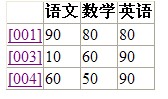
<asp:HyperLinkField DataTextField="studentno" DataTextFormatString="[{0}]"
DataNavigateUrlFields="studentno,chinese"
DataNavigateUrlFormatString="~/Default8.aspx?studentno={0}&chinese={1}" Target="_top"
/>
<asp:BoundField HeaderText="语文" DataField="chinese" />
<asp:BoundField HeaderText="数学" DataField="mathematics" />
<asp:BoundField HeaderText="英语" DataField="english" />
Columns>
asp:GridView>
div>
form>
<div>
<asp:SqlDataSource ID="ds" runat="server" ConnectionString="server=.;database=students;trusted_connection=true"
SelectCommandType="Text" SelectCommand="select * from student">asp:SqlDataSource>
<asp:GridView ID="gv" runat="server" DataSourceID="ds" AutoGenerateColumns="false">
<Columns>
<asp:HyperLinkField DataTextField="studentno" DataTextFormatString="[{0}]"
DataNavigateUrlFields="studentno,chinese"
DataNavigateUrlFormatString="~/Default8.aspx?studentno={0}&chinese={1}" Target="_top"
/>
<asp:BoundField HeaderText="语文" DataField="chinese" />
<asp:BoundField HeaderText="数学" DataField="mathematics" />
<asp:BoundField HeaderText="英语" DataField="english" />
Columns>
asp:GridView>
div>
form>
---------------------------
重点在于:
设置链接按钮显示的内容:DataTextField="studentno"
设置链接按钮显示的内容的样式DataTextFormatString="[{0}]"
设置链接按钮超链接字符串的参数列表DataNavigateUrlFields="studentno,chinese"
设置链接按钮超链接字符串
DataNavigateUrlFormatString="~/Default8.aspx?studentno={0}&chinese={1}" Target="_top"
---------------------------
效果如图:
---------------------------
下面介绍链接打开的页面:
链接打开的页面
<!--Code highlighting produced by Actipro CodeHighlighter (freeware)http://www.CodeHighlighter.com/--><body>
<script runat="server">
Sub Page_Load(ByVal obj As Object, ByVal e As EventArgs) Handles Me.Load
Response.Write("学号:" & Request.QueryString("studentno") & "
")
Response.Write("语文成绩:" & Request.QueryString("chinese") & "
")
End Sub
script>
<form id="form1" runat="server">
<div>
<asp:SqlDataSource ID="ds" runat="server" ConnectionString="server=.;database=students;trusted_connection=true"
SelectCommandType="Text" SelectCommand="select * from student where studentno=@studentno">
<SelectParameters>
<asp:QueryStringParameter Name="studentno" QueryStringField="studentno" />
SelectParameters>
asp:SqlDataSource>
<asp:GridView ID="gv" runat="server" DataSourceID="ds" AutoGenerateColumns="true">asp:GridView>
div>
form>
body>
<script runat="server">
Sub Page_Load(ByVal obj As Object, ByVal e As EventArgs) Handles Me.Load
Response.Write("学号:" & Request.QueryString("studentno") & "
")
Response.Write("语文成绩:" & Request.QueryString("chinese") & "
")
End Sub
script>
<form id="form1" runat="server">
<div>
<asp:SqlDataSource ID="ds" runat="server" ConnectionString="server=.;database=students;trusted_connection=true"
SelectCommandType="Text" SelectCommand="select * from student where studentno=@studentno">
<SelectParameters>
<asp:QueryStringParameter Name="studentno" QueryStringField="studentno" />
SelectParameters>
asp:SqlDataSource>
<asp:GridView ID="gv" runat="server" DataSourceID="ds" AutoGenerateColumns="true">asp:GridView>
div>
form>
body>
-------------------------
重点在于:
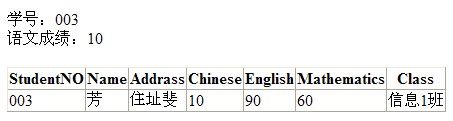
设置这个页面的数据源为传入的参数
------------------------
下面是效果图:
来自 “ ITPUB博客 ” ,链接:https://blog.itpub.net/12639172/viewspace-662145/ ,如需转载,请注明出处,否则将追究法律责任。
上一篇:
异步操作(一)
下一篇:
asp.net每天积累一点点之九

请登录后发表评论
登录
全部评论
