在VS2010中创建自定义的代码段
本文基于Visual Studio 2010 RC版本
1. 在项目中新增一个xml文件为carysn.snippet,然后插入代码段,如下图:


2. 完成后会自动插入代码段模板,我们将模板中相关信息修改后如下:
xml version="1.0" encoding="utf-8" ?>
<CodeSnippet Format="1.0.0" xmlns="http://schemas.microsoft.com/VisualStudio/2005/CodeSnippet">
<Header>
<Title>CarySNTestTitle>
<Author>CaryAuthor>
<Shortcut>CaryShortcutShortcut>
<Description>It is a test snippetDescription>
<SnippetTypes>
<SnippetType>SurroundsWithSnippetType>
<SnippetType>ExpansionSnippetType>
SnippetTypes>
Header>
<Snippet>
<Declarations>
<Literal>
<ID>AuthorID>
<Default>CaryDefault>
Literal>
Declarations>
<Code Language="CSharp">
/*--------------------------
Author:$Author$
Date:2010-02-22
--------------------------*/
class Program
{
static void Main(string[] args)
{
Console.WriteLine("Hello World!");
}
}
]]>
Code>
Snippet>
CodeSnippet>
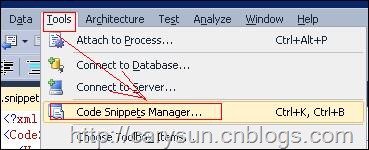
3. 打开代码段管理器,如下图:
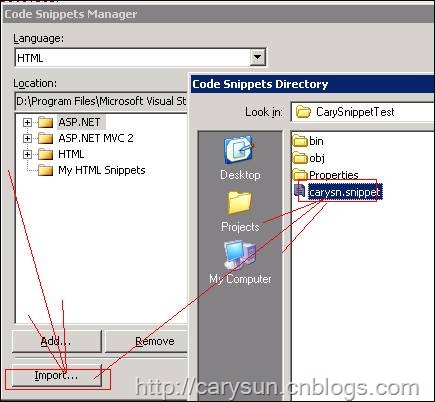
4.导入我们创建好的代码段,如下图:
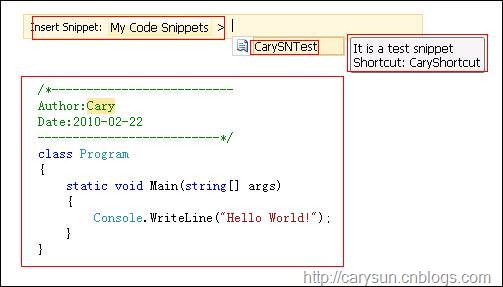
5.然后我们就可以在程序中使用了,如下图:
来自 “ ITPUB博客 ” ,链接:https://blog.itpub.net/12639172/viewspace-627708/ ,如需转载,请注明出处,否则将追究法律责任。

