Silverlight3+wcf+在不使用证书的情况下自定义用户名密码验证
先说一下我的需求。
系统需求:
系统是一个电子商务平台,可以提供信息的展示,购买和交易(交易将来考虑)。其实和淘宝是一样的,区别就是淘宝是一个综合类的,什么产品都上的,我们是一个行业性的,垂直的。
技术选型:
Silverlight3
WCF
MS SQL
功能需求:
客户端可以直接通过http访问,不需要使用https,而且也不需要安装证书。我们的wcf服务不想直接暴露在Internet中,但是不要 使用https访问,也不要证书验证,因为大部分还是信息的浏览,将来的交易部分肯定是需要https,甚至是需要安装证书的,目前不需要这些。
设计
 MyValidator类代码
using System.Collections.Generic;
using System.Linq;
using System.Web;
using System.IdentityModel.Tokens;
using System.IdentityModel.Selectors;
namespace WcfService
{
public class MyValidator:UserNamePasswordValidator
{
private string _userName;
public string UserName
{
get { return _userName; }
}
private string _password;
public string Password
{
get { return _password; }
}
public override void Validate(string userName, string password)
{
this._userName = userName;
this._password = password;
}
}
}
 wcf的web.config配置
<services>
<service behaviorConfiguration="WcfService.Service1Behavior" name="WcfService.ServiceCustomer">
<host >
<baseAddresses >
<add baseAddress="http://sl.kimbanxcn:82/ServiceCustomer.svc"/>
baseAddresses>
host>
<!--
<endpoint address="" binding="basicHttpBinding" bindingConfiguration="test" contract="WcfService.IServiceCustomer">
<identity>
<dns value="sl.kimbanxcn"/>
identity>
endpoint>
<endpoint address="mex" binding="mexHttpBinding" contract="IMetadataExchange"/>
service>
services>
<behaviors>
<serviceBehaviors>
<behavior name="WcfService.Service1Behavior">
<serviceMetadata httpGetEnabled="true"/>
<serviceDebug includeExceptionDetailInFaults="false"/>
<serviceCredentials >
<clientCertificate>
<authentication certificateValidationMode="None"/>
clientCertificate>
<!--
<userNameAuthentication userNamePasswordValidationMode="Custom" customUserNamePasswordValidatorType="WcfService.MyValidator, WcfService"/>
serviceCredentials>
behavior>
serviceBehaviors>
behaviors>
<bindings >
<basicHttpBinding >
<binding name="test">
<security mode="TransportCredentialOnly">
<message clientCredentialType="UserName"/>
security>
binding>
basicHttpBinding>
bindings>
system.serviceModel>
客户端的调用代码
client.ClientCredentials.UserName.UserName = "admin";
client.ClientCredentials.UserName.Password = "admin";
_sysUser = new SysUser() { UserName = "swb", Password = "swb" };
LoadCustomers();
GetCustomerById();
client.SayHelloAsync(_sysUser);
wcf暴露的接口
{
_myValidator = (MyValidator)OperationContext.Current.Host.Credentials.UserNameAuthentication.CustomUserNamePasswordValidator;
return string.Format("hello,{0},your password is {1}\n{2}{3}", sysUser.UserName, sysUser.Password,
_myValidator.UserName,_myValidator.Password );
// ,_myValidator.UserName ,_myValidator.Password );
}
可就是不成功,在wcf暴露的方法中设置断点, 跟踪到_myValidator .UserName为null,在MyValidator中设置断点,方法
public override void Validate(string userName, string password)
{
this._userName = userName;
this._password = password;
}
就没有运行,挂不得是null呢,为什么呢?是不是配置问题呢?我尝试了很多组合,就是出不来效果,是不能这样做呢?还是旧不支持这种需求呢?请各位有空的帮我看看,也请搞过的朋友指点一二,谢谢了!!
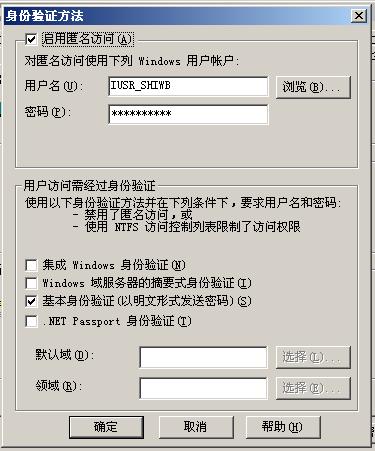
下图是我的WCF的IIS中的身份验证配置,是不是和这里也有什么关系呢?
来自 “ ITPUB博客 ” ,链接:https://blog.itpub.net/12639172/viewspace-626234/ ,如需转载,请注明出处,否则将追究法律责任。

