C#面向对象 基础概念25个
2.const 和 static readonly 区别?
3.extern 是什么意思?
4.abstract 是什么意思?
5.internal 修饰符起什么作用?
6.sealed 修饰符是干什么的?
7.override 和 overload 的区别?
8.什么是索引指示器?
9.new 修饰符是起什么作用?
10.this 关键字的含义?
11.可以使用抽象函数重写基类中的虚函数吗?
12.密封类可以有虚函数吗?
13.什么是属性访问器?
14.abstract 可以和 virtual 一起使用吗?可以和 override 一起使用吗?
15.接口可以包含哪些成员?
16.类和结构的区别?
17.接口的多继承会带来哪些问题?
18.抽象类和接口的区别?
19.别名指示符是什么?
20.如何手工释放资源?
21.P/Invoke是什么?
22.StringBuilder 和 String 的区别?
23.explicit 和 implicit 的含义?
24.params 有什么用?
25.什么是反射?
以下是我做的一份参考答案(C# 语言范畴之内),如果有不准确、不全面的,欢迎各位朋友指正!
1.静态成员和非静态成员的区别?
答:
静态变量使用 static 修饰符进行声明,在类被实例化时创建,通过类进行访问
不带有 static 修饰符声明的变量称做非静态变量,在对象被实例化时创建,通过对象进行访问
一个类的所有实例的同一静态变量都是同一个值,同一个类的不同实例的同一非静态变量可以是不同的值
静态函数的实现里不能使用非静态成员,如非静态变量、非静态函数等
示例:
using System;using System.Collections.Generic;using System.Text;namespace Example01{ class Program { class Class1 {public static String staticStr = "Class";
public String notstaticStr = "Obj";
}
static void Main(string[] args)
{ //静态变量通过类进行访问,该类所有实例的同一静态变量都是同一个值 Console.WriteLine("Class1's staticStr: {0}", Class1.staticStr); Class1 tmpObj1 = new Class1(); tmpObj1.notstaticStr = "tmpObj1"; Class1 tmpObj2 = new Class1(); tmpObj2.notstaticStr = "tmpObj2"; //非静态变量通过对象进行访问,不同对象的同一非静态变量可以有不同的值 Console.WriteLine("tmpObj1's notstaticStr: {0}", tmpObj1.notstaticStr); Console.WriteLine("tmpObj2's notstaticStr: {0}", tmpObj2.notstaticStr);Console.ReadLine();
}
}
}
Class1's staticStr: Class
tmpObj1's notstaticStr: tmpObj1
tmpObj2's notstaticStr: tmpObj2
2.const 和 static readonly 区别?
答:
const
用 const 修饰符声明的成员叫常量,是在编译期初始化并嵌入到客户端程序
static readonly
用 static readonly 修饰符声明的成员依然是变量,只不过具有和常量类似的使用方法:通过类进行访问、初始化后不可以修改。但与常量不同的是这种变量是在运行期初始化
示例:
测试类:
using System;using System.Collections.Generic;using System.Text;namespace Example02Lib{public class Class1
{public const String strConst = "Const";
public static readonly String strStaticReadonly = "StaticReadonly";
//public const String strConst = "Const Changed"; //public static readonly String strStaticReadonly = "StaticReadonly Changed";}
}
客户端代码:
.csharpcode, .csharpcode pre
{
font-size: small;
color: black;
font-family: consolas, "Courier New", courier, monospace;
background-color: #ffffff;
/*white-space: pre;*/
}
.csharpcode pre { margin: 0em; }
.csharpcode .rem { color: #008000; }
.csharpcode .kwrd { color: #0000ff; }
.csharpcode .str { color: #006080; }
.csharpcode .op { color: #0000c0; }
.csharpcode .preproc { color: #cc6633; }
.csharpcode .asp { background-color: #ffff00; }
.csharpcode .html { color: #800000; }
.csharpcode .attr { color: #ff0000; }
.csharpcode .alt
{
background-color: #f4f4f4;
width: 100%;
margin: 0em;
}
.csharpcode .lnum { color: #606060; }
using System;using System.Collections.Generic;using System.Text;using Example02Lib;namespace Example02{ class Program {static void Main(string[] args)
{ //修改Example02中Class1的strConst初始值后,只编译Example02Lib项目 //然后到资源管理器里把新编译的Example02Lib.dll拷贝Example02.exe所在的目录,执行Example02.exe //切不可在IDE里直接调试运行因为这会重新编译整个解决方案!! //可以看到strConst的输出没有改变,而strStaticReadonly的输出已经改变 //表明Const变量是在编译期初始化并嵌入到客户端程序,而StaticReadonly是在运行时初始化的 Console.WriteLine("strConst : {0}", Class1.strConst); Console.WriteLine("strStaticReadonly : {0}", Class1.strStaticReadonly);Console.ReadLine();
}
}
}
结果:
strConst : Const
strStaticReadonly : StaticReadonly
修改后的示例:
测试类:
using System;using System.Collections.Generic;using System.Text;namespace Example02Lib{public class Class1
{ //public const String strConst = "Const"; //public static readonly String strStaticReadonly = "StaticReadonly";public const String strConst = "Const Changed";
public static readonly String strStaticReadonly = "StaticReadonly Changed";
}
}
strConst : Const
strStaticReadonly : StaticReadonly Changed
3.extern 是什么意思?
答:
extern 修饰符用于声明由程序集外部实现的成员函数
经常用于系统API函数的调用(通过 DllImport )。注意,和DllImport一起使用时要加上 static 修饰符
也可以用于对于同一程序集不同版本组件的调用(用 extern 声明别名)
不能与 abstract 修饰符同时使用
示例:
using System;using System.Collections.Generic;using System.Text;using System.Runtime.InteropServices;namespace Example03{ class Program { //注意DllImport是一个Attribute Property,在System.Runtime.InteropServices命名空间中定义 //extern与DllImport一起使用时必须再加上一个static修饰符 [DllImport("User32.dll")]public static extern int MessageBox(int Handle, string Message, string Caption, int Type);
static int Main()
{ string myString; Console.Write("Enter your message: ");myString = Console.ReadLine();
return MessageBox(0, myString, "My Message Box", 0);
}
}
}

4.abstract 是什么意思?
答:
abstract 修饰符可以用于类、方法、属性、事件和索引指示器(indexer),表示其为抽象成员
abstract 不可以和 static 、virtual 一起使用
声明为 abstract 成员可以不包括实现代码,但只要类中还有未实现的抽象成员(即抽象类),那么它的对象就不能被实例化,通常用于强制继承类必须实现某一成员
示例:
using System;using System.Collections.Generic;using System.Text;namespace Example04{ #region 基类,抽象类public abstract class BaseClass
{ //抽象属性,同时具有get和set访问器表示继承类必须将该属性实现为可读写public abstract String Attribute
{get;
set;
}
//抽象方法,传入一个字符串参数无返回值public abstract void Function(String value);
//抽象事件,类型为系统预定义的代理(delegate):EventHandlerpublic abstract event EventHandler Event;
//抽象索引指示器,只具有get访问器表示继承类必须将该索引指示器实现为只读public abstract Char this[int Index]
{get;
}
}
#endregion #region 继承类public class DeriveClass : BaseClass
{ private String attribute;public override String Attribute
{get
{ return attribute;}
set
{ attribute = value;}
}
public override void Function(String value)
{ attribute = value;if (Event != null)
{Event(this, new EventArgs());
}
}
public override event EventHandler Event;
public override Char this[int Index]
{get
{ return attribute[Index];}
}
}
#endregion class Program {static void OnFunction(object sender, EventArgs e)
{for (int i = 0; i < ((DeriveClass)sender).Attribute.Length; i++)
{Console.WriteLine(((DeriveClass)sender)[i]);
}
}
static void Main(string[] args)
{ DeriveClass tmpObj = new DeriveClass(); tmpObj.Attribute = "1234567";Console.WriteLine(tmpObj.Attribute);
//将静态函数OnFunction与tmpObj对象的Event事件进行关联 tmpObj.Event += new EventHandler(OnFunction); tmpObj.Function("7654321");Console.ReadLine();
}
}
}
1234567
7
6
5
4
3
2
1
5.internal 修饰符起什么作用?
答:
internal 修饰符可以用于类型或成员,使用该修饰符声明的类型或成员只能在同一程集内访问
接口的成员不能使用 internal 修饰符
值得注意的是,如果为 internal 成员加上了 protected 修饰符,这时的访问级别为 internal 或 protected。只是看字面意思容易弄错,许多人认为 internal protected 应该是“只有同一个程序集中的子类可以访问”,但其实它表示“同一个程序集中的所有类,以及所有程序集中的子类都可以访问”
示例
Example05Lib 项目的 Class1
using System;using System.Collections.Generic;using System.Text;namespace Example05Lib{public class Class1
{internal String strInternal = null;
public String strPublic;internal protected String strInternalProtected = null;
}
}
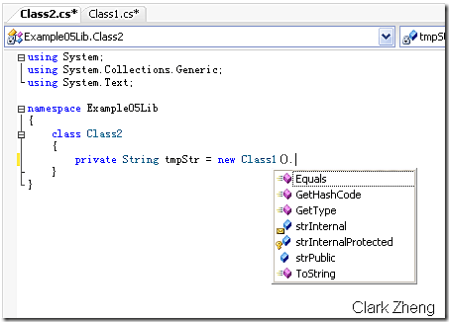
Example05Lib 项目的 Class2 类可以访问到 Class1 的 strInternal 成员,当然也可以访问到 strInternalProtected 成员,因为他们在同一个程序集里
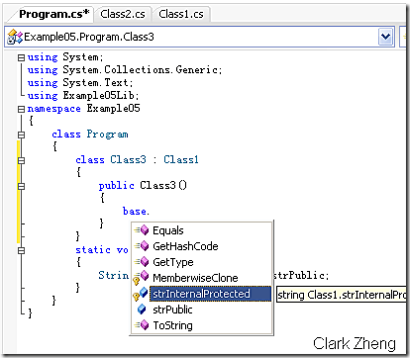
Example05 项目里的 Class3 类无法访问到 Class1 的 strInternal 成员,因为它们不在同一个程序集里。但却可以访问到 strInternalProtected 成员,因为 Class3 是 Class1 的继承类
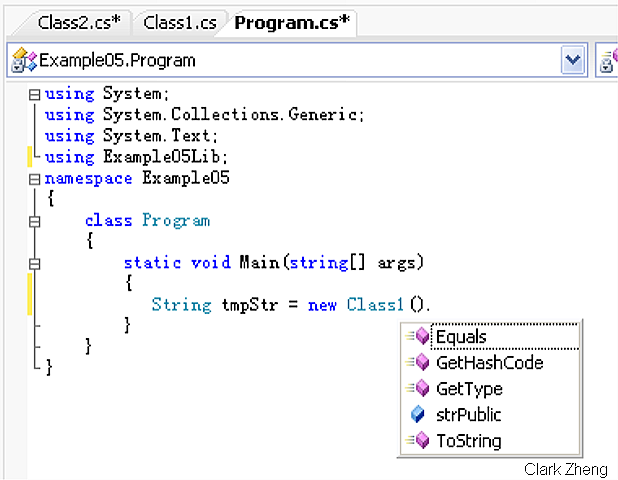
Example05 项目的 Program 类既无法访问到 Class1 的 strInternal 成员,也无法访问到 strInternalProtected 成员,因为它们既不在同一个程序集里也不存在继承关系
6.sealed 修饰符是干什么的?
答:
sealed 修饰符表示密封
用于类时,表示该类不能再被继承,不能和 abstract 同时使用,因为这两个修饰符在含义上互相排斥
用于方法和属性时,表示该方法或属性不能再被重写,必须和 override 关键字一起使用,因为使用 sealed 修饰符的方法或属性肯定是基类中相应的虚成员
通常用于实现第三方类库时不想被客户端继承,或用于没有必要再继承的类以防止滥用继承造成层次结构体系混乱
恰当的利用 sealed 修饰符也可以提高一定的运行效率,因为不用考虑继承类会重写该成员
示例:
using System;using System.Collections.Generic;using System.Text;namespace Example06{ class Program { class A {public virtual void F()
{ Console.WriteLine("A.F");}
public virtual void G()
{ Console.WriteLine("A.G");}
}
class B : A {public sealed override void F()
{ Console.WriteLine("B.F");}
public override void G()
{ Console.WriteLine("B.G");}
}
class C : B {public override void G()
{ Console.WriteLine("C.G");}
}
static void Main(string[] args)
{ new A().F(); new A().G(); new B().F(); new B().G(); new C().F(); new C().G();Console.ReadLine();
}
}
}
类 B 在继承类 A 时可以重写两个虚函数,如图所示:
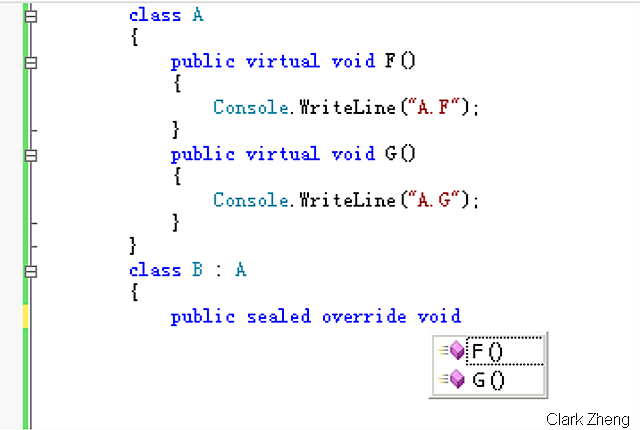
由于类 B 中对 F 方法进行了密封, 类 C 在继承类 B 时只能重写一个函数,如图所示:
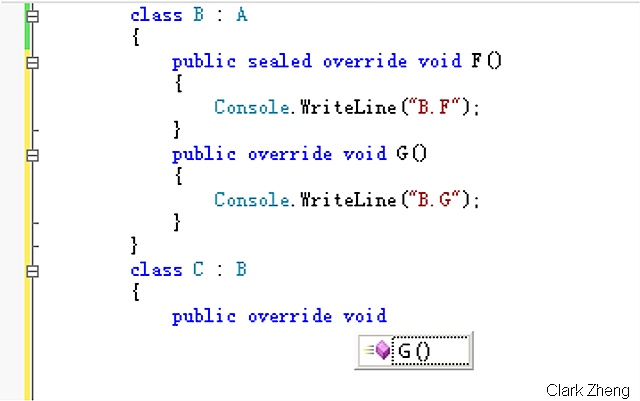
控制台输出结果,类 C 的方法 F 只能是输出 类B 中对该方法的实现:
A.F
A.G
B.F
B.G
B.F
C.G
7.override 和 overload 的区别?
答:
override 表示重写,用于继承类对基类中虚成员的实现
overload 表示重载,用于同一个类中同名方法不同参数(包括类型不同或个数不同)的实现
示例:
using System;using System.Collections.Generic;using System.Text;namespace Example07{ class Program { class BaseClass {public virtual void F()
{ Console.WriteLine("BaseClass.F");}
}
class DeriveClass : BaseClass {public override void F()
{ base.F(); Console.WriteLine("DeriveClass.F");}
public void Add(int Left, int Right)
{ Console.WriteLine("Add for Int: {0}", Left + Right);}
public void Add(double Left, double Right)
{ Console.WriteLine("Add for int: {0}", Left + Right);}
}
static void Main(string[] args)
{ DeriveClass tmpObj = new DeriveClass();tmpObj.F();
tmpObj.Add(1, 2);
tmpObj.Add(1.1, 2.2);
Console.ReadLine();
}
}
}
BaseClass.F
DeriveClass.F
Add for Int: 3
Add for int: 3.3
8.什么是索引指示器?
答:
实现索引指示器(indexer)的类可以象数组那样使用其实例后的对象,但与数组不同的是索引指示器的参数类型不仅限于int
简单来说,其本质就是一个含参数属性
示例:
using System;using System.Collections.Generic;using System.Text;namespace Example08{public class Point
{private double x, y;
public Point(double X, double Y)
{x = X;
y = Y;
}
//重写ToString方法方便输出public override string ToString()
{return String.Format("X: {0} , Y: {1}", x, y);
}
}
public class Points
{Point[] points;
public Points(Point[] Points) {points = Points;
}
public int PointNumber
{get
{ return points.Length; }
}
//实现索引访问器public Point this[int Index]
{get
{ return points[Index];}
}
}
//感谢watson hua(http://huazhihao.cnblogs.com/)的指点 //索引指示器的实质是含参属性,参数并不只限于int class WeatherOfWeek {public string this[int Index]
{get
{ //注意case段使用return直接返回所以不需要break switch (Index) { case 0: {return "Today is cloudy!";
}
case 5: {return "Today is thundershower!";
}
default: {return "Today is fine!";
}
}
}
}
public string this[string Day]
{get
{string TodayWeather = null;
//switch的标准写法 switch (Day) {case "Sunday":
{ TodayWeather = "Today is cloudy!"; break;}
case "Friday":
{ TodayWeather = "Today is thundershower!"; break;}
default: { TodayWeather = "Today is fine!"; break;}
}
return TodayWeather;}
}
}
class Program {static void Main(string[] args)
{ Point[] tmpPoints = new Point[10];for (int i = 0; i < tmpPoints.Length; i++)
{ tmpPoints[i] = new Point(i, Math.Sin(i));}
Points tmpObj = new Points(tmpPoints);for (int i = 0; i < tmpObj.PointNumber; i++)
{Console.WriteLine(tmpObj[i]);
}
string[] Week = new string[] { "Sunday", "Monday", "Tuesday", "Wednesday", "Thursday", "Friday", "Staurday"};
WeatherOfWeek tmpWeatherOfWeek = new WeatherOfWeek();for (int i = 0; i < 6; i++)
{Console.WriteLine(tmpWeatherOfWeek[i]);
}
foreach (string tmpDay in Week)
{Console.WriteLine(tmpWeatherOfWeek[tmpDay]);
}
Console.ReadLine();
}
}
}
X: 0 , Y: 0
X: 1 , Y: 0.841470984807897
X: 2 , Y: 0.909297426825682
X: 3 , Y: 0.141120008059867
X: 4 , Y: -0.756802495307928
X: 5 , Y: -0.958924274663138
X: 6 , Y: -0.279415498198926
X: 7 , Y: 0.656986598718789
X: 8 , Y: 0.989358246623382
X: 9 , Y: 0.412118485241757
Today is cloudy!
Today is fine!
Today is fine!
Today is fine!
Today is fine!
Today is thundershower!
Today is cloudy!
Today is fine!
Today is fine!
Today is fine!
Today is fine!
Today is thundershower!
Today is fine!
9.new 修饰符是起什么作用?
答:
new 修饰符与 new 操作符是两个概念
new 修饰符用于声明类或类的成员,表示隐藏了基类中同名的成员。而new 操作符用于实例化一个类型
new 修饰符只能用于继承类,一般用于弥补基类设计的不足
new 修饰符和 override 修饰符不可同时用在一个成员上,因为这两个修饰符在含义上互相排斥
示例:
using System;using System.Collections.Generic;using System.Text;namespace Example09{ class BaseClass { //基类设计者声明了一个PI的公共变量,方便进行运算public static double PI = 3.1415;
}
class DervieClass : BaseClass { //继承类发现该变量的值不能满足运算精度,于是可以通过new修饰符显式隐藏基类中的声明public new static double PI = 3.1415926;
}
class Program {static void Main(string[] args)
{Console.WriteLine(BaseClass.PI);
Console.WriteLine(DervieClass.PI);
Console.ReadLine();
}
}
}
3.1415
3.1415926
10.this 关键字的含义?
答:
this 是一个保留字,仅限于构造函数和方法成员中使用
在类的构造函数中出现表示对正在构造的对象本身的引用,在类的方法中出现表示对调用该方法的对象的引用,在结构的构造上函数中出现表示对正在构造的结构的引用,在结构的方法中出现表示对调用该方法的结果的引用
this 保留字不能用于静态成员的实现里,因为这时对象或结构并未实例化
在 C# 系统中,this 实际上是一个常量,所以不能使用 this++ 这样的运算
this 保留字一般用于限定同名的隐藏成员、将对象本身做为参数、声明索引访问器、判断传入参数的对象是否为本身
示例:
using System;using System.Collections.Generic;using System.Text;namespace Example10{ class Class1 {private double c;
private string value;
public double C
{get
{ return c;}
}
public Class1(double c)
{ //限定同名的隐藏成员 this.c = c;}
public Class1(Class1 value)
{ //用对象本身实例化自己没有意义if (this != value)
{ c = value.C;}
}
public override string ToString()
{ //将对象本身做为参数return string.Format("{0} Celsius = {1} Fahrenheit", c, UnitTransClass.C2F(this));
}
//由于好奇,在这做了一个效率测试,想看看到底哪种方式访问成员变量更快,结论:区别不大。。。public string Test1()
{ long vTickCount = Environment.TickCount;for (int i = 0; i < 10000000; i++)
this.value = i.ToString();
return string.Format("Have this.: {0} MSEL", Environment.TickCount - vTickCount);
}
public string Test2()
{ long vTickCount = Environment.TickCount;for (int i = 0; i < 10000000; i++)
value = i.ToString();return string.Format("Don't have this.: {0} MSEL", Environment.TickCount - vTickCount);
}
}
class UnitTransClass {public static double C2F(Class1 value)
{ //摄氏到华氏的转换公式return 1.8 * value.C + 32;
}
}
class Program {static void Main(string[] args)
{ Class1 tmpObj = new Class1(37.5);Console.WriteLine(tmpObj);
Console.WriteLine(tmpObj.Test1());
Console.WriteLine(tmpObj.Test2());
Console.ReadLine();
}
}
}
37.5 Celsius = 99.5 Fahrenheit
Have this.: 4375 MSEL
Don't have this.: 4406 MSEL
11.可以使用抽象函数重写基类中的虚函数吗?
答:
可以
需使用 new 修饰符显式声明,表示隐藏了基类中该函数的实现
或增加 override 修饰符,表示抽象重写了基类中该函数的实现
示例:
class BaseClass {public virtual void F()
{ Console.WriteLine("BaseClass.F");}
}
abstract class DeriveClass1 : BaseClass
{public abstract new void F();
}
//感谢watson hua(http://huazhihao.cnblogs.com/)的指点 //是他提醒了我还可以用这种方法抽象重写基类的虚方法abstract class DeriveClass2 : BaseClass
{public abstract override void F();
}
12.密封类可以有虚函数吗?
答:
可以,基类中的虚函数将隐式的转化为非虚函数,但密封类本身不能再增加新的虚函数
示例:
class BaseClass {public virtual void F()
{ Console.WriteLine("BaseClass.F");}
}
sealed class DeriveClass : BaseClass
{ //基类中的虚函数F被隐式的转化为非虚函数 //密封类中不能再声明新的虚函数G //public virtual void G() //{ // Console.WriteLine("DeriveClass.G"); //}}
13.什么是属性访问器?
答:
属性访问器(Property Accessor),包括 get 访问器和 set 访问器分别用于字段的读写操作
其设计目的主要是为了实现面向对象(OO)中的封装思想。根据该思想,字段最好设为private,一个精巧的类最好不要直接把字段设为公有提供给客户调用端直接访问
另外要注意属性本身并不一定和字段相联系
14.abstract 可以和 virtual 一起使用吗?可以和 override 一起使用吗?
答:
abstract 修饰符不可以和 static、virtual 修饰符一起使用
abstract 修饰符可以和 override 一起使用,参见第11点
示例:
using System;using System.Collections.Generic;using System.Text;namespace Example14{ class BaseClass {public virtual void F()
{ Console.WriteLine("BaseClass.F");}
}
abstract class DeriveClass1 : BaseClass
{ //在这里, abstract是可以和override一起使用的public abstract override void F();
}
class Program {static void Main(string[] args)
{}
}
}
15.接口可以包含哪些成员?
答:
接口可以包含属性、方法、索引指示器和事件,但不能包含常量、域、操作符、构造函数和析构函数,而且也不能包含任何静态成员
16.类和结构的区别?
答:
类:
类是引用类型在堆上分配,类的实例进行赋值只是复制了引用,都指向同一段实际对象分配的内存
类有构造和析构函数
类可以继承和被继承
结构:
结构是值类型在栈上分配(虽然栈的访问速度比较堆要快,但栈的资源有限放),结构的赋值将分配产生一个新的对象。
结构没有构造函数,但可以添加。结构没有析构函数
结构不可以继承自另一个结构或被继承,但和类一样可以继承自接口
示例:
根据以上比较,我们可以得出一些轻量级的对象最好使用结构,但数据量大或有复杂处理逻辑对象最好使用类。
如:Geoemtry(GIS 里的一个概论,在 OGC 标准里有定义) 最好使用类,而 Geometry 中点的成员最好使用结构
using System;using System.Collections.Generic;using System.Text;namespace Example16{ interface IPoint { double X {get;
set;
}
double Y {get;
set;
}
double Z {get;
set;
}
}
//结构也可以从接口继承 struct Point: IPoint {private double x, y, z;
//结构也可以增加构造函数public Point(double X, double Y, double Z)
{ this.x = X; this.y = Y; this.z = Z;}
public double X
{ get { return x; } set { x = value; }}
public double Y
{ get { return x; } set { x = value; }}
public double Z
{ get { return x; } set { x = value; }}
}
//在此简化了点状Geometry的设计,实际产品中还包含Project(坐标变换)等复杂操作 class PointGeometry {private Point value;
public PointGeometry(double X, double Y, double Z)
{value = new Point(X, Y, Z);
}
public PointGeometry(Point value)
{ //结构的赋值将分配新的内存this.value = value;
}
public double X
{ get { return value.X; } set { this.value.X = value; }}
public double Y
{ get { return value.Y; } set { this.value.Y = value; }}
public double Z
{ get { return value.Z; } set { this.value.Z = value; }}
public static PointGeometry operator +(PointGeometry Left, PointGeometry Rigth)
{return new PointGeometry(Left.X + Rigth.X, Left.Y + Rigth.Y, Left.Z + Rigth.Z);
}
public override string ToString()
{return string.Format("X: {0}, Y: {1}, Z: {2}", value.X, value.Y, value.Z);
}
}
class Program {static void Main(string[] args)
{ Point tmpPoint = new Point(1, 2, 3); PointGeometry tmpPG1 = new PointGeometry(tmpPoint); PointGeometry tmpPG2 = new PointGeometry(tmpPoint);tmpPG2.X = 4;
tmpPG2.Y = 5;
tmpPG2.Z = 6;
//由于结构是值类型,tmpPG1 和 tmpPG2 的坐标并不一样Console.WriteLine(tmpPG1);
Console.WriteLine(tmpPG2);
//由于类是引用类型,对tmpPG1坐标修改后影响到了tmpPG3PointGeometry tmpPG3 = tmpPG1;
tmpPG1.X = 7;
tmpPG1.Y = 8;
tmpPG1.Z = 9;
Console.WriteLine(tmpPG1);
Console.WriteLine(tmpPG3);
Console.ReadLine();
}
}
}
X: 1, Y: 2, Z: 3
X: 4, Y: 5, Z: 6
X: 7, Y: 8, Z: 9
X: 7, Y: 8, Z: 9
17.接口的多继承会带来哪些问题?
答:
C# 中的接口与类不同,可以使用多继承,即一个子接口可以有多个父接口。但如果两个父成员具有同名的成员,就产生了二义性(这也正是 C# 中类取消了多继承的原因之一),这时在实现时最好使用显式的声明
示例:
using System;using System.Collections.Generic;using System.Text;namespace Example17{ class Program { //一个完整的接口声明示例 interface IExample { //属性 string P {get;
set;
}
//方法string F(int Value);
//事件 event EventHandler E; //索引指示器string this[int Index]
{get;
set;
}
}
interface IA { int Count { get; set;}}
interface IB { int Count();}
//IC接口从IA和IB多重继承 interface IC : IA, IB {}
class C : IC {private int count = 100;
//显式声明实现IA接口中的Count属性 int IA.Count { get { return 100; } set { count = value; }}
//显式声明实现IB接口中的Count方法 int IB.Count() { return count * count;}
}
static void Main(string[] args)
{ C tmpObj = new C(); //调用时也要显式转换 Console.WriteLine("Count property: {0}", ((IA)tmpObj).Count); Console.WriteLine("Count function: {0}", ((IB)tmpObj).Count());Console.ReadLine();
}
}
}
Count property: 100
Count function: 10000
18.抽象类和接口的区别?
答:
抽象类(abstract class)可以包含功能定义和实现,接口(interface)只能包含功能定义
抽象类是从一系列相关对象中抽象出来的概念, 因此反映的是事物的内部共性;接口是为了满足外部调用而定义的一个功能约定, 因此反映的是事物的外部特性
分析对象,提炼内部共性形成抽象类,用以表示对象本质,即“是什么”
为外部提供调用或功能需要扩充时优先使用接口
19.别名指示符是什么?
答:
通过别名指示符我们可以为某个类型起一个别名
主要用于解决两个命名空间内有同名类型的冲突或避免使用冗余的命名空间
别名指示符在所有命名空间最外层定义,作用域为整个单元文件。如果定义在某个命名空间内,那么它只在直接隶属的命名空间内起作用
示例:
Class1.cs:
using System;using System.Collections.Generic;using System.Text;namespace com.nblogs.reonlyrun.CSharp25QExample.Example19.Lib01{ class Class1 {public override string ToString()
{return "com.nblogs.reonlyrun.CSharp25QExample.Example19.Lib01's Class1";
}
}
}
using System;using System.Collections.Generic;using System.Text;namespace com.nblogs.reonlyrun.CSharp25QExample.Example19.Lib02{ class Class1 {public override string ToString()
{return "com.nblogs.reonlyrun.CSharp25QExample.Example19.Lib02's Class1";
}
}
}
using System;using System.Collections.Generic;using System.Text;//使用别名指示符解决同名类型的冲突//在所有命名空间最外层定义,作用域为整个单元文件using Lib01Class1 = com.nblogs.reonlyrun.CSharp25QExample.Example19.Lib01.Class1;using Lib02Class2 = com.nblogs.reonlyrun.CSharp25QExample.Example19.Lib02.Class1;namespace Example19{ namespace Test1 { //Test1Class1在Test1命名空间内定义,作用域仅在Test1之内 using Test1Class1 = com.nblogs.reonlyrun.CSharp25QExample.Example19.Lib01.Class1; class Class1 { //Lib01Class1和Lib02Class2在这可以正常使用 Lib01Class1 tmpObj1 = new Lib01Class1(); Lib02Class2 tmpObj2 = new Lib02Class2(); //TestClass1在这可以正常使用 Test1Class1 tmpObj3 = new Test1Class1();}
}
namespace Test2 { using Test1Class2 = com.nblogs.reonlyrun.CSharp25QExample.Example19.Lib01.Class1; class Program {static void Main(string[] args)
{ //Lib01Class1和Lib02Class2在这可以正常使用 Lib01Class1 tmpObj1 = new Lib01Class1(); Lib02Class2 tmpObj2 = new Lib02Class2(); //注意这里,TestClass1在这不可以正常使用。 //因为,在Test2命名空间内不能使用Test1命名空间定义的别名 //Test1Class1 tmpObj3 = new Test1Class1(); //TestClass2在这可以正常使用 Test1Class2 tmpObj3 = new Test1Class2();Console.WriteLine(tmpObj1);
Console.WriteLine(tmpObj2);
Console.WriteLine(tmpObj3);
Console.ReadLine();
}
}
}
}
结果:
com.nblogs.reonlyrun.CSharp25QExample.Example19.Lib01's Class1
com.nblogs.reonlyrun.CSharp25QExample.Example19.Lib02's Class1
com.nblogs.reonlyrun.CSharp25QExample.Example19.Lib01's Class1
20.如何手工释放资源?
答:
.NET 平台在内存管理方面提供了GC(Garbage Collection),负责自动释放托管资源和内存回收的工作。但在以下两种情况需要我们手工进行资源释放:一、由于它无法对非托管资源进行释放,所以我们必须自己提供方法来释放对象内分配的非托管资源,比如你在对象的实现代码中使用了一个COM对象;二、你的类在运行是会产生大量实例(象 GIS 中的Geometry),必须自己手工释放这些资源以提高程序的运行效率
最理想的办法是通过实现一个接口显式的提供给客户调用端手工释放对象,System 命名空间内有一个 IDisposable 接口,拿来做这事非常合适,省得我们自己再声明一个接口了示例:
using System;using System.Collections.Generic;using System.Text;namespace Example20{ class Program { class Class1 : IDisposable { //析构函数,编译后变成 protected void Finalize(),GC会在回收对象前会调用调用该方法~Class1()
{ Dispose(false);}
//通过实现该接口,客户可以显式地释放对象,而不需要等待GC来释放资源,据说那样会降低效率 void IDisposable.Dispose() { Dispose(true);}
//将释放非托管资源设计成一个虚函数,提供在继承类中释放基类的资源的能力protected virtual void ReleaseUnmanageResources()
{ //Do something...}
//私有函数用以释放非托管资源private void Dispose(bool disposing)
{ReleaseUnmanageResources();
//为true时表示是客户显式调用了释放函数,需通知GC不要再调用对象的Finalize方法 //为false时肯定是GC调用了对象的Finalize方法,所以没有必要再告诉GC你不要调用我的Finalize方法啦 if (disposing) { GC.SuppressFinalize(this);}
}
}
static void Main(string[] args)
{ //tmpObj1没有手工释放资源,就等着GC来慢慢的释放它吧 Class1 tmpObj1 = new Class1(); //tmpObj2调用了Dispose方法,传说比等着GC来释放它效率要调一些 //个人认为是因为要逐个对象的查看其元数据,以确认是否实现了Dispose方法吧 //当然最重要的是我们可以自己确定释放的时间以节省内存,优化程序运行效率 Class1 tmpObj2 = new Class1();((IDisposable)tmpObj2).Dispose();
}
}
}
21.P/Invoke是什么?
答:
在受控代码与非受控代码进行交互时会产生一个事务(transition) ,这通常发生在使用平台调用服务(Platform. Invocation Services),即P/Invoke
如调用系统的 API 或与 COM 对象打交道,通过 System.Runtime.InteropServices 命名空间
虽然使用 Interop 非常方便,但据估计每次调用事务都要执行 10 到 40 条指令,算起来开销也不少,所以我们要尽量少调用事务
如果非用不可,建议本着一次调用执行多个动作,而不是多次调用每次只执行少量动作的原则
22.StringBuilder 和 String 的区别?
答:
String 在进行运算时(如赋值、拼接等)会产生一个新的实例,而 StringBuilder 则不会。所以在大量字符串拼接或频繁对某一字符串进行操作时最好使用 StringBuilder,不要使用 String
另外,对于 String 我们不得不多说几句:
1.它是引用类型,在堆上分配内存
2.运算时会产生一个新的实例
3.String 对象一旦生成不可改变(Immutable)
3.定义相等运算符(== 和 !=)是为了比较 String 对象(而不是引用)的值
示例:
using System;using System.Collections.Generic;using System.Text;namespace Example22{ class Program {static void Main(string[] args)
{const int cycle = 10000;
long vTickCount = Environment.TickCount; String str = null;for (int i = 0; i < cycle; i++)
str += i.ToString();
Console.WriteLine("String: {0} MSEL", Environment.TickCount - vTickCount);vTickCount = Environment.TickCount;
//看到这个变量名我就生气,奇怪为什么大家都使它呢? :) StringBuilder sb = new StringBuilder();for (int i = 0; i < cycle; i++)
sb.Append(i);
Console.WriteLine("StringBuilder: {0} MSEL", Environment.TickCount - vTickCount);string tmpStr1 = "A";
string tmpStr2 = tmpStr1;Console.WriteLine(tmpStr1);
Console.WriteLine(tmpStr2);
//注意后面的输出结果,tmpStr1的值改变并未影响到tmpStr2的值 tmpStr1 = "B";Console.WriteLine(tmpStr1);
Console.WriteLine(tmpStr2);
Console.ReadLine();
}
}
}
String: 375 MSEL
StringBuilder: 16 MSEL
A
A
B
A
23.explicit 和 implicit 的含义?
答:
explicit 和 implicit 属于转换运算符,如用这两者可以让我们自定义的类型支持相互交换
explicti 表示显式转换,如从 A -> B 必须进行强制类型转换(B = (B)A)
implicit 表示隐式转换,如从 B -> A 只需直接赋值(A = B)
隐式转换可以让我们的代码看上去更漂亮、更简洁易懂,所以最好多使用 implicit 运算符。不过!如果对象本身在转换时会损失一些信息(如精度),那么我们只能使用 explicit 运算符,以便在编译期就能警告客户调用端
示例:
using System;using System.Collections.Generic;using System.Text;namespace Example23{ class Program { //本例灵感来源于大话西游经典台词“神仙?妖怪?”--主要是我实在想不出什么好例子了 class Immortal {public string name;
public Immortal(string Name)
{name = Name;
}
public static implicit operator Monster(Immortal value)
{return new Monster(value.name + ":神仙变妖怪?偷偷下凡即可。。。");
}
}
class Monster {public string name;
public Monster(string Name)
{name = Name;
}
public static explicit operator Immortal(Monster value)
{return new Immortal(value.name + ":妖怪想当神仙?再去修炼五百年!");
}
}
static void Main(string[] args)
{Immortal tmpImmortal = new Immortal("紫霞仙子");
//隐式转换Monster tmpObj1 = tmpImmortal;
Console.WriteLine(tmpObj1.name);
Monster tmpMonster = new Monster("孙悟空");
//显式转换Immortal tmpObj2 = (Immortal)tmpMonster;
Console.WriteLine(tmpObj2.name);
Console.ReadLine();
}
}
}
紫霞仙子:神仙变妖怪?偷偷下凡即可。。。
孙悟空:妖怪想当神仙?再去修炼五百年!
24.params 有什么用?
答:
params 关键字在方法成员的参数列表中使用,为该方法提供了参数个数可变的能力
它在只能出现一次并且不能在其后再有参数定义,之前可以
示例:
using System;using System.Collections.Generic;using System.Text;namespace ConsoleApplication1{ class App { //第一个参数必须是整型,但后面的参数个数是可变的。 //而且由于定的是object数组,所有的数据类型都可以做为参数传入public static void UseParams(int id, params object[] list)
{Console.WriteLine(id);
for (int i = 0; i < list.Length; i++)
{Console.WriteLine(list[i]);
}
}
static void Main()
{ //可变参数部分传入了三个参数,都是字符串类型UseParams(1, "a", "b", "c");
//可变参数部分传入了四个参数,分别为字符串、整数、浮点数和双精度浮点数数组UseParams(2, "d", 100, 33.33, new double[] { 1.1, 2.2 });
Console.ReadLine();
}
}
}
1
a
b
c
2
d
100
33.33
System.Double[]
25.什么是反射?
答:
反射,Reflection,通过它我们可以在运行时获得各种信息,如程序集、模块、类型、字段、属性、方法和事件
通过对类型动态实例化后,还可以对其执行操作
简单来说就是用string可以在runtime为所欲为的东西,实际上就是一个.net framework内建的万能工厂
一般用于插件式框架程序和设计模式的实现,当然反射是一种手段可以充分发挥其能量来完成你想做的任何事情(前面好象见过一位高人用反射调用一个官方类库中未说明的函数。。。)
示例:
using System;using System.Collections.Generic;using System.Text;namespace Example25Lib{public class Class1
{private string name;
private int age;
//如果显式的声明了无参数构造函数,客户端只需要用程序集的CreateInstance即可实例化该类 //在此特意不实现,以便在客户调用端体现构造函数的反射实现 //public Class1() //{ //}public Class1(string Name, int Age)
{name = Name;
age = Age;
}
public void ChangeName(string NewName)
{name = NewName;
}
public void ChangeAge(int NewAge)
{age = NewAge;
}
public override string ToString()
{return string.Format("Name: {0}, Age: {1}", name, age);
}
}
}
using System;using System.Collections.Generic;using System.Text;//注意添加该反射的命名空间using System.Reflection;namespace Example25{ class Program {static void Main(string[] args)
{ //加载程序集 Assembly tmpAss = Assembly.LoadFile(AppDomain.CurrentDomain.BaseDirectory + "Example25Lib.dll"); //遍历程序集内所有的类型,并实例化Type[] tmpTypes = tmpAss.GetTypes();
foreach (Type tmpType in tmpTypes)
{ //获取第一个类型的构造函数信息ConstructorInfo[] tmpConsInfos = tmpType.GetConstructors();
foreach (ConstructorInfo tmpConsInfo in tmpConsInfos)
{ //为构造函数生成调用的参数集合ParameterInfo[] tmpParamInfos = tmpConsInfo.GetParameters();
object[] tmpParams = new object[tmpParamInfos.Length];
for (int i = 0; i < tmpParamInfos.Length; i++)
{tmpParams[i] = tmpAss.CreateInstance(tmpParamInfos[i].ParameterType.FullName);
if (tmpParamInfos[i].ParameterType.FullName == "System.String")
{ tmpParams[i] = "Clark";}
}
//实例化对象 object tmpObj = tmpConsInfo.Invoke(tmpParams);Console.WriteLine(tmpObj);
//获取所有方法并执行foreach (MethodInfo tmpMethod in tmpType.GetMethods())
{ //为方法的调用创建参数集合tmpParamInfos = tmpMethod.GetParameters();
tmpParams = new object[tmpParamInfos.Length];
for (int i = 0; i < tmpParamInfos.Length; i++)
{tmpParams[i] = tmpAss.CreateInstance(tmpParamInfos[i].ParameterType.FullName);
if (tmpParamInfos[i].ParameterType.FullName == "System.String")
{ tmpParams[i] = "Clark Zheng";}
if (tmpParamInfos[i].ParameterType.FullName == "System.Int32")
{tmpParams[i] = 27;
}
}
tmpMethod.Invoke(tmpObj, tmpParams);
}
//调用完方法后再次打印对象,比较结果Console.WriteLine(tmpObj);
}
}
Console.ReadLine();
}
}
}
Name: Clark, Age: 0
Name: Clark Zheng, Age: 27
来自 “ ITPUB博客 ” ,链接:https://blog.itpub.net/12639172/viewspace-624443/ ,如需转载,请注明出处,否则将追究法律责任。


北京盛拓优讯信息技术有限公司. 版权所有 京ICP备16024965号-8 北京市公安局海淀分局网监中心备案编号:11010802021510 niuxiaotong@pcpop.com 17352615567 未成年人举报专区
广播电视节目制作经营许可证(京) 字第1234号 中国互联网协会会员
违法和不良信息举报电话:18101376593