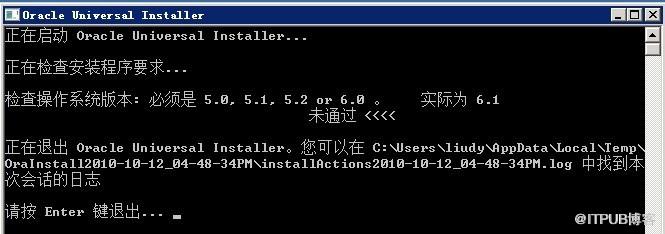
在Windows 7 (版本6.1)上面安装 Oracle10g(10204_vista_w2k8_x64_production_db)时,安装程序自检失败,报错“检查操作系统版本:必须是5.0,5.1,5.2
or 6.0。实际为6.1。未通过”,如下图。
解决办法为:
在安装目录下找到\install\oraparam.ini,将[Certified
Versions]修改为如下:
[Certified Versions]
#You can customise error message shown for failure, provide value for CERTIFIED_VERSION_FAILURE_MESSAGE
Windows=5.0,5.1,5.2,6.0,6.1
[Certified Versions]
#You can customise error message shown for failure, provide value for CERTIFIED_VERSION_FAILURE_MESSAGE
Windows=5.0,5.1,5.2,6.0,6.1
修改完毕,重新安装,自检通过。
 无标题.jpg
来自 “ ITPUB博客 ” ,链接:https://blog.itpub.net/11540701/viewspace-706185/ ,如需转载,请注明出处,否则将追究法律责任。
上一篇:
没有了~
下一篇:
没有了~

请登录后发表评论
登录
全部评论
